
Animator: an alternative to keyframe animation
The Animator is a bit special because it is halfway between a Generator and a Modifier. Just like every Modifier, it can be added to the data embedded in a parameter or on the result of a Generator, but it has two options:
- The value(s) produced can be added to the existing one(s)
- This/these value(s) can progressively replace the existing one(s)
Visit these separate pages to learn about to use of the Animator with specific data types:
The Animator allows you to generate a 100% procedural animation on a single parameter (1D/2D/3D/4D), defined by a type of evolution, a start time, and a duration or end time.
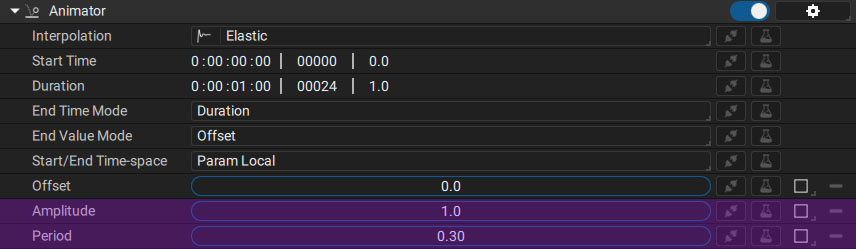
Depending on the interpolation type used, additional options (shown here in purple) will be added to the list:
- Amplitude
- Period
- Overshoot
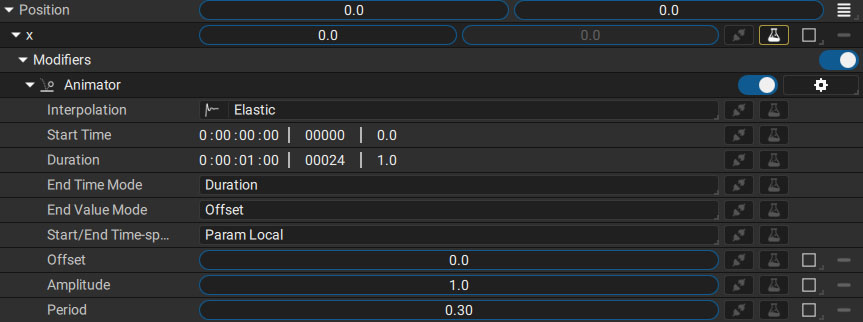
In order to understand the principle of each option, we will start with a simple case: a layer using a Circle Generator with its Position parameter in Separated mode. Position X will be the only one animated and an Animator will be added onto it.
Interpolation type
The first parameter defines the interpolation type between the starting value, prior to applying the Animator Modifier, and the final value, after it has been applied. By default, the Elastic interpolation type is selected, among the 50 available types.
Depending on which interpolation type is chosen, the parameters Amplitude, Period, and Overshoot will appear, allowing you to control the evolution of the parameter with more precision.
Timing parameters
The animation speed, beginning, and end are determined by the following five parameters:
- Start/End Time-space: defines whether the time information is based on:
- the Local time of the layer, taking into account possible temporal modifications (Time Offset, Speed multiplier, etc.)
- the absolute Composition time, ignoring layer time tweaking
- End Time Mode: sets how you define the end of the animation, using a Duration or Custom end Timecode. This will change the name of the Duration parameter to End Time
- Start Time: Time parameter which describes the starting time of the animation, depending of the Start/End Time-space current state.
- Duration/End Time: Time parameter which describes the Duration or End time of the animation
- End Value Mode: setting this to Offset will add the animation relative to the initial value, while Target will progressively replace it with the value set in Offset/EndValue
- Offset/EndValue: value used to offset or replace the original value