
Cloner Overview
The Cloner is available from the list of generators like Noise or Circle; but, it has a particular status because whereas other generators provide a source in one layer, the Cloner can visually provide hundreds of them.
Its principle is simple. You provide it with one or more graphic sources to duplicate, or "instantiate", then you tell it how to distribute these duplicates in the composition space.
To add an Cloner, simply press the "+" button at the top of the stack. Since it’s a generator, everything happens in the layer source which is added automatically.
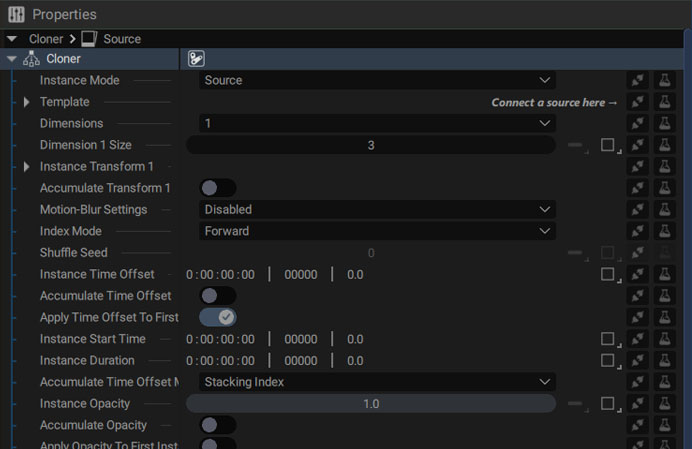
It includes:
- Instance Mode: instantiates a single source or all sublayers of a composition
- Dimensions: defines the number of dimensions, which instantiates the result of the previous instantiation (up to 4 times), or scatters each instance in different dimensions
- Dimension X Size: defines the number of instances per dimension
- Template: the source to instantiate. It can be any source, like a generator, image, video, composition, Layer Image, etc.
- Instance Transform X: how to transform each instance
- Accumulate Transform: transforms each instance based on the transformation of the previous one
- Motion-Blur: sets the quality and shutter angle to generate a motion-blur when Instance Transform X has animated parameters
- Index mode: defines the order of instances, Forward, Backward, or Shuffle
- Instance Time Offset: defines a global time offset value for previously animated instances, image sequences, or videos
- Accumulate Time Offset: by checking this option, the time offset is now based on the timing of the previous instance, easily making logos pop up one after another
- Instance Opacity: the global opacity value for all instances
- Accumulate Opacity: by checking this option, the opacity value is now added to that of the previous instance
- Instance Blending Mode: the blending mode used when instances overlap each other.
Other options will appear when switching Instance Mode to Source Sub-Layers, which will be described in this section.
A new way to mass animate dozen of layers
The Cloner completely changes the way to create an animation that involves several graphic elements forming a whole, as in the following examples:
- Displaying pictograms on a map during a weather forecast
- Displaying the logos of a large group’s different subsidiaries at the end of a keynote
- Distributing several graphic sources along a path – like when creating this ribbon card spread, made with a single layer
Keep in mind that in the end this Cloner is only a layer source and you can modify its transformations, add modifiers, parent to another layer, etc.