
Managing Dimensions
What are dimensions?
A parameter can consist of several values called dimensions. For example, the parameter Position2D consists of a first value for "X" (the horizontal position), and another for "Y" (the vertical position).
So, Position2D is a single parameter consisting of two dimensions, and it is referred to as a 2D parameter.
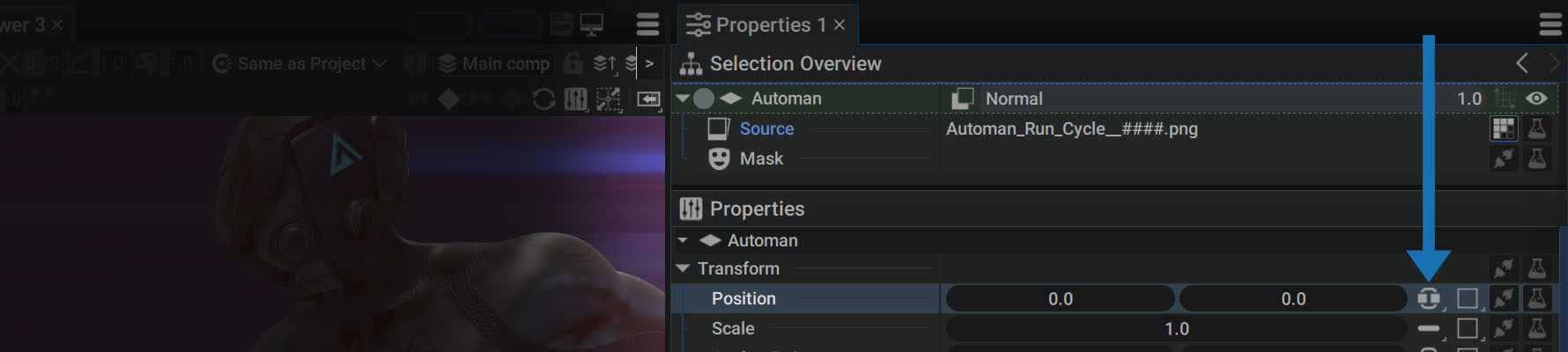
The term dimensions is particularly well-suited when Position2D defines spatial positioning; but, it is also used to define colors, for example, which have nothing to do with positioning. Just keep in mind that this term indicates the number of elements that make up a parameter.
Autograph has parameters with up to four dimensions. Here are some examples:
- 2D rotation: a 1D param defined by only one "float"
- 2D Position: a 2D param defined by two "floats"
- 3D Position: a 3D param defined by three "floats"
- Color: a 4D param defined by four "floats"
As previously mentioned in the documentation, a compound parameter can be split into single parameters, even if a parameter has multiple dimensions. This is because Autograph lets you assign values to each dimension in three different ways:
- Unified
- Separated
- Single
The menu for changing modes is located on the right of the parameter.
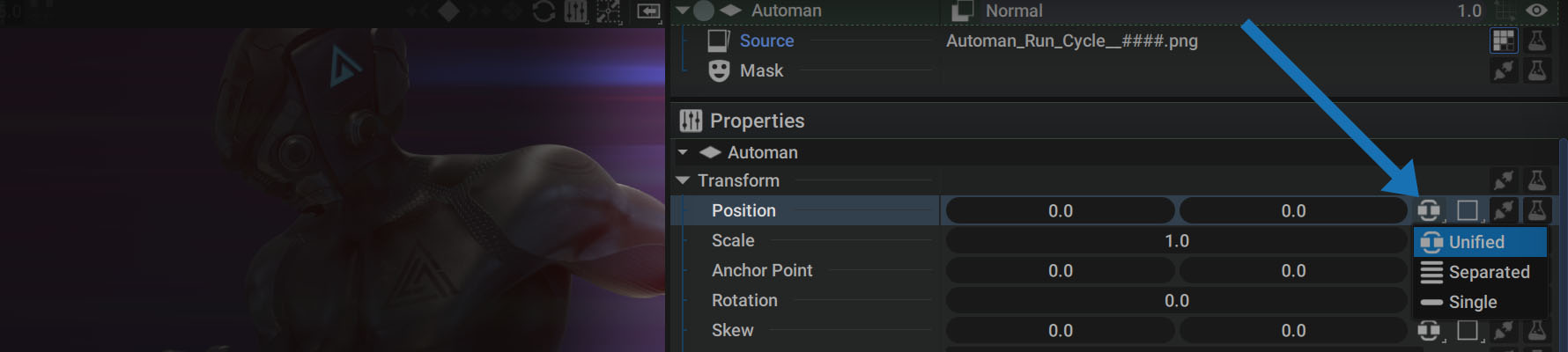
Unified
Autograph displays 2D/3D/4D params in Unified mode by default. All dimensions are displayed next to each other and there is only one Generator slot, Modifier slot, and keyframe button (if the parameter can be animated) for the whole parameter. Any keyframes will be added for both dimensions at the same time.
For example, in the case of Position2D, only one keyframe will be used to define X AND Y values:

Separated
Separated mode allows you to display 2D/3D/4D params separately. Unlike Unified mode, each dimension will be displayed on a separate line, each with a Generator and Modifier slot, as well as a keyframe button (if applicable). Each dimension can be changed and animated separately.
Once the parameter has been set to Separated mode, the button for choosing between the three modes will be displayed next to the parameter name.

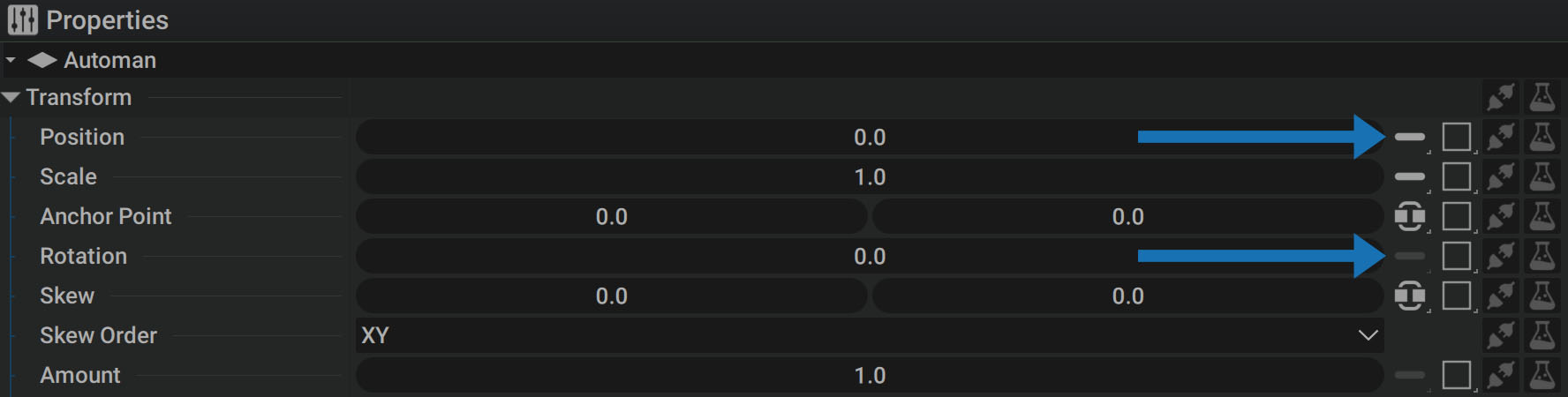
Also note that the individual parameters on the right are in Single mode, which is grayed out because it cannot be displayed in any other mode.
- If a parameter's Single mode can be switched to Unified or Separated, the icon will be bright.
- If Single is the only way to display a parameter, such as the Rotation of a 2D layer, the icon will be grayed out and you won't be able to switch to another mode.
Single
Autograph displays all 1D params and some 2D params in Single mode by default, such as layer Scale. By switching to Single, the same values will be used by all dimensions, no matter their number.
Switching a Position2D to Single will set only one value to be used by X and Y, which will move the layer diagonally.
Switching from one mode to another
- If a parameter's Single mode can be switched to Unified or Separated, the icon will be bright.
- If Single is the only way to show a parameter, such as the Rotation of a 2D layer, the icon will be grayed out and you won't be able to switch to another mode.
When you decide to switch from one mode to another, it is important to anticipate what you might lose in the process as well as any changes you may experience. Here is an example for the Scale of a layer, initially displayed in Single mode.
By placing keyframes to animate it, the same value will be used for scale.x and scale.y:

Now let's say you decide to switch to Separated mode in order to enter two different values, one for each dimension:

The keyframes will be replicated for both params with the same values, and you can offset and desynchronize them:

Now, let's go back to Unified mode:

All keyframes have been merged onto one line. This is something that can be anticipated, especially with regard to the interpolation of numerical values; but, the change in information can be even more drastic.
Let's undo this switch to get back to Separated, then switch to Single:
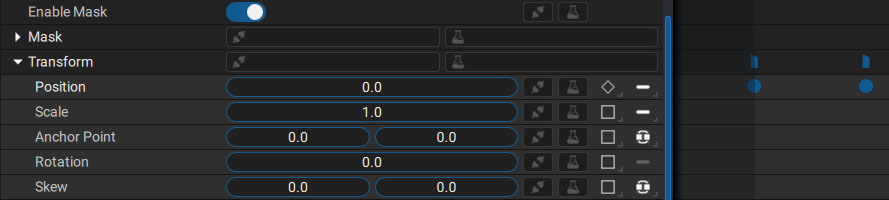
Because both dimensions had different values, a choice had to be made following this rule:
When you switch from Unified or Separated to Single, Autograph will only keep the first dimension and disregard the others. If you want to retain other information and/or keyframes before merging dimensions, please refer to the Copy/Paste section to see different options.
Extracting one dimension
Some Generators and Modifiers are only available for 1D params. If you want to add them to a specific dimension of a 2D/3D/4D param, or simply link only one dimension of a 4D param to a 1D one, you can use the following Generators:
- 2D -> 1D
- 3D -> 1D
- 4D -> 1D
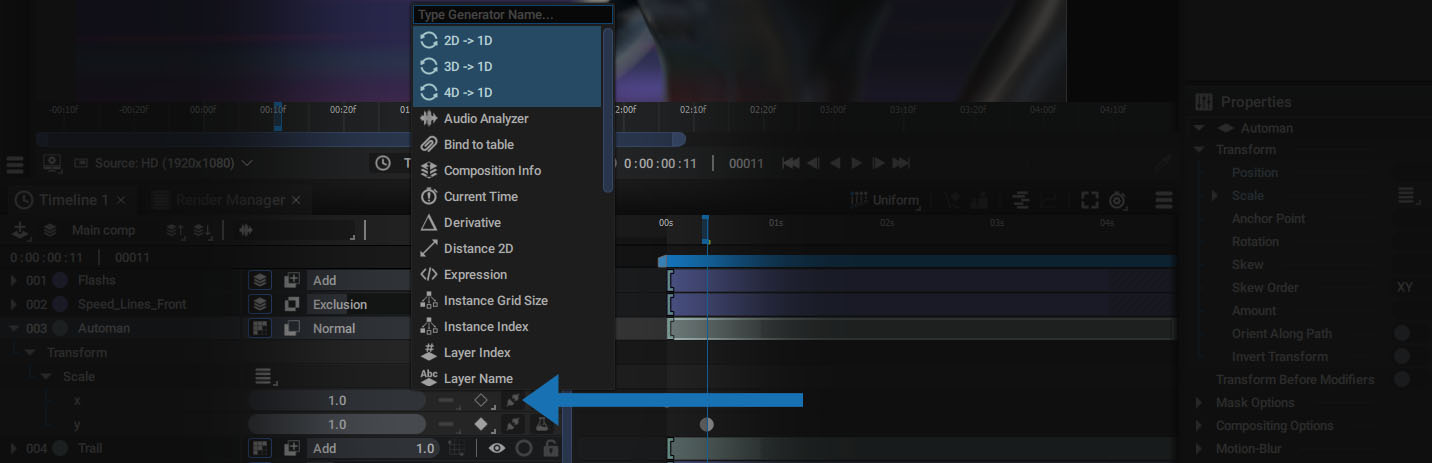
This Generator contains a Source to connect or share to the 2D/3D/4D parameter and an Index allowing you to define which dimension to select and keep.

Keep in mind that these dimensions are numbered from 0 to 3:
- 0 will be the first dimension
- 3 will be the fourth dimension