
Mesh Primitives
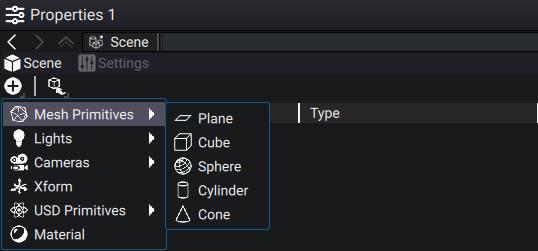
To create a new mesh go to the Properties Panel of the Scene, and in the Outliner, click on the Add button, then hover your mouse over Mesh Primitives:
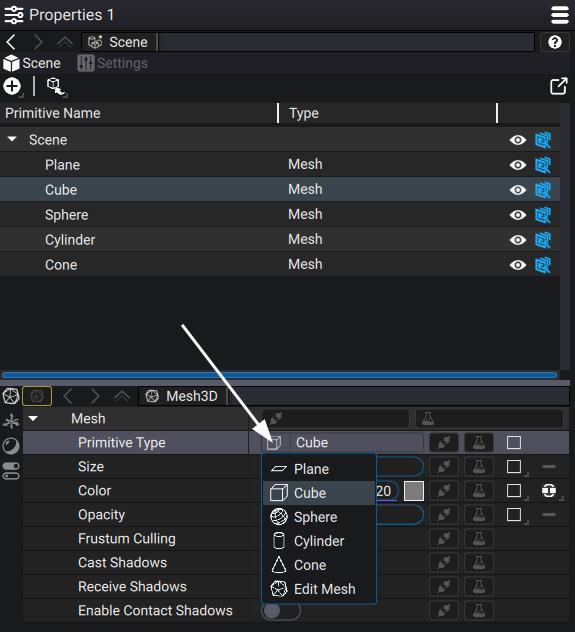
All primitives are procedurally-generated, and the primitive type can be changed at any time in the primitive Properties, below the Scene Graph:
You can procedurally change the vertices position of the Mesh Primitive in the Properties.
| Primitive | Parameters | Description |
|---|---|---|
| Plane | Rectangle | Defines the positions of the four vertices of the plane. |
| Cube | Size | Defines the length of all edges of the cube. |
| Sphere | Radius, Columns, Rows | Columns and Rows control how many vertices the sphere is made of.
Radius defines the distance of those vertices from the center of the sphere. |
| Cylinder | Radius, Columns, Height | Columns controls how many vertices are used to build the round part of the cylinder.
Radius defines the distance from the direction axis. Height defines the size of the cylinder along that axis. |
| Cone | Radius, Columns, Height, Second Radius |
The first parameters are the same as for the Cylinder.
Second Radius defines the radius of the top part of the cone. |
The last entry of the drop-down list, Edit Mesh is automatically selected when overriding an existing Prim of Type Mesh and is almost never set manually.
Additionally, they all share parameters that let you simulate a basic material (Color, Opacity) without the need to plug a Material Prim, and rendering behavior.