
Parenting
Parenting consists of adding an additional parent layer transformation to a layer's transformation.
To understand this concept, you can think of the example of getting on a train. Inside the train, you are free to move around; but, you are also affected by the train’s movement. You are "parented" to the train and the same concept applies to layers.
The following terminology is used:
- Parent layer(s)
- Child layer(s)
A Child layer can also be the Parent of another layer/other layers, creating a "transformation dependency tree". That is the way parenting is defined in Autograph in this separated module.
Creating a dependency tree
At the top right of the Timeline, there are different modules. Switching to the Parenting module will show a blank area superimposed on the Dope Sheet.
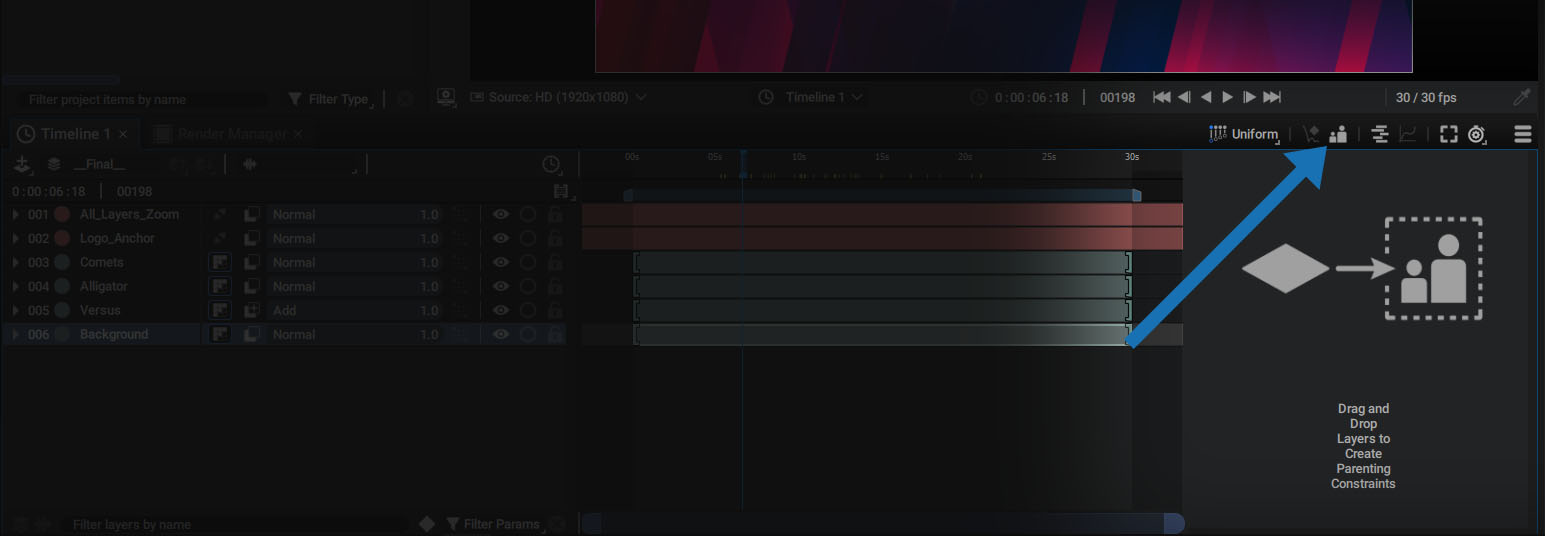
Now, you can drag layers from the stack on left to this area in order to create dependency trees.

After a first drag and drop, a new line with the name of the dragged layer will appear.
If you drag another layer from the stack to the right, you can:
- Create a new tree by dragging your layer to the void
- Parent a layer by dragging it over the name of an existing layer in the tree, which will outline this layer in yellow.

If your cursor is between two layers or even two branches, a long yellow line will appear, indicating that you can insert a layer into this spot.

Layers can be reordered, parented, or unparented by simply clicking and dragging them.
You can also select a layer in the tree and delete it to remove parenting.
Selecting parent and children
Each name in the tree is also clickable in order to directly scroll and reveal the corresponding layer in the stack. This will also unfold the Transform properties to easily access the Transform Modifiers. That's because when you create this tree, you actually automatically add/remove Modifiers to the children’s Transform.
Parenting Modifiers
Parenting constraint:
Each composition is assigned a Parenting tree. By switching to the composition in the Timeline, the corresponding tree will be displayed in the Parenting module. This tree is in fact a more convenient way to adjust the childrens Transform Modifiers by automatically adding or removing Modifiers onto them.
For example, by dragging a null into the tree before parenting a layer, under the hood the parenting module automatically performs the following operations (here done manually):
- Right-click on the parent's Transform parameter, then select Copy
- Add a Parent Transform Modifier to the child's Transform parameter
- Right-click the child's Parent parameter and select Paste (Linked)
If you select a layer and check the Selection Overview section, you will notice the addition of a Parent Transform Modifier.
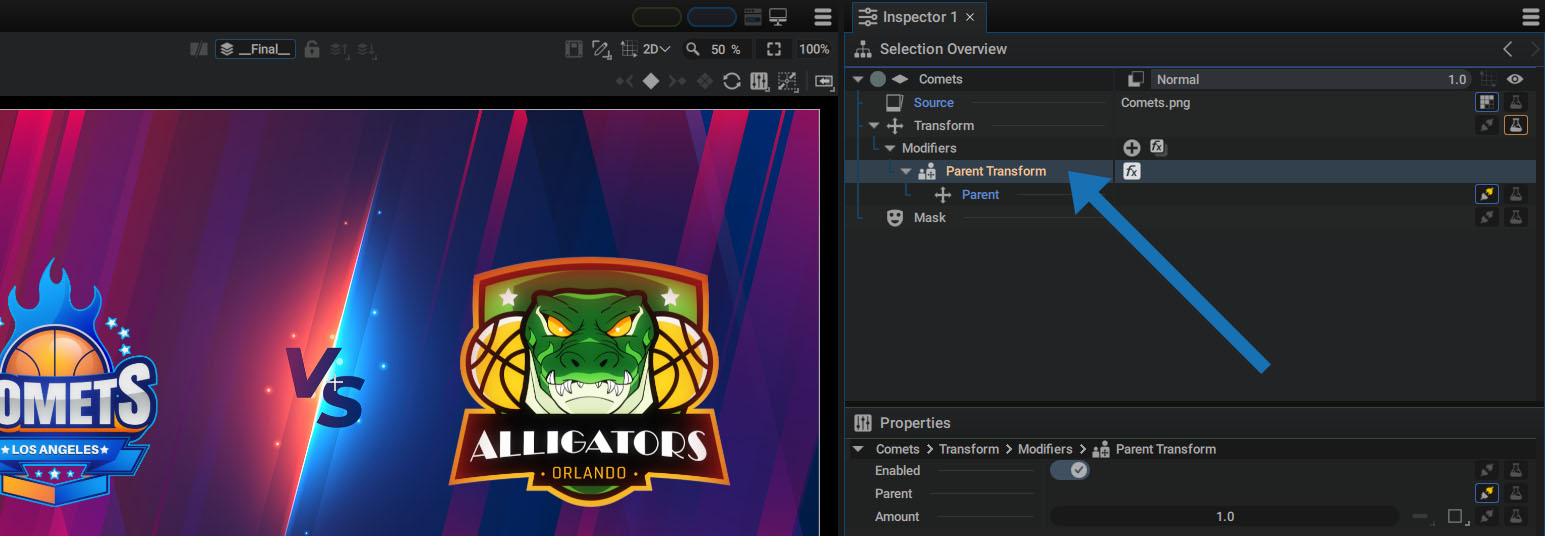
It contains two parameters:
- Parent: to link the Transform of the parent layer (and not the layer itself)
- Amount: to define the "weight" of this parenting
Animating the parenting constraint
You can still animate a layer even if it's subjected to this constraint, which can even be weighted and animated by changing the Amount value:
- Amount= 0.0: no parenting applied
- Amount= 1.0: parenting is fully applied
- Amount= 0.5: the layer undergoes half of the constraint; (to compare, if the train moves 10 meters, you will only move 5 meters)
By animating the Amount, you can parent/unparent a layer on the fly, or progressively stick a child to its parent.
It's also possible to set the Amount to a value greater than 1.0 or even a negative value:
- Amount= 2.0: the child move twice as much as its parent (to compare, if the train moves 10 meters, you will move 20 meters).
- Amount= -1.0: the child goes in the opposite direction of its parent
- Amount= -2.0: the child goes in the opposite direction of its parent and twice as much
Since the Parent Transform Modifier is a Transform itself, you can also add any Modifiers dedicated to this type.
Parenting between 2D and 3D layers
Parenting is not limited to 2D layers. It is also possible to:
- Parent a 3D layer to another 3D layer
- Parent a 3D layer to a 2D layer
In this second case, the 2D layer Transform will be reprojected on the 3D layer, in the Viewer axis.
In a 3D scene, Parent Transform is also available as a Transform Modifier.