
Sharing and Unsharing Parameters and Modifiers
Sharing parameters
Here we have two different layers and we want to share the scale parameter:
We can connect these two parameters using the Quad menu by clicking on:
- Copy Share Group (you can also use the ctrl/cmd + c keys after selecting the parameter)
- Paste Share Group
It doesn't matter which of the two parameters is selected first because they are being shared mutually.
Unsharing parameters
To unshare a parameter, simply open up the Quad menu again and select Unshare:
Sharing Modifiers or Modifier groups
In the previous example, we shared a numerical value. But as mentioned in the previous section, absolutely anything can be shared in Autograph.
Here is an example of how to share a Modifier group:
- Select the Modifiers line representing the Modifier Group.
- Press ctrl/cmd + c to Copy
- Select the second layer
- Use the Action menu to Paste (Shared) > Paste Modify Group
Now both layers share the same Modifiers.
Note: Sharing a Modifier Group also lets you synchronize the removal or addition of future Modifiers.
Sharing while adding Modifiers or Generators
If multiple layers are selected when adding a Modifier, you will be asked if you want to share them or not.
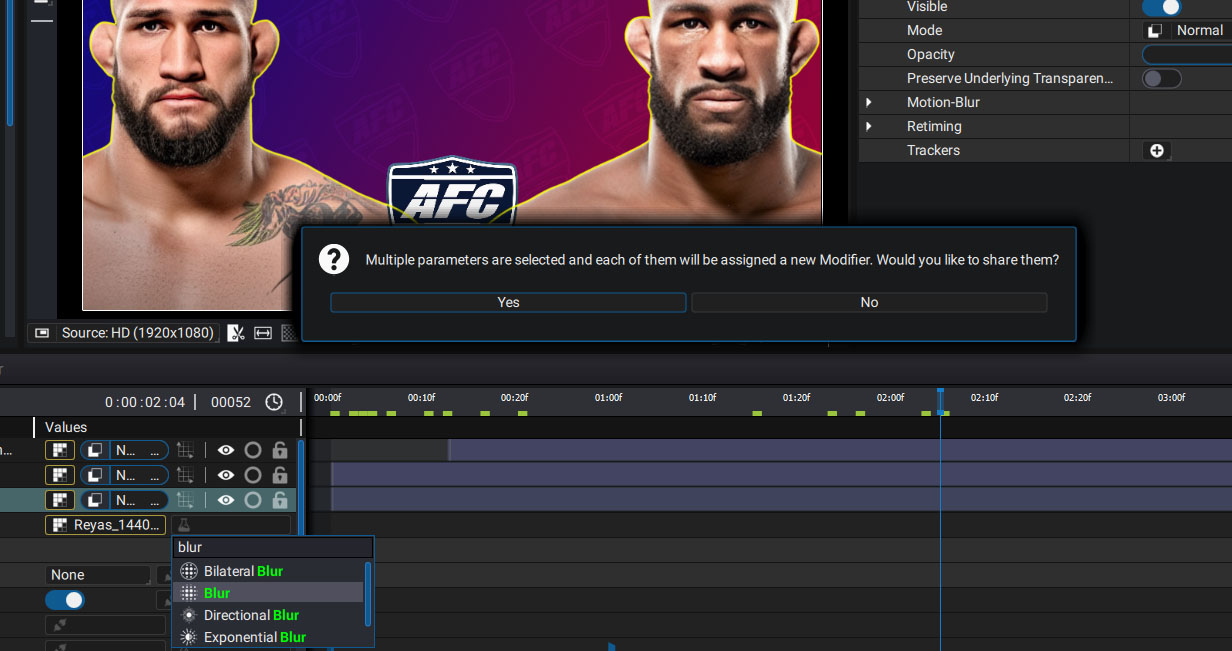
Note: This question will also be asked when adding a Generator.