
Templates and Packages
A project created with Autograph can contain all kinds of different resources. Images, animations, 3D objects... all of this often spread out in several different folders, even in different storages.
When moving a project to another device, it can be useful to collect all of these resources into a single folder when modifying the project, in order to direct the sources to these new reorganized copies rather than miscellaneous files.
This task can be done with the Collect files function.
Autograph allows you to go even further by giving you the option to encapsulate all these elements into a single compressed and encrypted file, to produce a reusable and customizable template called a Package.
Why create packages
The purpose of Collect Files is to collect a project and its resources in one place. This way, you can copy this file from one device to another and open it without any relinking issues.
Imagine that this project contains a Lower Third intended to be reused very often in multiple projects. How can you do that?
- Previously, you exposed its Source as composition parameters to facilitate access to relevant parameters.
- You could copy/paste this composition from one project to another, automatically recreating all resources in the Project Panel, or link the collected project as an Autograph Sub-Project.
This is one way to reuse an external graphic element in new projects, but it’s not the most optimal:
- If you reuse this sub-project on several layers, all parameters will be Shared by default. Changing the name of one banner will change the name of all the others, unless you manually unshare the parameters to be changed each time a new Lower Third is added.
- The collected project may consist of hundreds of files, making it difficult to interchange what starts to look like a Template.
- Linking a sub-project means that it is probably possible to load it into Autograph in order to modify its behavior, which the template creator may not want.
- The graphic elements used may be trademarked and shouldn’t be reused outside this Template.
Defining the main composition
Even if your project contains several Sub-compositions, one particular composition can be defined as the “main” one, or the one that should be rendered if we want to produce a movie file on a storage.
After selecting one of them, you can unfold the Export Options section in the Properties Panel to find the Main composition option.
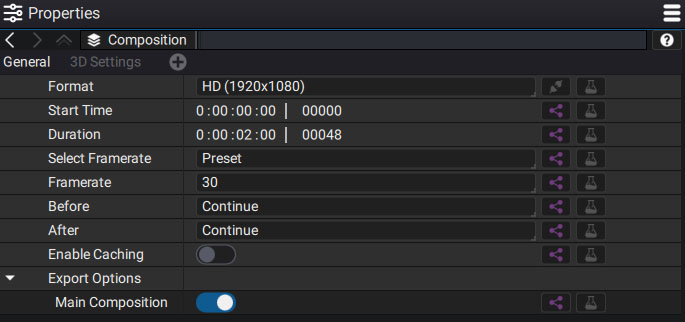
By clicking on it, you define this composition as the one that will be used as an entry point when using the package. There can only be one Main Comp in a project. If you activate this option on another composition, it will disconnect the other one automatically.
Exporting a Package to create a new Generator or Modifier
Instead of copying or moving project elements, you can use a Package which encapsulates all of them in a single compressed and encrypted file. You can then use this package as:
- A new Generator (appearing among those Autograph provides) which can be instantiated as several independent layers, solving the sharing issue previously described.
- A new Modifier, which can be used as any regular image modifier
After defining the Main Composition, go to File > Export As Package.
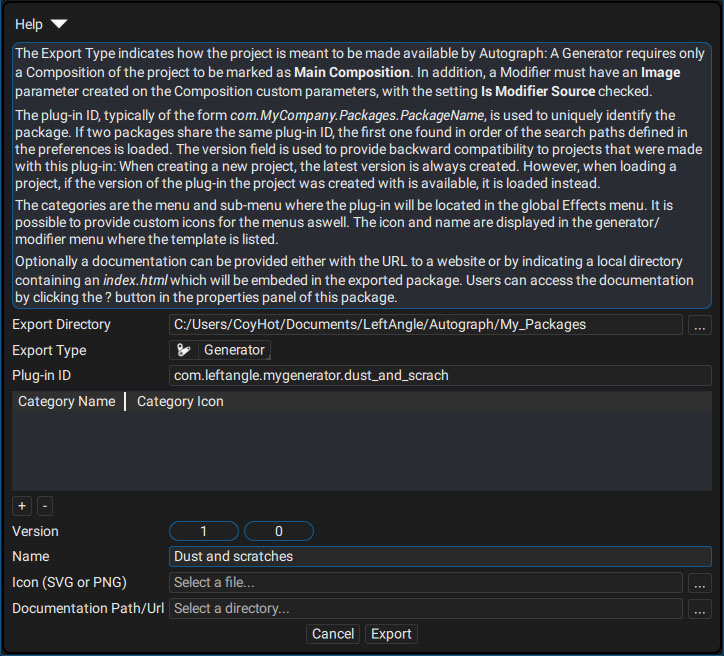
A pop-up appears containing a Help section summarizing the export steps:
- Choose if you want to export a Generator or Modifier.
- Define a Plugin ID: this is not technically mandatory but as a general rule, we always start it with "com", followed by the name of the company, the Template group, and the plugin, all separated by periods and without any spaces.
- You can optionally create categories in the Generators and Modifiers menus in which the plugin will be placed .
- Set the version number: a change in the first digit usually represents a major advance, while the second digit is more minor, such as a bug fix.
- Name your Generator/Modifier.
- Set an icon in SVG or PNG image format to personalize your plugin.
- Indicate a folder containing a documentation in TXT or HTML format that can be read by a web browser. This doc will be embedded too and it will unpack on the fly and on demand when you click the "?" button.