Introduction
OSL stands for Open Shading Language and allows to write your own shader descriptions, that can be shared between other renderers that also offer OSL support. OSL scripts can be loaded as files or written directly inside the shader dialog.
You can find out more about OSL on this website: https://github.com/AcademySoftwareFoundation/OpenShadingLanguage and some Redshift compatible OSL shaders here: https://github.com/redshift3d/RedshiftOSLShaders
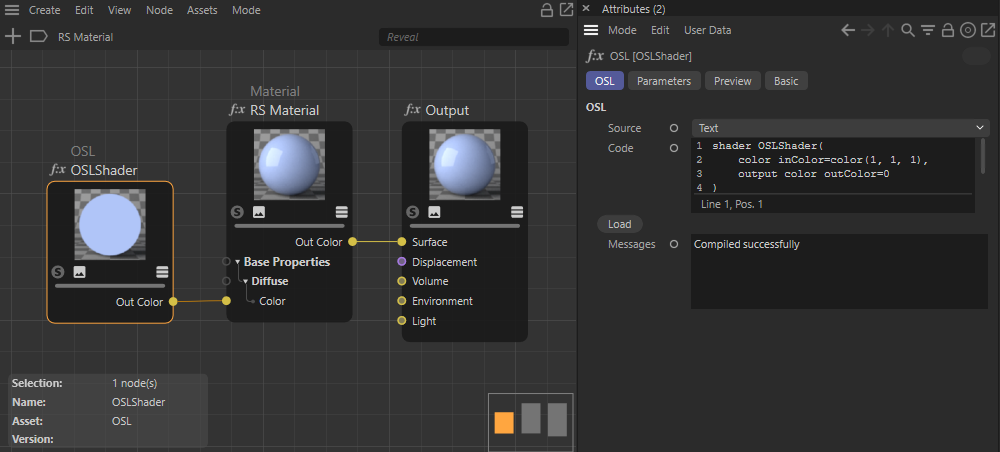
OSL
Here you can load an OSL definition or write your own OSL script into the Code field.
Source
Choose the source of your OSL code:
- Text: Write your OSL code directly to the Code field of the node.
- File: Use the folder icon to load your OSL file
Code
Use this input to paste or write the OSL code.
Path
In File mode you can find the loaded file path here.
Load
In Text mode you can use this button to open an OSL file and copy its content to the Code field.
Edit
If you have loaded an OSL file in File mode, you can use this button to open a script editor or text editor to edit the content of the file.
Messages
This area gives feedback about the OSL code, such as compiler messages.
Parameters
You can define variables in your OSL code which are then displayed in this tab.
You can for example add additional input variables for a float and a vector value at the preset code like this:
shader OSLShader(
					color inColor=color(1, 1, 1),
float myValue=0.0,
point myVector=vector(0),
					output color outColor=0
					)
					{
					outColor = inColor;
					}
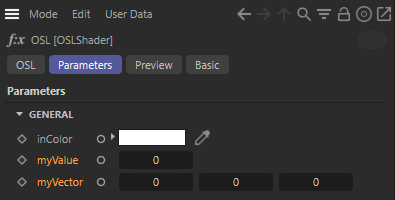
Additional user variables at the preset OSL code.