---
title: "High Altitude Clouds"
url: "https://help.maxon.net/c4d/en-us/Content/html/ORSCLOUD-REDSHIFT_SKY_PHYSICALSKY_CLOUD_HIGH_TAB.html"
section_path: "Create Menu > Clouds > High Altitude Clouds"
element_id: "ORSCLOUD"
group_id: "REDSHIFT_SKY_PHYSICALSKY_CLOUD_HIGH_TAB"
description: "High altitude clouds simulate a layer of cirrus clouds for added realism."
---
## High Altitude Clouds
### Enabled
Parameter ID: `REDSHIFT_SKY_PHYSICALSKY_CLOUD_HIGH_ENABLED`
Turns the high altitude clouds layer on or off.
High altitude clouds simulate a layer of cirrus clouds for added realism.
| | |
| --- | --- |
| 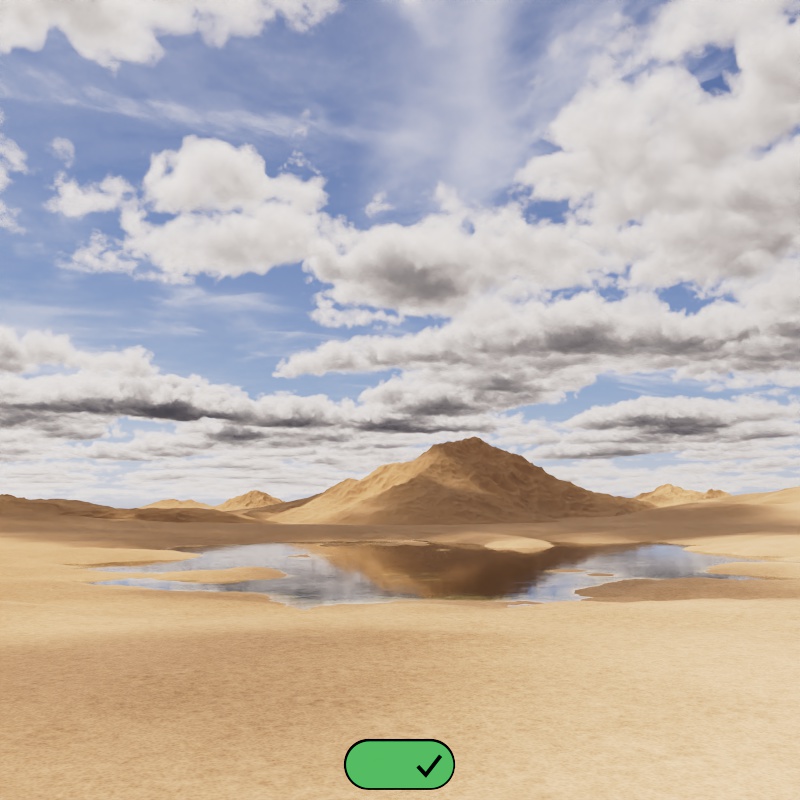 | 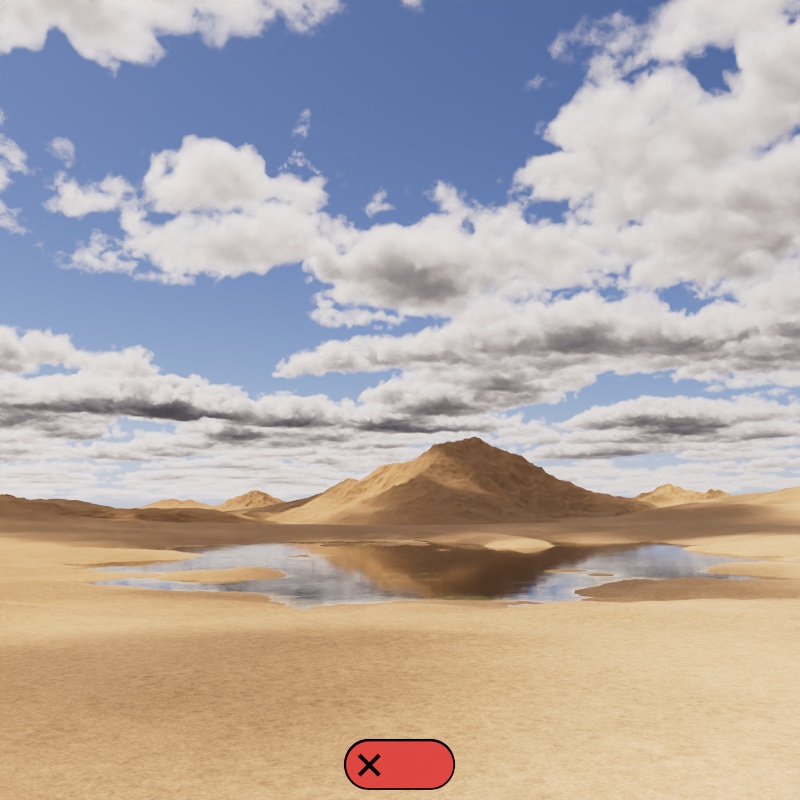 |
| High Altitude Clouds: Enabled | Disabled |
### Seed
Parameter ID: `REDSHIFT_SKY_PHYSICALSKY_CLOUD_HIGH_SEED` · Range: [0..2147483647]
Randomizes the position of the clouds. Change this value until you find a nice starting point for your scene.
| |
| --- |
| [Video: Clouds_HAC_Seed_anim.mp4](https://help.maxon.net/c4d/en-us/Content/_REDSHIFT_/Resources/Images/InSnippets_Redshift/Clouds/Clouds_HAC_Seed_anim.mp4) |
| Changing the Seed |
### Density
Parameter ID: `REDSHIFT_SKY_PHYSICALSKY_CLOUD_HIGH_DENSITY` · Range: [0.00..+∞]
Controls how thick the clouds appear to be, functioning similarly to an opacity slider.
| |
| --- |
| [Video: Clouds_HAC_Density_0-10_anim.mp4](https://help.maxon.net/c4d/en-us/Content/_REDSHIFT_/Resources/Images/InSnippets_Redshift/Clouds/Clouds_HAC_Density_0-10_anim.mp4) |
| Density: 0 - 10 |
### Altitude (m)
Parameter ID: `REDSHIFT_SKY_PHYSICALSKY_CLOUD_HIGH_ALTITUDE` · Range: [0.00..+∞]
> **Note:** Fixed Unit: Meters
Controls at what height the high altitude cloud layer appears in meters.
| |
| --- |
| [Video: Clouds_HAC_Altitude_6000-12000_anim.mp4](https://help.maxon.net/c4d/en-us/Content/_REDSHIFT_/Resources/Images/InSnippets_Redshift/Clouds/Clouds_HAC_Altitude_6000-12000_anim.mp4) |
| Altitude: 6000 - 12000 |
### Scale
Parameter ID: `REDSHIFT_SKY_PHYSICALSKY_CLOUD_HIGH_SCATTER_SCALE` · Range: [0.00..+∞]
Controls the size of the high altitude clouds texture.
> **Important:** Low values will reveal texture tiling.
| |
| --- |
| [Video: Clouds_HAC_Scale_20k-64k_anim.mp4](https://help.maxon.net/c4d/en-us/Content/_REDSHIFT_/Resources/Images/InSnippets_Redshift/Clouds/Clouds_HAC_Scale_20k-64k_anim.mp4) |
| Scale: 20000 - 64000 |
\
Position
### Offset X (m)
Parameter ID: `REDSHIFT_SKY_PHYSICALSKY_CLOUD_HIGH_POS_OFFSET_X` · Range: [-∞..+∞]
### Offset Z (m)
Parameter ID: `REDSHIFT_SKY_PHYSICALSKY_CLOUD_HIGH_POS_OFFSET_Z` · Range: [-∞..+∞]
> **Note:** Fixed Unit: Meters
Controls the position of the clouds in meters, this is good for nudging clouds in a particular direction until they are framed exactly how you want them in your shot.
> **Note:** Use Wind Speed and Wind Direction controls when animating the high altitude clouds.
| |
| --- |
| [Video: Clouds_HAC_Position_Offset_anim.mp4](https://help.maxon.net/c4d/en-us/Content/_REDSHIFT_/Resources/Images/InSnippets_Redshift/Clouds/Clouds_HAC_Position_Offset_anim.mp4) |
| Changing the X and Y Offset |
### Wind Speed
Parameter ID: `REDSHIFT_SKY_PHYSICALSKY_CLOUD_HIGH_WIND_SPEED` · Range: [0.00..+∞]
Controls how fast the clouds move across the sky. Higher values move the clouds a greater distance each frame. A value of 0 leaves the clouds stationary. The clouds move along the Wind Direction.
| | | |
| --- | --- | --- |
| [Video: Clouds_HAC_Position_Wind_Speed_50_anim.mp4](https://help.maxon.net/c4d/en-us/Content/_REDSHIFT_/Resources/Images/InSnippets_Redshift/Clouds/Clouds_HAC_Position_Wind_Speed_50_anim.mp4) | [Video: Clouds_HAC_Position_Wind_Speed_300_anim.mp4](https://help.maxon.net/c4d/en-us/Content/_REDSHIFT_/Resources/Images/InSnippets_Redshift/Clouds/Clouds_HAC_Position_Wind_Speed_300_anim.mp4) | [Video: Clouds_HAC_Position_Wind_Speed_1000_anim.mp4](https://help.maxon.net/c4d/en-us/Content/_REDSHIFT_/Resources/Images/InSnippets_Redshift/Clouds/Clouds_HAC_Position_Wind_Speed_1000_anim.mp4) |
| Wind Speed: 50 | 300 | 1000 |
### Wind Direction
Parameter ID: `REDSHIFT_SKY_PHYSICALSKY_CLOUD_HIGH_WIND_DIRECTION` · Range: [0..360°]
Controls the direction the clouds move across the sky.
| | | |
| --- | --- | --- |
| [Video: Clouds_HAC_Position_Wind_Direction_0_anim.mp4](https://help.maxon.net/c4d/en-us/Content/_REDSHIFT_/Resources/Images/InSnippets_Redshift/Clouds/Clouds_HAC_Position_Wind_Direction_0_anim.mp4) | [Video: Clouds_HAC_Position_Wind_Direction_45_anim.mp4](https://help.maxon.net/c4d/en-us/Content/_REDSHIFT_/Resources/Images/InSnippets_Redshift/Clouds/Clouds_HAC_Position_Wind_Direction_45_anim.mp4) | [Video: Clouds_HAC_Position_Wind_Direction_0-360_anim.mp4](https://help.maxon.net/c4d/en-us/Content/_REDSHIFT_/Resources/Images/InSnippets_Redshift/Clouds/Clouds_HAC_Position_Wind_Direction_0-360_anim.mp4) |
| Wind Direction: 0 | 45 | 0 - 360 |
\
Shading
### Color
Parameter ID: `REDSHIFT_SKY_PHYSICALSKY_CLOUD_HIGH_SCATTER_COLOR`
Controls the color of the clouds
### Scale
Parameter ID: `REDSHIFT_SKY_PHYSICALSKY_CLOUD_HIGH_SCALE` · Range: [0.00..+∞]
Controls how much light is scattered which affects the brightness of the clouds. Higher values result in more scattered light and brighter clouds while lower values make them darker.
### Anisotropy
Parameter ID: `REDSHIFT_SKY_PHYSICALSKY_CLOUD_HIGH_SCATTER_ANISOTROPY` · Range: [-1.00..1.00]
Controls the direction light scatters inside the clouds within a -1 to 1 range. In the real world the composition of a volume can cause light to scatter in specific directions, clouds frequently exhibit forward scattering (positive values) due the inclusion of water and ice molecules.
The default anisotropy of 0 results in isotropic scattering, when the light scatters equally in all directions. Positive values increase the chance for forward scattering, when more light is scattered in the direction the light rays are already traveling. Negative values increase the chance for back scattering, when more light is scattered back towards the location of the light source.
| | | |
| --- | --- | --- |
| [Video: Clouds_HAC_Shading_Scatter_Aniso_-07-07_Front_anim.mp4](https://help.maxon.net/c4d/en-us/Content/_REDSHIFT_/Resources/Images/InSnippets_Redshift/Clouds/Clouds_HAC_Shading_Scatter_Aniso_-07-07_Front_anim.mp4) | [Video: Clouds_HAC_Shading_Scatter_Aniso_-07-07_Normal_anim.mp4](https://help.maxon.net/c4d/en-us/Content/_REDSHIFT_/Resources/Images/InSnippets_Redshift/Clouds/Clouds_HAC_Shading_Scatter_Aniso_-07-07_Normal_anim.mp4) | [Video: Clouds_HAC_Shading_Scatter_Aniso_-07-07_Back_anim.mp4](https://help.maxon.net/c4d/en-us/Content/_REDSHIFT_/Resources/Images/InSnippets_Redshift/Clouds/Clouds_HAC_Shading_Scatter_Aniso_-07-07_Back_anim.mp4) |
| Anisotropy: -0.7 to +0.7
Front lighting | -0.7 to +0.7
Overhead lighting | -0.7 to +0.7
Back lighting |
### Direct Lighting Scale
Parameter ID: `REDSHIFT_SKY_PHYSICALSKY_CLOUD_HIGH_DIRECT_INTENSITY` · Range: [0.00..+∞]
Controls how intensely the clouds are affected by the Sun or the brightest parts of a Dome Light.
| |
| --- |
| [Video: Clouds_HAC_Shading_Scatter_Direct_Scale_0-4_anim.mp4](https://help.maxon.net/c4d/en-us/Content/_REDSHIFT_/Resources/Images/InSnippets_Redshift/Clouds/Clouds_HAC_Shading_Scatter_Direct_Scale_0-4_anim.mp4) |
| Direct Lighting Scale: 0 - 4 |
### Ambient Lighting Scale
Parameter ID: `REDSHIFT_SKY_PHYSICALSKY_CLOUD_HIGH_INDIRECT_INTENSITY` · Range: [0.00..+∞]
Controls the indirect lighting contribution, most notable on the underside of the clouds. This can be heavily affected by the Sun & Sky's Ground Color.
| |
| --- |
| [Video: Clouds_HAC_Shading_Scatter_Ambient_Scale_0-05_anim.mp4](https://help.maxon.net/c4d/en-us/Content/_REDSHIFT_/Resources/Images/InSnippets_Redshift/Clouds/Clouds_HAC_Shading_Scatter_Ambient_Scale_0-05_anim.mp4) |
| Ambient Lighting Scale: 0 - 0.5 |