

Command Line Argument
General
A rendering can be started via a terminal console without having to open Cinema 4D or use an interface (see Cinema 4D and the Command Line).
This workflow also allows to send specific information, such as the name of the Take or the range of desired frames to be rendered to Cinema 4D.
With the Command Line Argument node, in turn, any character strings, such as
- a text for a text object
- a value for any object or tag parameter
- a texture path as a command line argument
- a text for the watermark post effect
to Cinema 4D at render time. These are then processed using XPresso. Numbers and figures are also evaluated, simply connect the value output to a port that expects floating point or integer numbers.
How can I replace the text of a text spline at render time using a command line argument?
- Create a scene with a Text spline and assign it to an Extrude object.
- Create an XPresso Tag and create a Command Line Argument node in the XPresso Editor that opens.
- Click on the top left blue corner and click on the two input port names, which are then activated for the node.
- If you have not already done so, select the newly created node. The two input parameters Name and Default are now displayed in the Attribute Manager. Now enter the command line argument for Name (e.g. "text"), which you will have to enter later in the command line. In Default, enter the text (e.g. "Cube") that is to be used in the scene from the start, without using the command line.
- Now drag the Text object into the XPresso Editor and create a "Text Spline" input port by clicking on the top left blue corner of the newly created node and selecting ().
- Now connect the value output port of the Command Line Argument node to the text spline input port of the text spline node. Done.
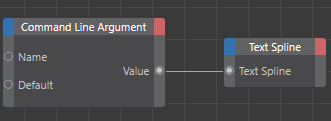

You can now transfer any text to the text spline via the command line. This will look like this in the Windows command prompt, for example:
- Commandline.exe -render c:\Scenes\2026-2_command_line_node_01_.c4d
- Commandline.exe -render c:\Scenes\2026-2_command_line_node_01_.c4d text="Disc"
Use these two commands to tell the command line renderer to render the file "c:\Scenes\2026-2_command_line_node_01_.c4d". In the first case, no "text" argument is passed and the text is rendered as described above under "4." under Default.
In the second case, pass the argument text="Disc". The text spline then uses "Disc" with correspondingly different rendering results:

You are welcome to try it out: the file to be rendered can be downloaded from the screenshot above. Copy these to a suitable directory and let the command line renderer work (see Cinema 4D and the Command Line). To do this, adjust the paths in the command line accordingly.