---
title: "Fur"
url: "https://help.maxon.net/c4d/en-us/Content/html/ORSPROCEDURAL-REDSHIFT-PROCFUR_GROUP_GENERAL.html"
section_path: "Create Menu > Generators > RS Procedural Fur > Fur"
element_id: "ORSPROCEDURAL"
group_id: "REDSHIFT_PROCFUR_GROUP_GENERAL"
description: "Connect an object here to generate fur strands across the surface of the mesh."
---
## Fur
## General
### Object
Parameter ID: `REDSHIFT_PROCFUR_BASE_MESH`
Connect an object here to generate fur strands across the surface of the mesh.
> **Note:** The Source Object must have UV coordinates to control things like density and thickness with a texture. More information can be found in the Maps section below.
### Surface Offset
Parameter ID: `REDSHIFT_PROCFUR_SURFACE_OFFSET`
Moves the fur strand away from the surface of the source object along the face normal.
| |
| --- |
| [Video: rsFur_General_Surface_Offset_-1-1_anim.mp4](https://help.maxon.net/c4d/en-us/Content/_REDSHIFT_/Resources/Images/InSnippets_Redshift/Fur/rsFur_General_Surface_Offset_-1-1_anim.mp4) |
| Surface Offset: -1 to +1 |
### Enable Instancing
Parameter ID: `REDSHIFT_PROCFUR_ENABLE_INSTANCING`
When checked, the fur mesh can be used with instances. This should be used to save memory when the same fur object appears multiple times in the scene.
### Density
Parameter ID: `REDSHIFT_PROCFUR_DENSITY`
Sets the number of fur strands per square unit across the surface of the mesh. Higher values produce more fur. Since density is based on the area the strand count scales naturally across differently sized meshes, producing consistent results.
| |
| --- |
| [Video: rsFur_General_Density_0-100_anim.mp4](https://help.maxon.net/c4d/en-us/Content/_REDSHIFT_/Resources/Images/InSnippets_Redshift/Fur/rsFur_General_Density_0-100_anim.mp4) |
| Density: 0 - 100 |
### Length
Parameter ID: `REDSHIFT_PROCFUR_LENGTH`
Controls the base length of each strand in scene units.
| |
| --- |
| [Video: rsFur_General_Length_0-2_anim.mp4](https://help.maxon.net/c4d/en-us/Content/_REDSHIFT_/Resources/Images/InSnippets_Redshift/Fur/rsFur_General_Length_0-2_anim.mp4) |
| Length: 0 - 2 |
### Radius
Parameter ID: `REDSHIFT_PROCFUR_RADIUS`
Controls the base thickness (radius) of each strand in scene units.
| |
| --- |
| [Video: rsFur_General_Thickness_0-02_Density_200_anim.mp4](https://help.maxon.net/c4d/en-us/Content/_REDSHIFT_/Resources/Images/InSnippets_Redshift/Fur/rsFur_General_Thickness_0-02_Density_200_anim.mp4) |
| Thickness: 0 - 0.2 |
### Taper
Parameter ID: `REDSHIFT_PROCFUR_TAPER`
Controls the base thickness (radius) of each strand in scene units.
| |
| --- |
| [Video: rsFur_General_Thickness_0-02_Density_200_anim.mp4](https://help.maxon.net/c4d/en-us/Content/_REDSHIFT_/Resources/Images/InSnippets_Redshift/Fur/rsFur_General_Thickness_0-02_Density_200_anim.mp4) |
| Thickness: 0 - 0.2 |
### Auto Segments
Parameter ID: `REDSHIFT_PROCFUR_AUTO_SEGMENTS`
When enabled, the number of segments per-strand is controlled by the Bend and Curl values. This lets you adjust the Bend and Curl without having to adjust the number of segments each time, making it easier to use.
When disabled, the number of segments is controlled directly by the Curve Segments parameter.
| | |
| --- | --- |
| [Video: rsFur_General_Segments_Auto_Enabled_Curl_anim.mp4](https://help.maxon.net/c4d/en-us/Content/_REDSHIFT_/Resources/Images/InSnippets_Redshift/Fur/rsFur_General_Segments_Auto_Enabled_Curl_anim.mp4) | [Video: rsFur_General_Segments_Auto_Disabled_Curl_anim.mp4](https://help.maxon.net/c4d/en-us/Content/_REDSHIFT_/Resources/Images/InSnippets_Redshift/Fur/rsFur_General_Segments_Auto_Disabled_Curl_anim.mp4) |
| Auto Segments: Enabled
Curve Segments: N/A
Curl: 0 - 2 | Disabled
6
0 - 2 |
### Curve Segments
Parameter ID: `REDSHIFT_PROCFUR_CURVE_SEGMENTS`
> **Note:** Auto Segments must be disabled.
Controls the number of segments per-strand curve. Higher segments result in smoother and more rounded arcs on fur that is bent or curled. Find a balance between enough segments that the bend and curl can be adequately seen without going overboard. Segments increase render time and this compounds with extremely dense fur so you want to keep this value as low as possible without sacrificing the look.
| |
| --- |
| [Video: rsFur_General_Segments_Curve_1-12_Curl_anim.mp4](https://help.maxon.net/c4d/en-us/Content/_REDSHIFT_/Resources/Images/InSnippets_Redshift/Fur/rsFur_General_Segments_Curve_1-12_Curl_anim.mp4) |
| Curve Segments: 1 - 12
Curl: 2 |
### Bend
Parameter ID: `REDSHIFT_PROCFUR_BEND`
> **Note:** Gravity must be greater than 0.
Controls how much the fur bends due to gravity. A value of 0 results in fur that is completely rigid with no effect by gravity while higher values make the fur more flexible and droop farther due to gravity. Extremely high Bend values can stretch out fur in an unrealistic manner.
Since bend is based on gravity the fur bends differently based on its angle on the surface and the gravity direction.
Bend requires some segments but is less demanding than Curl.
| |
| --- |
| [Video: rsFur_General_Bend_0-5_anim.mp4](https://help.maxon.net/c4d/en-us/Content/_REDSHIFT_/Resources/Images/InSnippets_Redshift/Fur/rsFur_General_Bend_0-5_anim.mp4) |
| 0 - 5 |
### Curl
Parameter ID: `REDSHIFT_PROCFUR_CURL`
Controls the amount of coiling around the strand axis. Positive values curl the fur clockwise while negative values curl the fur counter-clockwise, the farther the value is from 0 the more curly the fur.
Curls requires many segments to render properly, too low of a value may result in fur that doesn't look curly at all.
| |
| --- |
| [Video: rsFur_General_Curl_0-2_anim.mp4](https://help.maxon.net/c4d/en-us/Content/_REDSHIFT_/Resources/Images/InSnippets_Redshift/Fur/rsFur_General_Curl_0-2_anim.mp4) |
| Curl: 0 - 2 |
### Gravity
Parameter ID: `REDSHIFT_PROCFUR_GRAVITY`
Controls the intensity of gravity which in turn controls how much the fur bends when the Bend value is greater than 0. Most of the time you can just leave it at the default 9.81 for realistic results, lower values bend the fur less.
| |
| --- |
| [Video: rsFur_General_Gravity_0-10_anim.mp4](https://help.maxon.net/c4d/en-us/Content/_REDSHIFT_/Resources/Images/InSnippets_Redshift/Fur/rsFur_General_Gravity_0-10_anim.mp4) |
| Gravity: 0 - 10 |
## Variation
### Density Variation
Parameter ID: `REDSHIFT_PROCFUR_DENSITY_VARIATION`
Varies the density of fur across the surface in patches. Higher values result in increased contrast between the patches of fur, a value of 0 results in uniformly dense fur.
> **Note:** Density variation is varied per triangle, the higher the mesh density the more detailed the density variation can be. On low poly objects the density variation may become apparent by revealing the low res nature of the object.
| |
| --- |
| [Video: rsFur_Variation_Density_0-100_anim.mp4](https://help.maxon.net/c4d/en-us/Content/_REDSHIFT_/Resources/Images/InSnippets_Redshift/Fur/rsFur_Variation_Density_0-100_anim.mp4) |
| Density Variation: 0 - 100 |
### Density Variation Scale
Parameter ID: `REDSHIFT_PROCFUR_DENSITY_VARIATION_SCALE`
> **Note:** Density Variation must be greater than 0.
Controls the size of the fur patches used for density variation in scene units.
| |
| --- |
| [Video: rsFur_Variation_Density_Scale_0-3_anim.mp4](https://help.maxon.net/c4d/en-us/Content/_REDSHIFT_/Resources/Images/InSnippets_Redshift/Fur/rsFur_Variation_Density_Scale_0-3_anim.mp4) |
| Density Variation Scale: 0 - 3 |
### Length Variation
Parameter ID: `REDSHIFT_PROCFUR_LENGTH_VARIATION`
Varies the length per-strand. Higher values vary the length of each strand by making them shorter or longer than the base length. A value of 0 results in all strands having the same length.
| |
| --- |
| [Video: rsFur_Variation_Length_0-100_anim.mp4](https://help.maxon.net/c4d/en-us/Content/_REDSHIFT_/Resources/Images/InSnippets_Redshift/Fur/rsFur_Variation_Length_0-100_anim.mp4) |
| Length Variation: 0 - 100 |
### Radius Variation
Parameter ID: `REDSHIFT_PROCFUR_RADIUS_VARIATION`
Varies the thickness per-strand. Higher values vary the thickness of each strand by making them thinner or thicker than the base thickness. A value of 0 results in all strands having the same thickness.
| |
| --- |
| [Video: rsFur_Variation_Thickness_0-100_anim.mp4](https://help.maxon.net/c4d/en-us/Content/_REDSHIFT_/Resources/Images/InSnippets_Redshift/Fur/rsFur_Variation_Thickness_0-100_anim.mp4) |
| Thickness Variation: 0 - 100 |
### Direction Variation
Parameter ID: `REDSHIFT_PROCFUR_DIRECTION_VARIATION`
Varies the how far each strand grows away from the growth direction. Higher values result in fur that grows in more random directions while a value of 0 results in fur that only grows out directly in line with the growth direction.
> **Note:** Overall growth direction is controlled by several things.
>
> - By default a strand grows out along the surface normal.
> - A Comb Direction Map can override the default direction by setting the initial growth direction.
> - A Bend Direction Map can change the direction fur bends after the initial growth direction.
| |
| --- |
| [Video: rsFur_Variation_Direction_0-100_anim.mp4](https://help.maxon.net/c4d/en-us/Content/_REDSHIFT_/Resources/Images/InSnippets_Redshift/Fur/rsFur_Variation_Direction_0-100_anim.mp4) |
| Direction Variation: 0 - 100 |
### Gravity Variation
Parameter ID: `REDSHIFT_PROCFUR_GRAVITY_VARIATION`
> **Note:** Bend must be greater than 0.
Randomizes the bend amount per-strand. Higher values produce more bend variation across the fur while a value of 0 results in each strand having the same bend amount.
| |
| --- |
| [Video: rsFur_Variation_Bend_0-100_anim.mp4](https://help.maxon.net/c4d/en-us/Content/_REDSHIFT_/Resources/Images/InSnippets_Redshift/Fur/rsFur_Variation_Bend_0-100_anim.mp4) |
| Bend Variation: 0 - 100 |
### Curl variation
Parameter ID: `REDSHIFT_PROCFUR_CURL_VARIATION`
> **Note:** Curl must be greater than 0.
Randomizes the curl amount per-strand. Higher values produce more curl variation across the fur while a value of 0 results in each strand having the same curl amount.
| |
| --- |
| [Video: rsFur_Variation_Curl_0-100_anim.mp4](https://help.maxon.net/c4d/en-us/Content/_REDSHIFT_/Resources/Images/InSnippets_Redshift/Fur/rsFur_Variation_Curl_0-100_anim.mp4) |
| Curl Variation: 0 - 100 |
## Level of Detail
### Enable LOD
Parameter ID: `REDSHIFT_PROCFUR_LOD_ENABLED`
> **Note:** Enable Instancing must be disabled.
When enabled, the density of the fur is optimized based on distance from the camera.
- Density is reduced in distant fur to lower the total number of strands generated
- Thickness is increased in distant fur to maintain the same visual density
This level of detail (LOD) effect can be balanced for visual impact while reducing the total number of strands generated and optimizing render time.
When disabled, all strands render at full detail.
> **Note:** Since LOD is based on camera distance, be mindful of the effect this can have with animations.
| | |
| --- | --- |
| 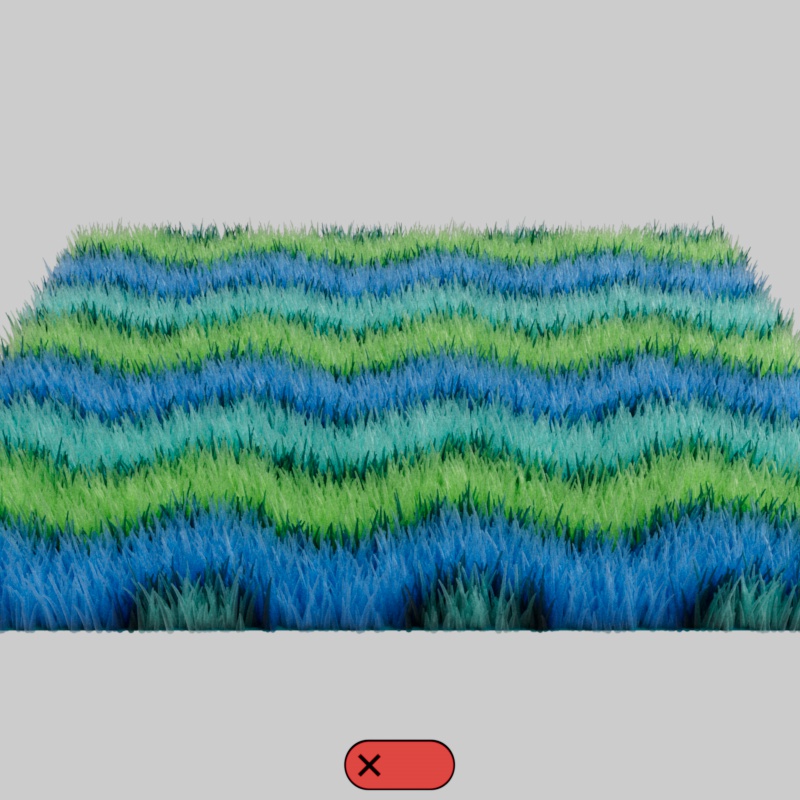 | 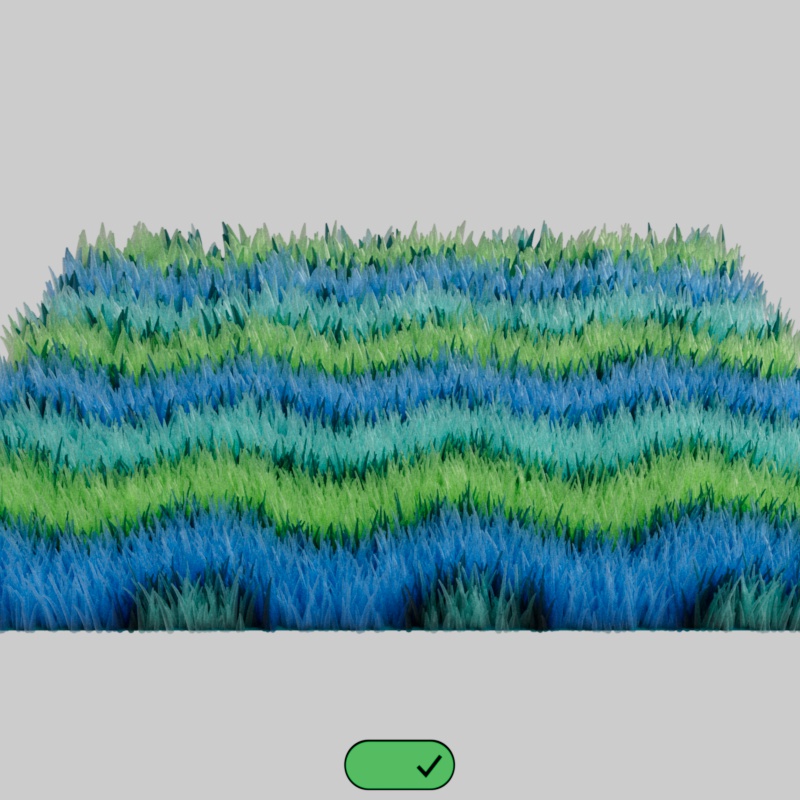 |
| Enable LOD: Disabled (default) | Enabled |
### LOD Start Distance
Parameter ID: `REDSHIFT_PROCFUR_LOD_START_DISTANCE`
Sets the distance in scene units from the camera where the LOD effects begin. Fur closer than the distance is rendered at full quality while fur beyond this distance is rendered at reduced quality.
Set the distance to something that works well for your scene scale.
In the example below, note how the fur closest to the camera always renders at full quality when the Start Distance is adjusted.
| |
| --- |
| [Video: rsFur_LOD_Start_Distance_30-40_anim.mp4](https://help.maxon.net/c4d/en-us/Content/_REDSHIFT_/Resources/Images/InSnippets_Redshift/Fur/rsFur_LOD_Start_Distance_30-40_anim.mp4) |
| Start Distance: 30 - 40 |
### LOD Rate
Parameter ID: `REDSHIFT_PROCFUR_LOD_RATE`
Controls how the fur beyond the Start Distance is rendered. Higher values increase the density of the distant fur while lower values decrease the density by culling more of the fur strands.
Values that are too low will reveal bald patches in the fur.
In the example below, note how the fur beyond a certain distance (the Start Distance) changes in density and thickness as the Distant Quality is adjusted.
| |
| --- |
| [Video: rsFur_LOD_Distant_Quality_1-50_anim.mp4](https://help.maxon.net/c4d/en-us/Content/_REDSHIFT_/Resources/Images/InSnippets_Redshift/Fur/rsFur_LOD_Distant_Quality_1-50_anim.mp4) |
| Distant Quality: 1 - 50 |