
Select Backfacing UV
UV polygons can also appear with their backsides visible in the UV Editor, similar to incorrectly oriented polygons on a geometry. This incorrect orientation can occur even if all surface normals on the object are correctly aligned. One possible cause is when a 4-sided polygon contains a degenerate triangle (see the example in the following figure).
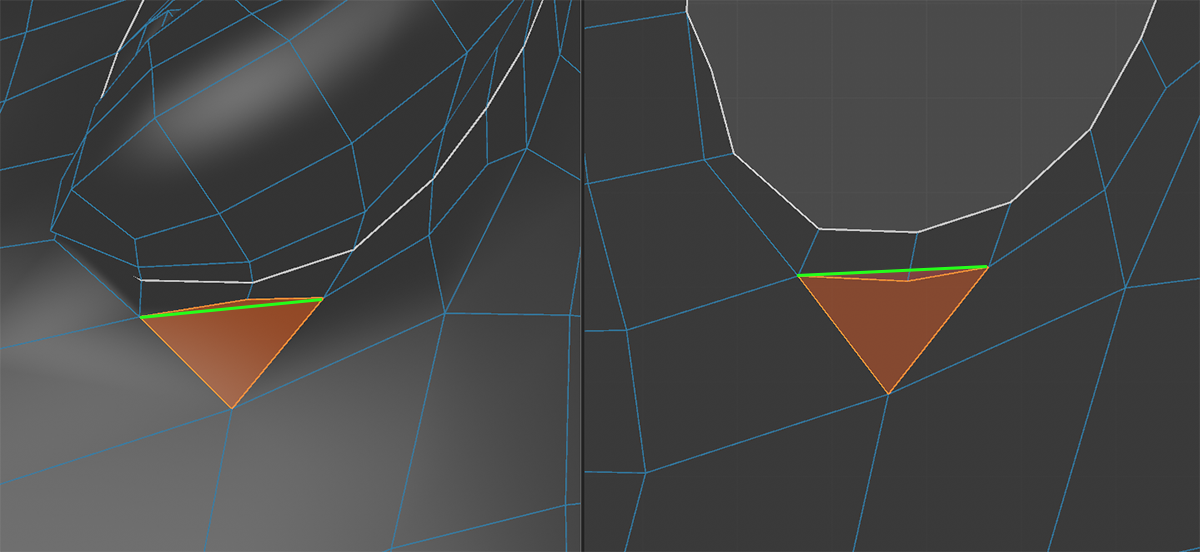 On the left is a selected polygon on the object's surface. On the right is the corresponding UV polygon onto which the surface has been collapsed. The manually added green line indicates the edge between the two internal triangles that make up the four-sided face.
It is important to note that even four-sided polygons are internally composed of two triangles, which are normally hidden from the user. The principle is similar to that of the internal faces of an N-gon. If the internal edge between the two triangles lies outside the quadrilateral face (as can be seen on the right in the UV polygon), this may result in rendering errors on that face. The Command Select Backfacing UV helps to spot those problematic UV polygons and allows you to correct the corner points so that a valid surface is created again.