---
title: "05 - Layer Controls"
url: "https://help.maxon.net/rg/en-us/Content/html/05-Supercomp_layer-controls.html"
section_path: "VFX > Supercomp > 05 - Layer Controls"
description: "Both individual layers and the entire Supercomp output have their own set of controls, which populate the Element Controls section when selected in the …"
---
# 05 - Layer Controls
Supercomp
## **LAYER CONTROLS**
Both individual layers and the entire Supercomp output have their own set of controls, which populate the Element Controls section when selected in the Supercomp Layers area.
| | |
| --- | --- |
|  | **Supercomp**
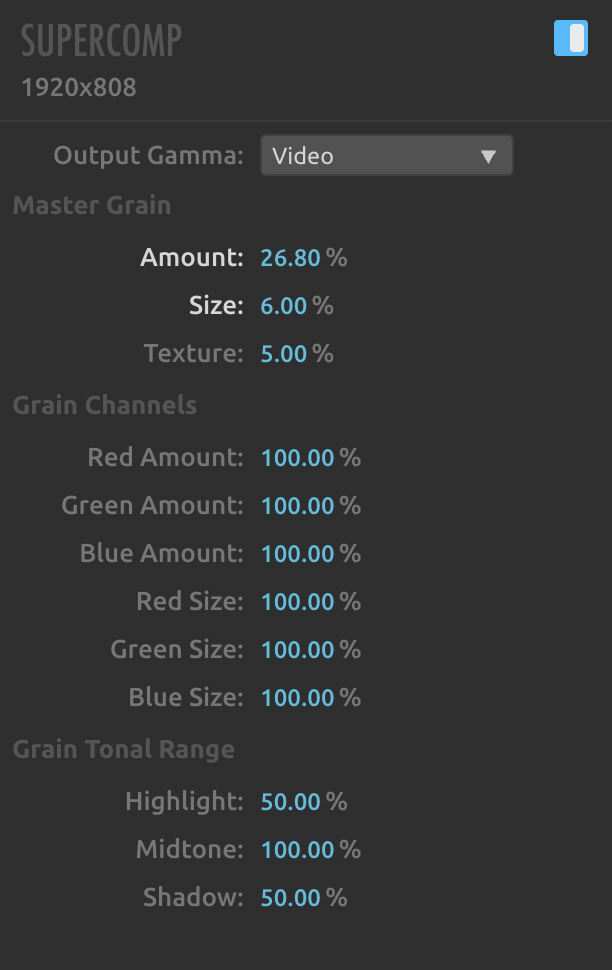
These parameters appear when the entire Supercomp output has been selected from the Supercomp Layers area:
- **Output Gamma**adjusts the gamma's output curve to the overall Supercomp Effect. Select Video, Log, or Linear depending on the image source. If you’re uncertain, leave at Video.
- **Master Grain**
- **Amount** sets how much grain applies to the image.
- **Size** controls the size of the grain generated by the Master Grain parameter.
- **Texture** controls how much the original image influences grain placement, rebuilding it out of grain.
- **Grain Channels**
- **Red** , **Green** , **Blue Amount** sets the amount of grain in the red, green, and blue channels.
- **Red** , **Green** , **Blue Size** sets the grain size in the red, green, and blue channels.
- **Grain Tonal Range**
- **Highlight** sets how much grain appears in the image highlights.
- **Midtone** sets how much grain appears in the image midtones.
- **Shadow** sets how much grain appears in image shadows. |
**Supercomp Layers**
These parameters appear whenever an individual Supercomp Layer has been selected.
- **Layer Presets** opens a menu of presets that, when selected, populate the layer with prebuilt effects. Presets are great for shortcuts, inspiration, or just a draft for depicting whatever the layer is going to be used for. [Learn more about Layer Presets here.](https://help.maxon.net/rg/en-us/Content/html/04-Supercomp_layer-presets.html.md)
- **Save Preset** (\
\
) creates a custom preset from the current array of effects and effect settings applied to a layer.
- **Layer Type** determines the layer's blend mode. Selecting a blend mode adjusts the layer's color in the Supercomp Layers area. If an additive blend mode had already been set for the layer in After Effects prior to applying Supercomp, the Layer Types will have already been set to Additive.
- **Normal** (blue): The layer is neither distorting nor coloring the frame information behind it.
- **Additive** (yellow): The layer will affect the colors of the frame information behind it.
- **Adjustment** (purple): The layer will distort the frame information behind it.
- **Gamma** adjusts the gamma's output curve to the overall Supercomp Effect. Select Video, Log, or Linear depending on the image source. If you’re uncertain, leave at Video.
- **Opacity** controls the layer's transparency.
- **Grain** sets how much grain applies to the output.