
What is Python Support in ZBrush?
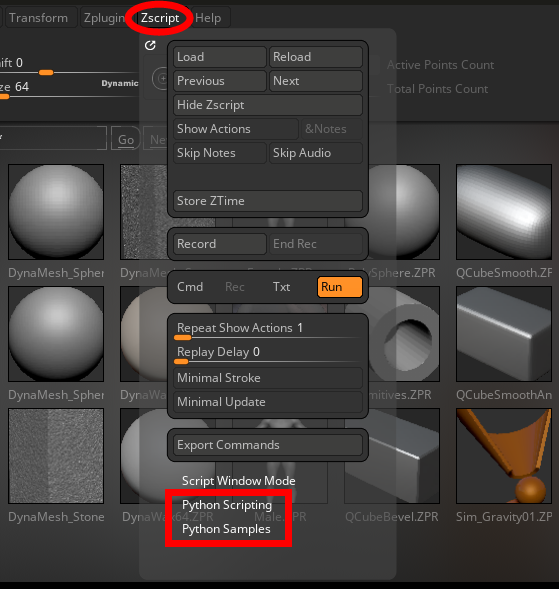
ZBrush now integrates the Python scripting language, a powerful tool for automation and pipeline integration. This implementation allows artists and studios to leverage the flexibility of Python to automate tasks and streamline workflows within ZBrush.
The primary goal of this initial release is to provide a bridge between Python and ZBrush's native ZScripting engine. This means you can write scripts in Python to execute sequences of commands, combining the robust, industry-standard language of Python with the deep, feature-rich command set of ZBrush.
Benefits of Using Python
Integrating Python into your workflow offers several key advantages:
-
Studio Pipeline Integration: Python is the de facto standard for scripting in the VFX and animation industry. This integration makes it significantly easier for studios to incorporate ZBrush into their existing automated pipelines.
-
Leverage Existing Knowledge: Many technical artists and TDs are already proficient in Python. They can now use their existing skills to script for ZBrush without needing to become experts in ZScript syntax.
-
Powerful Scripting Logic: Python offers more advanced and flexible tools for handling complex logic, file management, and data processing than ZScript. You can now prepare complex operations in Python before passing simple commands to ZBrush.
-
Automate Repetitive Tasks: Create simple scripts to handle multi-step processes, such as preparing a model for export, setting up a scene, or applying a series of modifications to multiple SubTools.
Key Concepts and Limitations
It is important to understand the scope of this "first wave" of Python integration:
-
The ZScript Bridge: Python's primary function in ZBrush is to call command sequences formerly handled with ZScript. You are essentially using Python as a "wrapper" to send instructions to ZBrush. You are not able to manipulate ZBrush's internal data directly with Python in this version.
-
External Script Editor: ZBrush does not include a built-in Python script editor. You should write and edit your .py files in your preferred external Integrated Development Environment (IDE), such as Visual Studio Code, PyCharm, or Sublime Text.
-
A Single, Persistent Session: Unlike ZScript, which re-initializes with each run, clearing any created interface items, the Python interpreter runs in a single, persistent session. This means variables, functions, and imported modules defined by one script will remain in memory and can be accessed by subsequent scripts run during the same ZBrush session (provided that their scopes are still accessible), in practice this means that buttons created by a script will not be destroyed as soon as another one runs.
Getting Started: UI for Python
The tools for running Python scripts are located in a new sub-palette within the main ZScript palette.
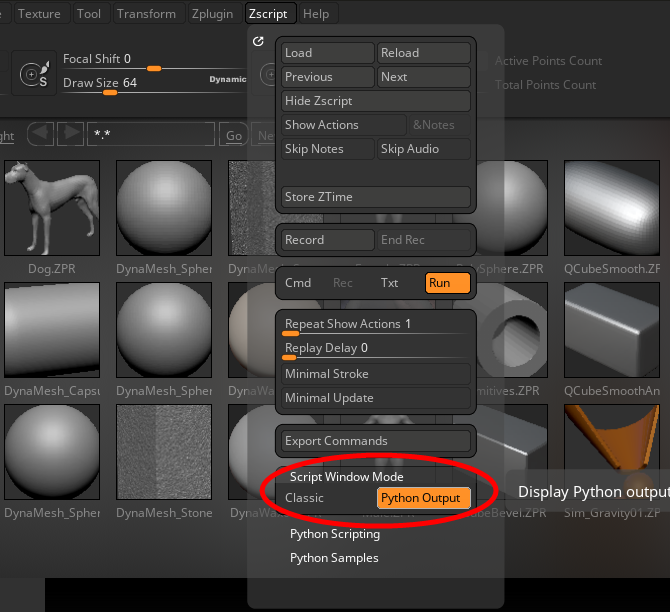
Python Output in the Script Window
You can view the output of your Python scripts (such as print() statements or error messages) in the script window at the bottom of the ZBrush UI.
-
Navigate to the Zscript palette.
-
Expand the Script Window Output section.
-
Enable the Python Output switch.
The Python Sub-Palette
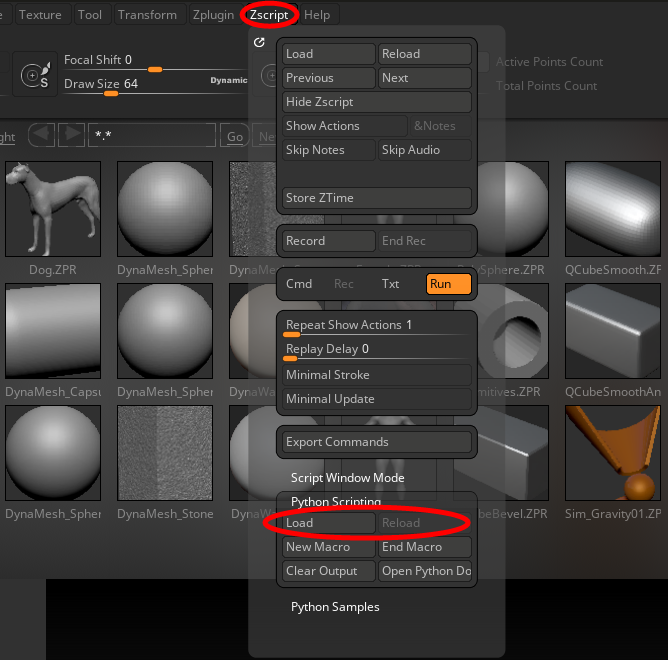
The Zscript > Python sub-palette contains the primary controls for interacting with your scripts:
-
Load Script: Opens a file dialog to load a .py script from disk.
-
Reload Script: Re-runs the last loaded script. This is useful for quickly testing changes you have made in your external editor.
-
New Macro: Starts a new macro recording session, it's equivalent to the one in the Macro palette with the difference that this one will start the recording using commands in the python scripting language (the original one uses ZScript).
-
End Macro: Ends the current macro recording session and saves the recorded commands as a .py file.
-
Clear Output: Clears the python output that is visible when the Script Window Output sub-palette is set to display 'Python Output'.
-
Open Docs: Opens the official ZBrush documentation for Python scripting in the default web browser.
Note: The Python scripting tools are separate from the traditional ZBrush Macro functions. Macros record commands previously available in ZScript while the Python sub-palette is used to execute .py files.
Practical Examples
Example: Batch Exporting SubTools
This script will iterate through all visible SubTools in the active Tool and save each one as a separate OBJ file in a specified directory. This is a common pipeline task that is tedious to do manually and is designed to run without user interaction.
The Script (batch_export_visible_subtools.py):
import os
import sys
import zbrush.commands as zbc

def export_subtools(export_directory=""):
	if not os.path.isdir(export_directory):
		print(f"Invalid export directory specified: {export_directory}")
		return False

	# Get the number of SubTools in the current tool
	subtool_count = zbc.get_subtool_count()
	if subtool_count == 0:
		print("No SubTools found to export.")
		return False

	exported_files = 0

	# Loop through all SubTools
	for i in range(subtool_count):
		# Set the active SubTool
		zbc.select_subtool(i)

		# Check if the SubTool is visible (status flag 0x01 means visible)
		status = zbc.get_subtool_status()
		if status & 0x01:
			# Get the full path of the active tool, which includes the SubTool name
			full_tool_path = zbc.get_active_tool_path()
			subtool_name = full_tool_path.rsplit("/", 1)[-1]

			# Create the final output path for the OBJ file
			output_path = os.path.join(export_directory, f"{subtool_name}.obj")

			# Set this as the next file name for ZBrush's exporter
			zbc.set_next_filename(output_path)

			# Press the "Export" button in the Tool palette
			zbc.press("Tool:Export")
			print(f"Exported SubTool '{subtool_name}' to {output_path}")
			exported_files += 1

	return exported_files

if __name__ == "__main__":
	# Expecting invocation via ZBrush with -script; args to this script follow the script path
	if "-script" not in sys.argv or (sys.argv.index("-script") + 1) >= len(sys.argv):
		print("This script requires the -script flag followed by the args to the script.")
		sys.exit(1)

	script_args = sys.argv[sys.argv.index("-script") + 2:]
	export_directory = script_args[0] if script_args else ""
	ret_code = not export_subtools(export_directory)
	sys.exit(ret_code)
Usage
		$ZBRUSH_BIN -batch -script <path_to_this_script> <path_to_output_dir> <path_to_zbrush_file_to_load>

		For example, on macOS:

		/Applications/Maxon ZBrush 2026/ZBrush.app/Contents/MacOS/ZBrush -batch -script /path/to/batch_export_visible_subtools.py /path/to/output/dir /path/to/input_file.zpr

		...or under Windows:

		C:\Program Files\Maxon ZBrush 2026\ZBrush.exe -batch -script /path/to/batch_export_visible_subtools.py /path/to/output/dir /path/to/input_file.zpr
Return Codes:
0: Success — visible SubTools were exported.1: Error — invalid arguments, missing directory, or no visible SubTools found.