The appearance of an object depends on several things; the surface normals (which determine how the object is shaded), the point from which the object is viewed, the lighting setup (orientation and types of lights) and how the surface reacts to that lighting (for example, how shiny it is).

MatCap tool
The MatCap tool uses calibration markers to capture this information from photographs and other images. Each marker samples a single point on the image, defining the surface normal and capturing the color. Several samples are used to build up a material map that simulates the lighting and material properties from the photograph.
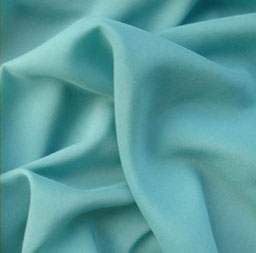
- The material you want to capture should be uniform, i.e. of one color, roughness, etc.
- The picture should show a surface with different angles, to capture all of the possible lighting conditions.
- The surface can be illuminated by multiple lights, of any color.
- Load the image into the Texture palette, select the Flat Color material and press Texture: CropandFill.
Define normal vectors for some points on the surface.
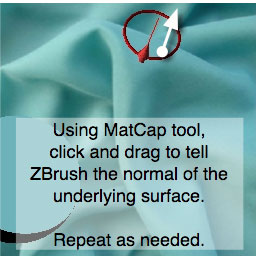
- Make sure the MatCap tool in the Tool menu is selected.
- Select a MatCap material in the Material menu, such as MatCap White.
- Click and drag on the image to define a normal for the point you clicked on. This tells ZBrush what the angle of the photographed object is at that point.
- Do this a few more times, to give ZBrush enough information to work with. Choose parts of the surface at different angles. 4-8 samples is usually enough.
- To adjust a previously marked normal, move the cursor until the square marker appears then click and drag.
MatCap gives you feedback as you go along
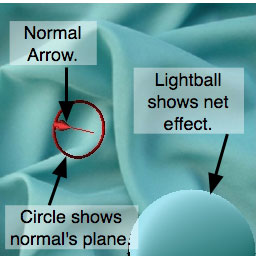
- The red arrow, and circle around it, let you see the surface angle you’re defining as you create a normal.
- The lightball that appears whenever you define a normal shows how the cumulative effect of all of the normals will look on a sphere.
Define specular normals.
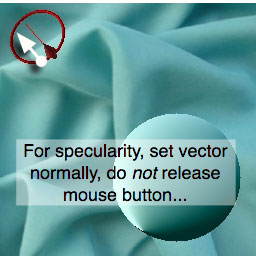
- Normals defined as previously shown apply to the diffuse color of the material (and shouldn’t be sampled at specular highlights).
- To define specular highlights, set a normal on top of a specular reflection on the surface, and then without releasing the mouse button, press and hold the Ctrl key and move the mouse to adjust specularity.
- The direction of the normal will not change, but the distance and direction you move the mouse will determine the appearance of specular highlights.
- Watch the lightball for visual feedback as you adjust the specularity.
Fine-Tuning
- During or after defining all of the surface normals, you can adjust special MatCap tool controls in the Material > MatCap Maker sub-palette, to tweak the appearance of the captured material. Typically you don’t need to do much.
Final result
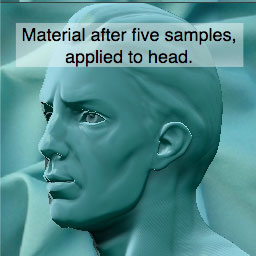
- The final material is very similar to the photo reference. Apply it to a model as with any other material.