Redshift Material Nodes
Here you can find all Redshift material types, such as the Hair material or the Car Paint material, alongside classic all-purpose materials.
These materials can also be accessed directly from the "+" menu in the Material Manager.
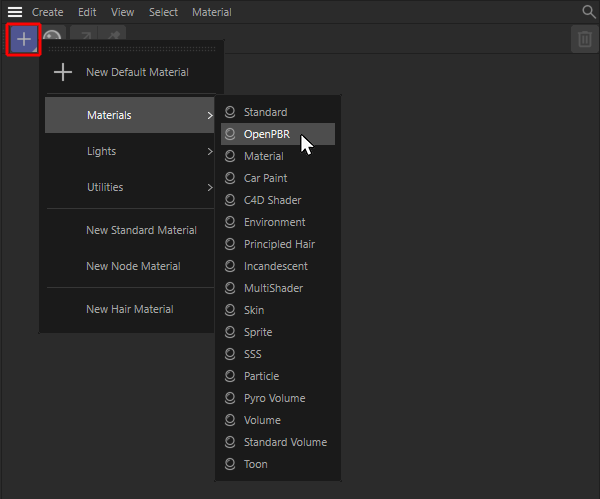 Use the '+' menu in the Material Manager to choose a Redshift material.
The new OpenPBR Material is recommended when creating a general-purpose material that can be customized in every respect.
The legacy Redshift Material and the Redshift Standard Material are thus replaced as the new standard material.
The settings for a node-based material can be edited directly in the Attribute Manager once the material has been selected in the Material Manager by clicking on it once. To add your own nodes to a material, double-click on the material to open its Node Editor.
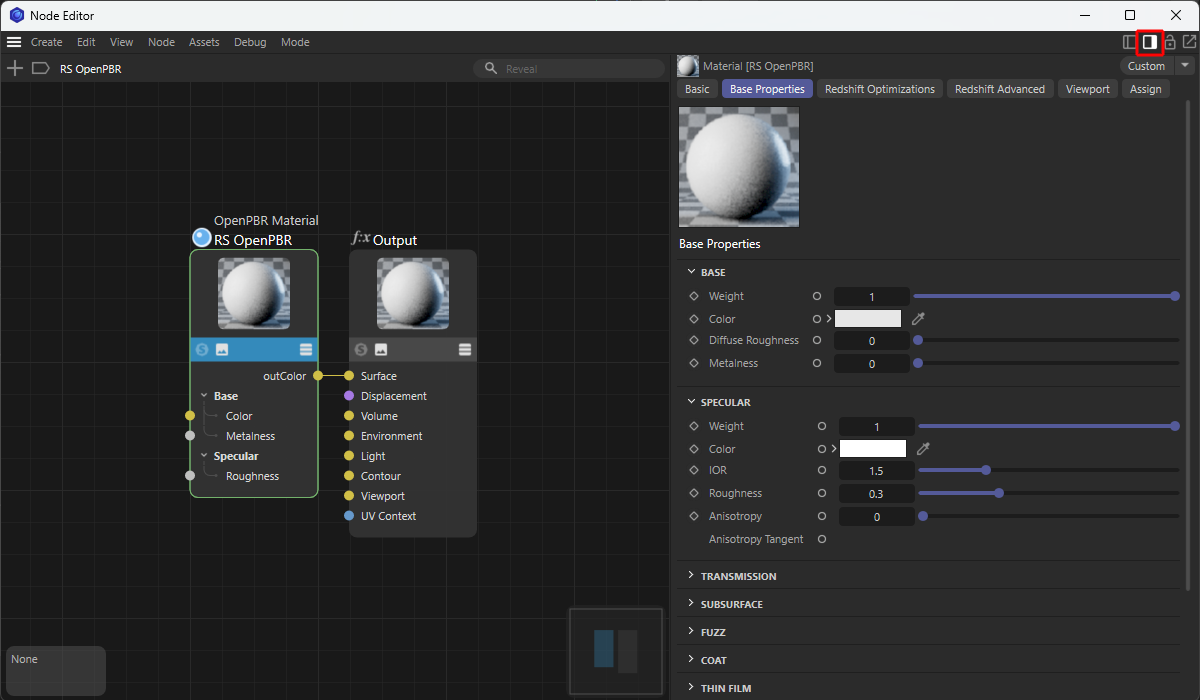 Double-clicking on a material in the Material Manager opens the ‘Node Editor’ for that material. There, you can add additional nodes to the material (left part of the image above) or edit the parameters of a selected node in the Attribute Manager (if it has been displayed by the red icon in the Node Editor). A simple click on the material in the Material Manager makes its settings available in C4D's default Attribute Manager without having to open the Node Editor.