
Scalar User Data
Introduction
Attribute scalar data can be stored per object or per point on a point cloud. This shader node gives you access to that attribute data, facilitating object or point shading variation without requiring different materials.
User Data does not work with volume shading.
Parameters
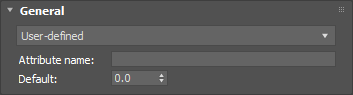
|
Attribute Preset
This dropdown sets the user data with the following preset options:
- User-defined
- Opacity
- Object ID
- Material ID
- Particle ID
- Particle normalized lifetime
- RS Multi-map - node handle hash
- RS Multi-map - node name hash
- RS Multi-map - particle ID hash
- Max Hair - strand opacity
- Max Hair - strand specular
- Max Hair - strand gloss
- Thinking Particles - Multi-Mtl offset
- Thinking Particles - Multi-Mtl num subs
Attribute Name
Only works when "User-defined" is set as the Attribute Preset.
The name of the user attribute assigned to the object or point cloud.
Default
This is the value that will be output by the shader if the attribute is not found on the object or point cloud.