
Generating a base mesh from a sketch
On the Sketch tab, you draw the outline of the model yourself. A text description can add information that the sketch does not show, such as the type of object or the material. Clay Builder turns both into a preview image and then into a 3D model.
Drawing the sketch
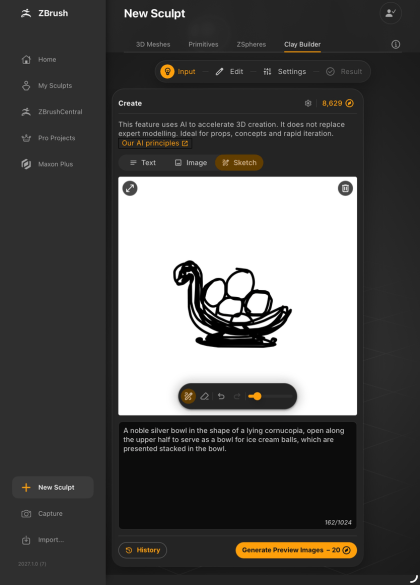
The drawing area has a toolbar at the bottom. From left to right:
- Draw: draws lines.
- Erase: erases parts of the lines.
- Undo and Redo: undo or redo the last strokes.
- Radius: sets the width of the stroke.
The button at the top left enlarges the drawing area, and the trash button at the top right deletes the sketch. Below the drawing area, enter the text description.
You cannot import a drawing on the Sketch tab. To use a sketch from another app, save it as an image and load it on the Image tab. See Generating a base mesh from an image.
Generating the base mesh
- Open Clay Builder and select the Sketch tab in the Create panel.
- Draw the sketch.
- Optionally, describe the object in the text field below.
- Click Generate Preview Images.
- In the Edit step, check the preview image and change it with an instruction if needed, see Step 2: Edit.
- Click Settings, choose the AI Provider and the Polygon Count, and click Generate Model.
- In the Result step, check the model and open or download it, see Step 4: Result.
Example: an ice cream bowl
The sketch shows a bowl shaped like a lying horn with stacked scoops of ice cream. The text adds what the sketch cannot show:
A noble silver bowl in the shape of a lying cornucopia, open along the upper half to serve as a bowl for ice cream balls, which are presented stacked in the bowl.
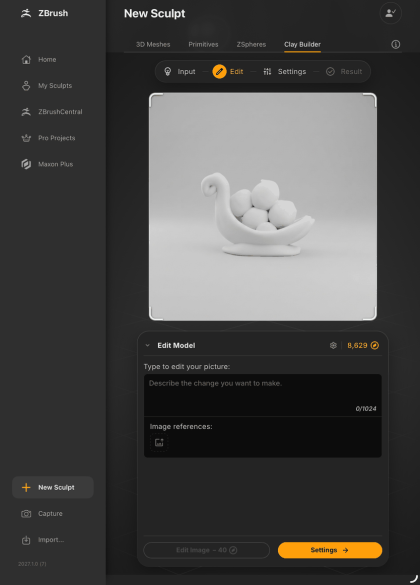
The preview image follows the sketch closely: the shape and the position of the bowl and the scoops come from the drawing, and the text did not change them. In this example, the sketch had priority over the text description.
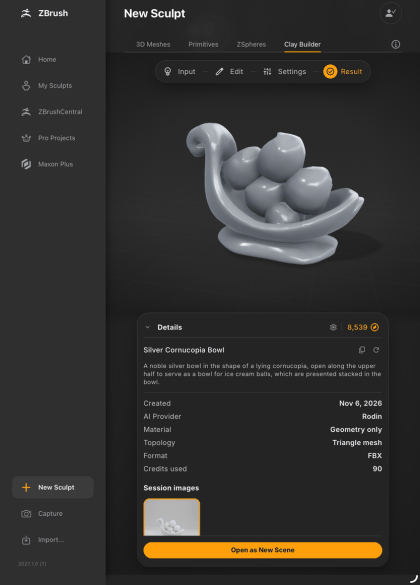
The Result step shows the generated model, here created with Rodin. Open as New Scene loads it into ZBrush for iPad for sculpting.
Draw the main shapes and their arrangement clearly; the sketch decides the form. Use the text description for what a line drawing cannot show, such as the type of object or its material.