
What is Maxon Plus?
Maxon Plus is a package of currently four online services from Maxon for reviewing visual content and for generating 3D models and textures from text prompts, sketches and images. The services are available in the browser and directly inside Cinema 4D and Maxon ZBrush, in addition to your existing Maxon products.
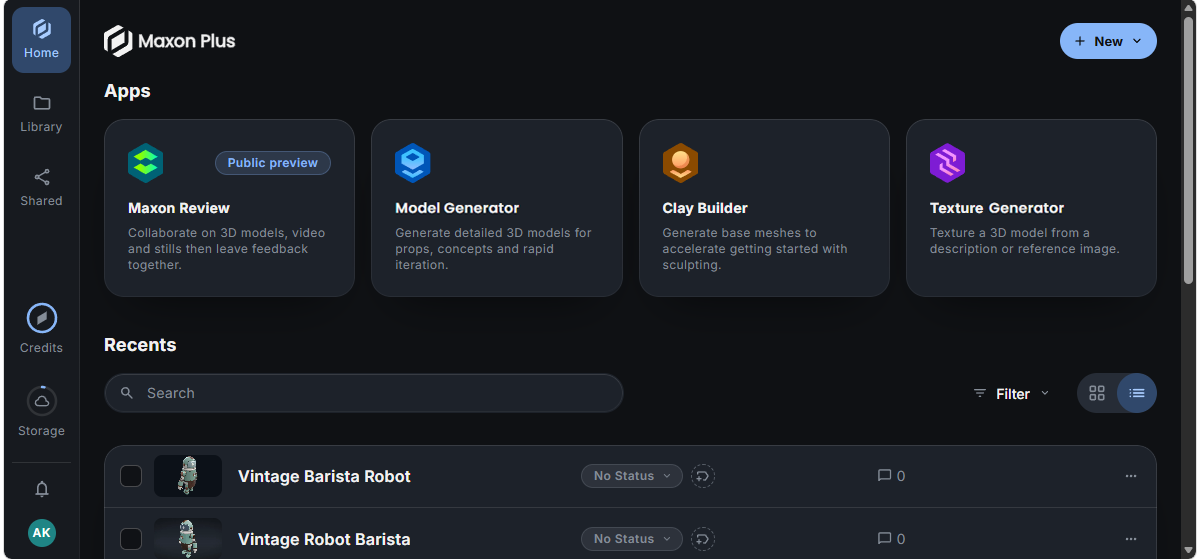
The services
Maxon Review
Upload 3D models, videos or still images and share them with your team or clients. Reviewers mark specific areas and leave comments on them, so feedback is easier to exchange and every iteration can be tracked until the final approval. Maxon Review is currently available as a Public Preview: creating and sharing reviews requires a Maxon Plus subscription but uses no credits, and the people you invite only need a free Maxon account to comment. Learn more about Maxon Review.
Model Generator
Generate detailed 3D models for props, concepts and rapid iteration from a text prompt, a quick sketch or an uploaded image. Optionally, Model Generator can texture the generated model as well. Model Generator requires a Maxon Plus credit subscription and is not included in a Cinema 4D or Maxon One subscription. Learn more about Model Generator.
Clay Builder
Generate base meshes with a neutral clay surface as a starting point for sculpting, for example in Maxon ZBrush. Clay Builder requires a Maxon Plus credit subscription and is not included in a ZBrush or Maxon One subscription. Learn more about Clay Builder.
Texture Generator
Upload a 3D model, with or without UV coordinates, and generate matching textures for it from a text prompt or an image reference. Texture Generator requires a Maxon Plus credit subscription and is not included in a Cinema 4D or Maxon One subscription. Learn more about Texture Generator.
Library
Your uploads and the results of your generations are kept in your Library, where you can organize them in folders and share them for review. Maxon Review and the Library can be used without any active AI features.
AI features and third-party providers
Maxon does not develop or operate its own AI models. The AI features in Maxon Plus connect to external services from third-party providers: your input, such as prompts, images or models, is passed to these services, and the results they generate are returned to you. The provider used for a generation is shown before you confirm the number of credits and in the details of each result.
This applies to Model Generator, Clay Builder and Texture Generator. Maxon Review does not use AI services: it does not generate content and does not change the files you upload.
Types of AI features
AI features in Maxon products fall into three types. They differ in where they run, whether data leaves your computer and whether they use credits.
| Type | What it is | Examples | Runs | Uses credits |
|---|---|---|---|---|
| Cloud AI | Your input is sent through Maxon Plus to an external AI provider, and the result is returned. | Model Generator, Clay Builder, Texture Generator | At the AI provider | Yes |
| Local AI | An AI model that runs on your computer. | Imagesense in the Cinema 4D Asset Browser | On your computer | No |
| Assistant connection | Your own AI assistant operates the application through an MCP server, either in the copy you work in or, with Maxon Agentic, in a separate copy without a user interface. Maxon provides no AI model. | MCP servers of Cinema 4D and Autograph; Cinema 4D Agent and Autograph Agent (Maxon Agentic) | On your computer, plus the AI service you choose | No (the AI service may charge its own fees) |
Maxon Review and your Library are part of Maxon Plus but do not use AI.
For details on how your data is handled, see Data privacy and usage rights.
For quick answers on AI settings, credits and results, see Frequently asked questions.
Where you can use the services
All services can be used in a web browser, starting from the home page (https://plus.maxon.net/). In addition, Model Generator and Texture Generator also feature integrations with Cinema 4D. The Clay Builder service, which specializes in sculpting templates, can also be accessed directly within ZBrush for iPad; on the ZBrush desktop version, you use it in the browser. Cinema 4D and the ZBrush desktop version also provide access to Maxon Review and allow users to manage comments and, for example, access rights directly. The integrations are adapted to each application, so their features differ slightly from the browser version. See Accessing the services for details.
How the services work together
The services are independent of each other, but they are designed to be combined: generate a model, texture it, and collect feedback on the result. The workflow example walks you through a complete project that combines the services.