
Using the services in Cinema 4D
The integration requires Cinema 4D 2027.1 or later. In Cinema 4D, you can use these Maxon Plus services without leaving the application:
- Maxon Review (): create 3D or video reviews of your scene, read and answer comments, and upload new versions. See Creating reviews from Cinema 4D.
- Texture Generator (): texture an object from your scene and apply the result to it. See Using Texture Generator in Cinema 4D.
- Model Generator (): generate models and insert them into your scene. See Using Model Generator in Cinema 4D.
This page describes only what is specific to Cinema 4D. All steps and options of the services are described in their own chapters: Model Generator, Texture Generator and Maxon Review.
Model Generator and Texture Generator are also available as icons in the icon bar directly below the main menu of the Standard layout.
Model Generator, Clay Builder and Texture Generator are a separate purchase and require a Maxon Plus credit subscription. They are not included in a Cinema 4D, ZBrush or Maxon One subscription. See Account, licensing and credits.
With Save to cloud turned on in the panel settings, the models and textures you generate in Cinema 4D are saved in your Library, results of Model Generator in the Models folder and results of Texture Generator (the textured model with its textures) in the Textures folder inside Model Generator. Inside Cinema 4D, you access your previous generations with the History button of the service panel, which lists the generations you created in Cinema 4D; to browse and organize the whole Library, open Maxon Plus in your web browser.
Credits and AI settings in the Preferences
In the Cinema 4D Preferences, the Maxon Credits category shows the same information as the Credits page in the browser: your remaining credits with Manage Subscriptions and Upgrade Plan, the Usage history with Show All, and under Settings, Open Settings for the AI and Maxon Plus preferences. There you turn the Global AI and Maxon Plus switches on or off, see AI and Maxon Plus settings.
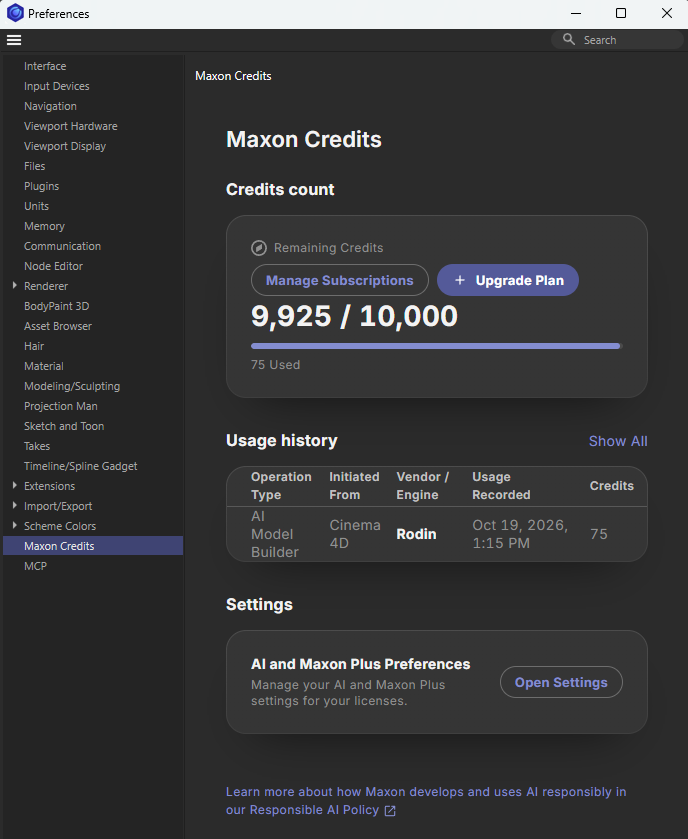
Open Settings, Manage Subscriptions and Show All load their pages from the internet and show them directly in the Preferences dialog. Upgrade Plan opens the Maxon Store in your web browser, and the links to the Responsible AI Policy and other information also open in your web browser.