Texturing generated models
Model Generator textures the model automatically, based on the colors and materials of your image. With Material set to PBR, the model gets physically based materials with textures for diffuse color, metalness, reflection roughness and a normal map; set it to None to build the geometry only. The resolution of the textures is set with Texture Resolution (Tripo) or Texture Detail (Rodin).
To change the look of a model later without generating new geometry, use Texture Generator with the downloaded model. For untextured models with a clay surface, use Clay Builder.
Materials in Cinema 4D
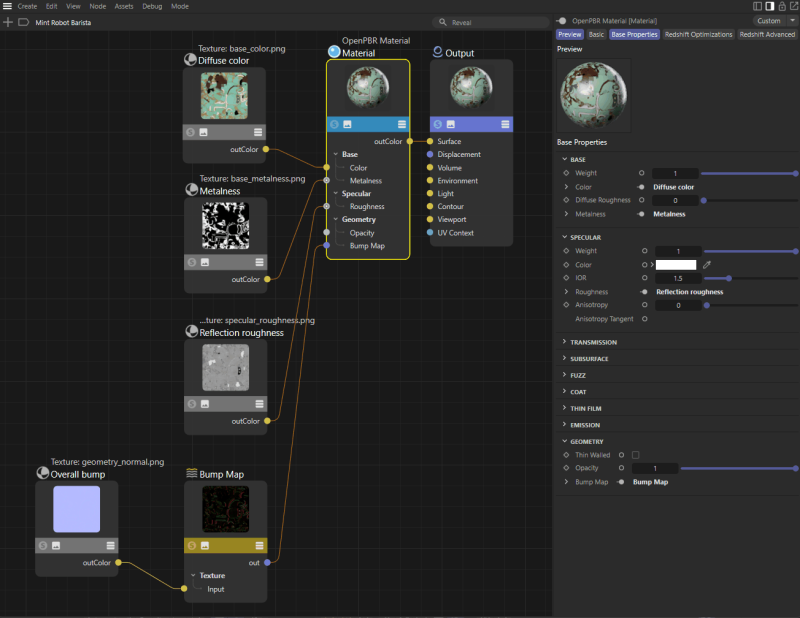
When you bring a model with PBR materials into Cinema 4D with Open as New Scene or Insert in Current Scene, Model Generator creates a Redshift OpenPBR Material. The textures are PNG files and are connected as follows:
| Texture file | Texture node | Connected to |
|---|---|---|
| base_color.png | Diffuse color | Base > Color |
| base_metalness.png | Metalness | Base > Metalness |
| specular_roughness.png | Reflection roughness | Specular > Roughness |
| geometry_normal.png | Overall bump | Geometry > Bump Map, through a Bump Map node |
You can edit the material like any other Redshift material, for example to adjust the roughness or to replace a texture. See Using Model Generator in Cinema 4D. Texture Generator also creates an OpenPBR Material, with the base color and normal textures as JPG files, see Texture maps reference.