
Generating a model from a text prompt
On the Text tab of Model Generator, describe the object you want. Model Generator turns the description into four design images, you pick one, refine it if needed, and the AI provider builds a textured 3D model from it. Describe one object, its shapes, its materials and its pose, and ask for a plain background.
Generating the model
- Open Model Generator and select the Text tab.
- Describe the model in up to 1,024 characters. Optionally, click a style button such as Illustrative or one of the suggested terms, see Style buttons and suggestions.
- Click Generate Preview Images and confirm the number of credits.
- Click the design you like best, then click Continue. To try again, change the prompt or click suggestion buttons, and click Generate New Preview Images.
- Optionally, refine the image in the Edit step.
- Click Settings, choose the provider and quality, and click Generate Model.
- Check the model in the Result step and click Download Model.
Example: a robot barista
This prompt describes a stylized character that is meant to be rigged later, so it asks for an A-pose, open hands and solid shapes without thin parts:
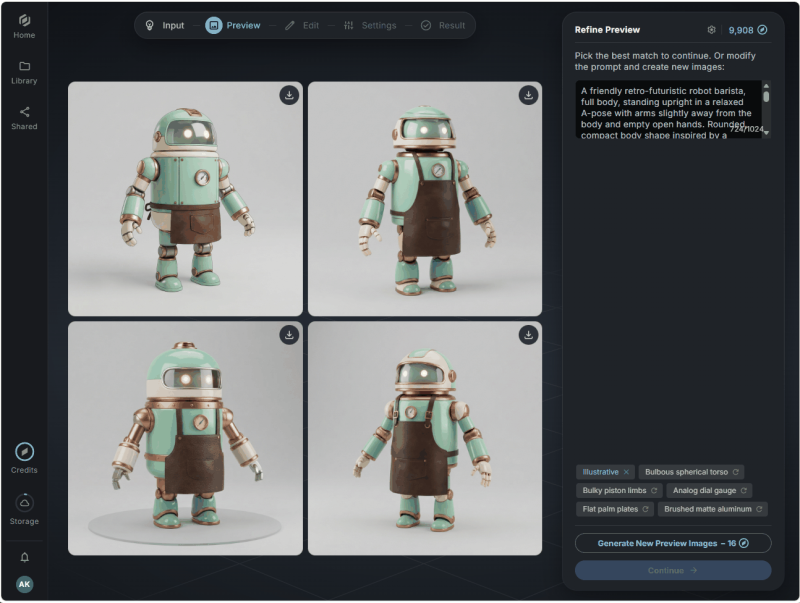
A friendly retro-futuristic robot barista, full body, standing upright in a relaxed A-pose with arms slightly away from the body and empty open hands. Rounded, compact body shape inspired by a vintage espresso machine: a domed head with a glass visor and two soft glowing eyes, a cylindrical torso with a small pressure gauge on the chest, sturdy jointed arms and short legs. Materials: glossy mint green enamel panels, cream-colored ceramic details, brushed copper joints and trims, a dark brown leather barista apron with a small front pocket. Clean, solid shapes, no loose cables, no thin antennas. Three-quarter front view, entire figure visible, centered, even studio lighting, plain light gray background.
With the style Illustrative, the four designs differ mainly in the apron and the proportions. The design at the top left was chosen: its short apron leaves the legs clearly separated, which matters for rigging, while a long apron would likely be merged with the legs into one block.
For the resulting models with Tripo and Rodin, see Choosing an AI provider.
Think about what happens after generation. For a character you want to animate, ask for a neutral pose with arms away from the body and separated legs; for a prop, ask for the object alone, without a base or stand. See Tips for prompts, sketches and input images.