Render Options
Disabling specific rendering steps
There are several render options available at the bottom left of the Viewer:
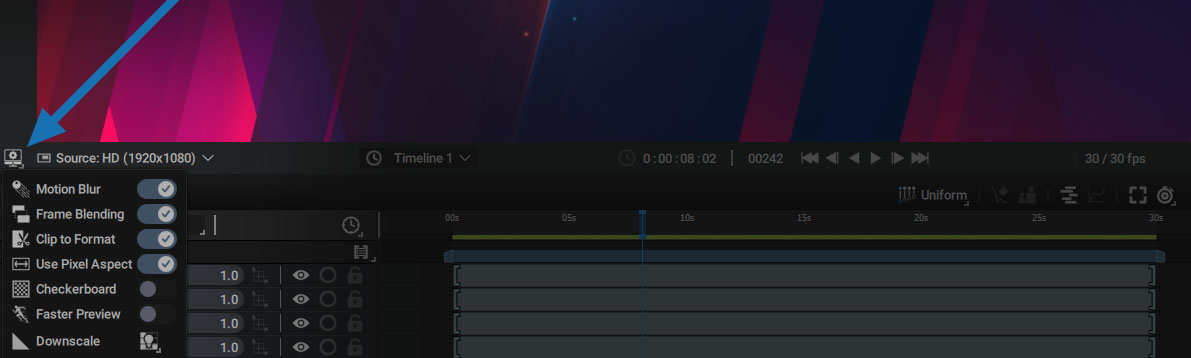
The first two options disable specific rendering steps:
- When animating a layer, it is possible to add a Motion Blur to make the animation visually smoother.
- When retiming a video or an image sequence, new frames can be created via one of the Retime Filter options.
These two operations may require more or less computation time, depending on the precision required and the number of layers using them.
The two first options allow you to temporarily disable Motion Blur and the Retime Filter for all layers in the current composition, in order to make Autograph more reactive when setting up an animation.
Clipping, Checkerboard, and Downscale
- Clip to Format: disable this option to render the Viewer image outside the format limits
- Use Pixel Aspect: disabling this option will not take into account the composition's pixel aspect ratio
- Checkerboard: displays the composition's transparent pixels as a checkerboard, with customizable square sizes and colors in Preferences > Appearance
- Faster Preview: disables Motion Blur and Frame Blending; also reduces resolution when scrubbing in the Timeline or moving a layer
- Downscale: a list of several presets that compute fewer pixels than the composition definition.
- Render the image one pixel by two, or four or eight, etc.
- Auto mode uses the zoom factor to automatically select one of the presets.
- Below 50%, preset 1:2 is selected
- Below 25%, preset 1:4 is selected
- Below 12.5%, preset 1:8 is selected
- Etc.
- Setting 1:1 forces the Viewer to render every pixel in the image, even if the zoom ratio is well below 100%.
Note:
Some Generators and Modifiers need to be rendered at full resolution to be displayed properly. This is where 1:1 mode can help.