
Ramp
Introduction
This shader node maps an input coordinate between to a color gradient. If you need to output just a float value, have a look at the Scalar Ramp instead.
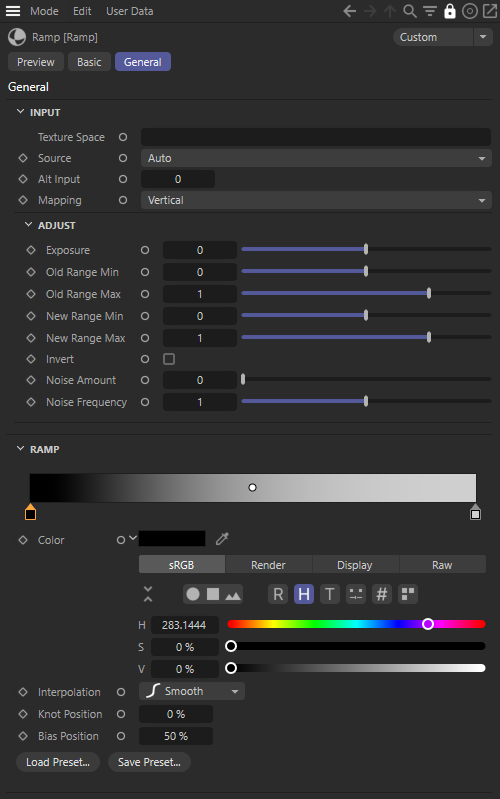
|
Parameters
Input
Texture Space
This is the name of the UV coordinate map on the surface that will index the color ramp, when the Source option is set to 'UV Map'.
Source
This option determines the source of the coordinate that will index the color ramp.
- UV Map - the coordinate is defined by a uv coordinate map on the object
- Alt - the coordinate is defined by the Alt Input value
- Auto - the default setting. If the inputs for Alt Input and Texture Space are both not configured, the standard UV map will be used instead. If one othe the inputs is configured, it will be used automatically as source.
Alt Input
The scalar coordinate value that will index the color ramp when Source is set to 'Alt'.
Mapping
This option remaps a uv coordinate input to a scalar coordinate in preparation for indexing the color ramp, when Source is 'UV Map'.
- Horizontal - the u component of the uv coordinate is used
- Vertical - the v component of the uv coordinate is used
- Diagonal - the average of the u and v components is used
- Radial - the angle between the u and v components is used, mapped to 0-1
- Circular - the hypotenuse of the u and v components is used
UV Context
Connect a UV Context Projection node here to enable a local connection for simplified texture mapping. For more information, please see the UV Context Projection page.
Adjust
Exposure
Increases or decreases how a ramp is mapped in a similar fashion to increasing or decreasing light exposure. This is a helpful parameter to adjust when setting up tone mapping with a Toon material.
Old Range Min and Max
Controls the input range of the ramp.
New Range Min and Max
Controls the output range of the ramp.
Invert
Enabling this option inverts the computed coordinate that will be used to index the color ramp.
Noise Amount
This scales the amount of noise that will be applied to the ramp coordinate to add variation to the texture. A value of 0.0 means no noise is applied, with higher values meaning stronger noise.
Noise Frequency
This scales the noise effect applied to the ramp coordinate, with higher values resulting in higher frequency noise.
Ramp
Ramp
This is the color ramp itself. Here knots can be added, removed, and repositioned at different points along the ramp and each knot can represent a different color.
Interpolation Type
Controls the interpolation type for ramp colors.
Knot Position
Controls where the knot is located in the ramp.
Bias Position
Controls where the transition occurs between knots.