
Magic Bullet Colorista V
Color Handling
Colorista contains parameters that adjust how the program preemptively treats your footage before you begin your color-correction process.
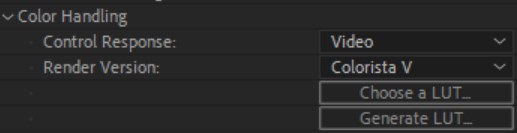
Control Response
This option determines whether Colorista treats your footage as flat (Video) or logarithmic (Log) footage. If you're not sure which one to choose, pick Video.
Render Version
Colorista V is backwards compatible with Colorista IV, but because some modifications were made to how colors are adjusted between the two versions, your Colorista effect might not look the same when brought forward from the previous version. Use this drop-down menu to select Colorista IV if needed. Otherwise, just leave it as its default.
LUTs [Lookup Tables]
Colorista now has the option to load an existing LUT or generate one from existing settings. Either way, the LUT can subsequently be passed to other machines or colorists looking to utilize your coloring data.
-
Generated LUTs are saved in a file and folder name of your choosing, located in your user library's
\Red Giant\Magic Bullet\LUTs\folder. -
Note that LUTs cannot include Vignettes, Highlight Regions, Shadow Regions, or Clarity settings. A preview will show you the effect without those adjustments.

- Output LUT shows the filename (if any) of the LUT currently loaded. Use the X button to remove the LUT from Colorista.
- LUT Strength determines the opacity of the loaded LUT over your Colorista effect.