
Tao
Overview of Tao Interface
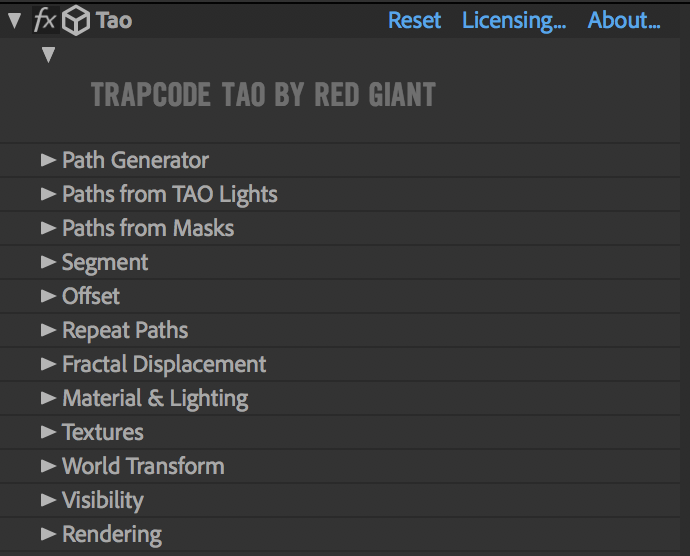
Parameter groups in the Effects list.
The following is an overview of Tao's main control groups:
- The Path Generator group defines the path.
- The Paths from TAO Lights group allows you to define the path using the motion path from animated After Effects lights in the same composition.
- The Paths From Masks group allow you to use After Effects masks as paths for Tao geometry. The AE masks must be applied to the same layer to which Tao is applied. These masks can be open or closed paths.
- The Segment group defines the type, size, shape, and position of geometry that comprises the path.
- The Offset group offsets certain properties along a path. It is typically used with Offset Size when Taper Size is enabled (in the Path Generator or Paths from Masks group) to make it appear as if the geometry is moving along the path.
- The Repeat Paths group makes repetitions of paths. Its properties allow you to differentiate the repetitions from the original path. They can be offset, rotated, and colorized in various ways. There are two repeaters with identical controls. The First Repeater repeats the paths, and the Second Repeater repeats the output of the First Repeater.
- The Fractal Displacement group controls the fractal noise pattern used to displace a path. The fractal noise defines how the mesh will be distorted in 3D space.
- The Material & Lighting group adjusts the geometry's color and appearance as well as how surfaces react to light.
- The Textures group lets you select a color texture and specify how to map it over the mesh.
- The World Transform group allows you to move and rotate all paths and accompanying geometry in world space. It does not affect lights used for lightning or environment maps. It does, however, affect all paths, including the paths made with TAO Lights and the repeated paths made in the Repeat Paths group.
- The Visibility group controls how close or far the Tao Path is from the camera before it is cropped. There are also fog controls to add atmosphere and depth.
- The Rendering group allows you to put the finishing touches on your work and gives you options for creating a variety of different looks with your geometry.