
Particular
Emitter > Text/Mask Subgroup
This parameter group controls how you emit particles from Text/Mask layers when Text/Mask is the selected Emitter Type.
Layer
Select a comp layer that will serve as your text or mask to emit particles.
- Note: Make sure Source is set to Effects & Masks. Since the Source menu isn't available in the Designer (due to plug-in integration limitations), if ever you find the Designer fails to match the output in After Effects, this is likely why.
Use Primary Layer: On additional emitters, this toggle determines whether the Text/Mask layer referenced is the same as that of the Primary System.
Match Text/Mask Size
This control toggles whether Particular uses the size of the Text/Mask to which it's mapped rather than the Emitter Size X and Y parameters within the effect. Emitter Size Z can still expand the particle emitter through z-space, giving it a 3D effect.
Emit From
This control defines where, from the layer referenced, particles emit from:
-
Edges:
Particles emit from the outer edges of the text/mask layer referenced.
- Sampling from edges is based on particle size. Larger particle sizes equal a larger edge sampling.
- Faces: Particles emit from the entire face of the of the text/mask layer referenced.
Layer Sampling
This control defines how the referenced layer will affect the emitted particles.
- Particle Birth Time: Each particle, when birthed, samples its source from the text/mask emitter and retains that image throughout its lifespan.
- Current Frame: Each particle sample is sourced from the referenced text/mask layer. The sample updates itself along with any changes to the text/mask reference.
Layer RGB Usage
This control defines how to use sampled from the layer used as the Text/Mask Emitter.
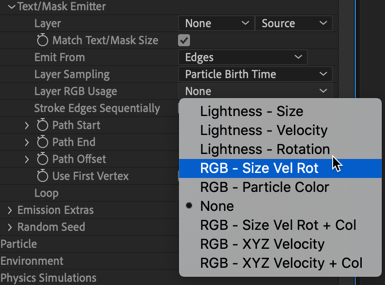
- Lightness - Size: Particle size is affected by the lightness of the Text/Mask Emitter.
- Lightness - Velocity: Particle velocity is affected by the lightness of the Text/Mask Emitter. If lightness is less than 50%, the particle will emit backward. If lightness is exactly 50%, velocity will be 0. Above 50%, particles will emit forward.
- Lightness - Rotation: The particle rotation is affected by the lightness of the Text/Mask Emitter.
- RGB - Size Vel Rot: Particles get their size, velocity, and rotation from the red, green, and blue color channels of the Text/Mask Emitter.
- RGB - Particle Color: Particles get their color from the red, green, and blue color channels of the Text/Mask Emitter.
- None: No values are used.
- RGB - Size Vel Rot + Col: Particle size, velocity, rotation, and color are affected by the red, green, and blue color channels of the Text/Mask Emitter.
- RGB - XYZ Velocity: Particles get their velocity from the red, green, and blue color channels of the Text/Mask Emitter.
- RGB - XYZ Velocity + Col: Particles get their velocity and color from the red, green, and blue color channels of the Text/Mask Emitter.
Options for Emit From Edges
The next section will only activate when Edges is selected from the Emit From parameter (above).
Stroke Edges Sequentially: This control toggles whether the Path Start and Path End controls (below) affect all referenced paths/letters at the same time or in sequence, starting with the first path/letter through the last.
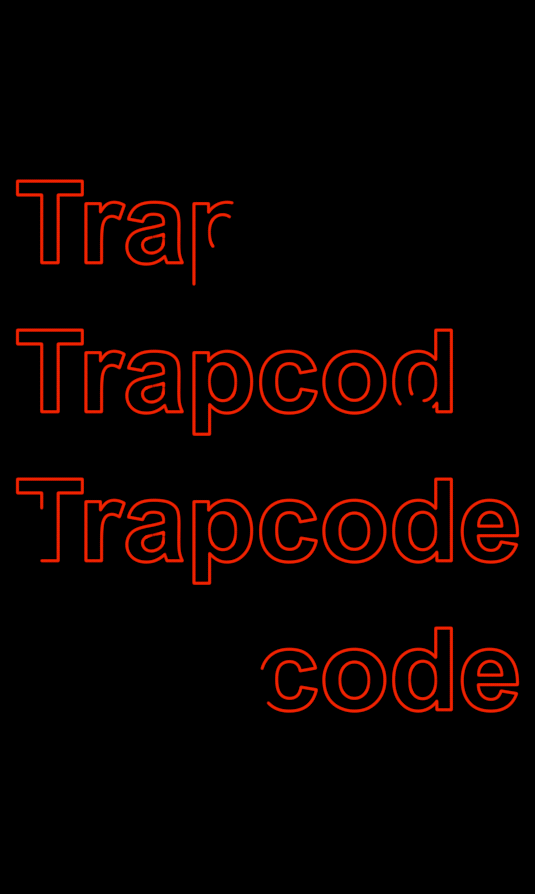
Stroke Edges Sequentially enabled. |
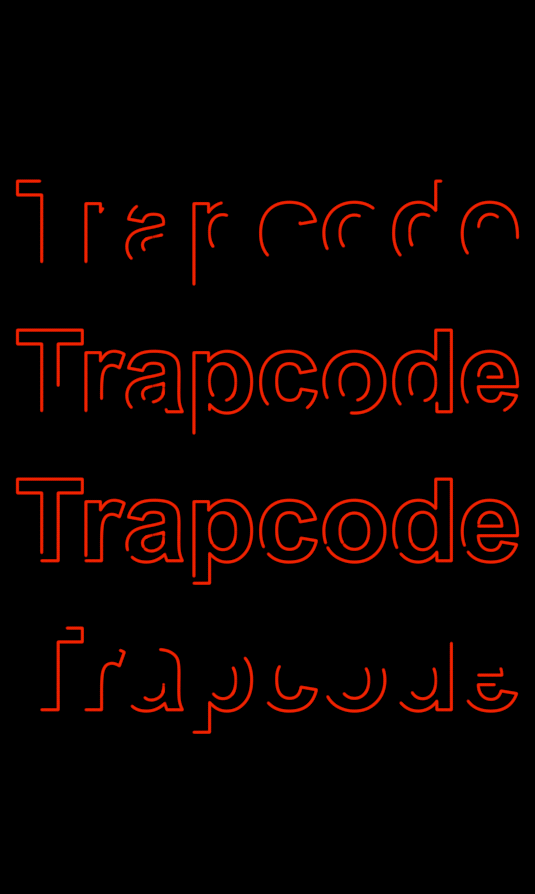 Stroke Edges Sequentially disabled. |
Path Start, Path End: This control adjusts where along the edges of the text/mask the emitter's position begins and ends. Paths start automatically from the lower-left region.
Path Offset: This control moves the emitter position along the text/mask between the start (lower values) and end (higher values) points.
Use First Vertex : This control sets exactly where along the mask you want the start point to be by assigning that as the first vertex.
Loop dropdown: This control defines whether path animations made in the path Star, Path End, and Path Offset parameters occur Once or on a Loop.