
Particular
Displace > Turbulence Field Subgroup
The Displace group offers two kinds of displacement models to push along particles. One is Turbulence Field, based on a 3D displacement of a Perlin noise fractal. Turbulence adds motion, so particles close to each other get a similar, but not equal, random motion.
This behavior helps tremendously when creating fire and smoke effects, allowing particle motion to look natural. Turbulence computes quickly and can be freely scrubbed back and forth in the timeline. Note that Air Turbulence is available in the Environment section and may be more suitable for certain animations. However, those turbulence properties are not compatible with Fluid Physics simulations or the Classic Form behavior. The Displace Turbulence Field is compatible.
If you want to know about the inner workings of Turbulence Field, go to the end of this page to read about Perlin fractal noise.
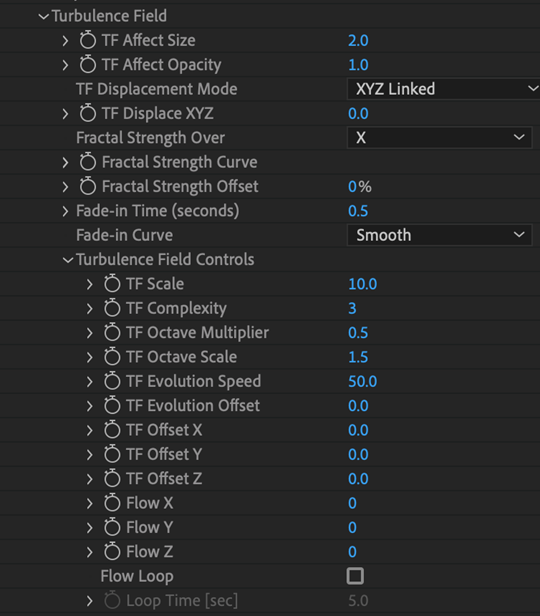
TF Affect Size
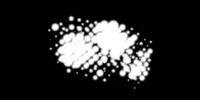
TF Affect Size enables using the fractal for particle size distortion. Setting up this parameter means the fractal field will be sampled at each particle's location, and the size of that particle will be affected by the field's value. This can be useful for creating cloud-like particle clusters.

|
|
|
Affect Size Off
|
Affect Size On |
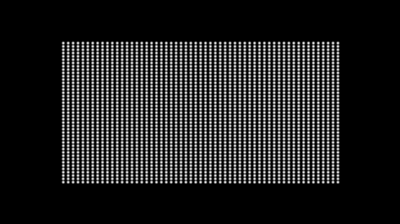
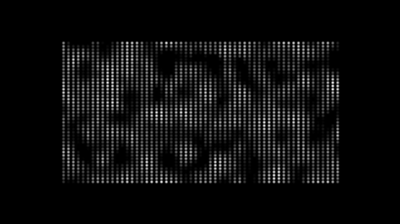
TF Affect Opacity
TF Affect Size enables using the fractal for particle size distortion. Setting up this parameter means the fractal field will be sampled at each particle's location, and the size of that particle will be affected by the value of the field. This can be useful for creating cloud-like particle clusters.
|
|
|
Affect Opacity Off |
Affect Opacity On |
TF Displacement Mode
This control allows you to adjust displacement uniformly or individually along the x, y, and/or z axes or radially.
Fractal Strength Over Pop-Up
This control sets the axis for the Fractal Strength Curve. This determines how displacement affects the form. Note: This is only available with Form behaviors. See the Using Curves page for more information.
Fractal Strength Curve
This control allows you to control the strength of particle displacement across the form. This is available when Fractal Strength Over is set to anything but Off. See the Using Curves page for more information.
Fractal Strength Curve Offset
This control universally adjusts all values of the Fractal Strength Curve and allows you to animate curve values. This is available when Fractal Strength Over is set to anything but Off. See the Using Curves page for more info about curves.
Fade-in Time (seconds)
Fade-in Time sets the amount of time in seconds before particles are fully affected by the Turbulence Field. High values mean Turbulence takes a while to affect particles, which makes the animation fade in gradually over time.
Fade-in Curve
This is a fade-in curve control for Turbulence Field. Smooth is on by default and fades in the field more subtly. Linear gives a linear interpolation to the curve, which sometimes produces a jerk in the animation.
Turbulence Field Controls
This group gives you control over the underlying fractal driving Turbulence Field offsets.
- TF Scale sets the overall scale of the fractal.
- TF Complexity sets the number of Perlin noise fields added together to form the fractal.
- TF Octave Multiplier sets the influence of each added noise field as compared to the previous field.
- TF Octave Scale sets the scale of each added noise field compared to the previous one.
- TF Evolution Speed sets how fast the Turbulence Field evolves over time.
- TF Evolution Offset offsets the Turbulence Field in time. Evolution Offset gives more control over how the Turbulence Field can be moved.
- TF Offset X, Y, Z controls offset the entire Turbulence Field in each axis. They also give more control over how the Turbulence Field can be moved.
- Flow X, Flow Y, Flow Z controls the speed of motion in each direction as the fractal field moves through the particle grid.
- Flow Loop will loop the fractal field after a specified time when this checkbox is turned on. That time is specified in Loop Time. This is turned off by default, creating a seamless loop that repeats endlessly. When this checkbox is turned on, Particular will perform some internal tests and report if a seamless loop is not possible with the current settings. If the loop isn't possible, try increasing the Loop Time and/or the Flow X,Y or Z values.
- Loop Time [sec] defines the time in seconds before the fractal loop repeats. This is turned on when the Flow Loop checkbox is enabled. For example, if Loop Time is set to 4 seconds, then the first frame and frame 4:00 will have identical fractal fields. In turn, this means that frame 5:00 is NOT part of the loop. So, if you are using this as a looping background, be sure to remove the last frame of the loop. The playback will then seamlessly loop over the specified time interval.
TF Move with Wind
TF Move with Wind (measured as a percentage of the Wind value) gives the ability to move the Turbulence Field with the Wind X, Y, Z controls in Environment. At 100%, the Turbulence Field follows the Wind exactly. At 50%, it still follows the Wind's direction but only across 50% of the distance.
This control gives a very realistic look to fire and smoke effects. It is useful for getting a natural look in making wind, since the Turbulence Field moves with the wind, as it would in real life.
TF Move with Drift
TF Move with Drift (measured as a percentage of the Drift value) gives the ability to move the Turbulence Field with the Drift X, Y, Z controls in Fast Physics. At 100%, the Turbulence Field follows the Drift exactly. At 50%, it still follows the Drift's direction, but only across 50% of the distance.
How it works: Perlin Noise Fractal Theory
To fully comprehend Turbulence functionality, some Perlin noise fractal theory helps. Perlin noise was invented by Ken Perlin. (Kudos to Mr. Perlin. This is amazing stuff!) Perlin noise is a quick way to produce a pseudo-random field of any dimensionality (1D, 2D, 3D, etc).
The field is "smooth" and can look something like this (2D):

If the same field is scaled down or "zoomed out," it looks something like this:
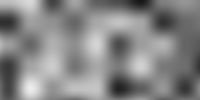
Now, if a couple of these fields with different scales are added together, they form what is called a Perlin noise fractal:
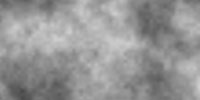
The number of fields added together is called Complexity . For example, if three fields are added together, complexity equals 3. The difference in scale for each field is called Octave Scale, and the difference in influence for each field is called Octave Multiplier. The images above were created using Adobe After Effects' built-in Perlin noise fractal generator (Effect > Noise > Fractal Noise).
Now, the really interesting part of Perlin Noise is that these fractals can evolve over time. The images above actually show a cross-section of a 3D Perlin noise fractal. The cross-section can slide through 3D space and thus create a smoothly evolving 2D pattern. This parameter is called Evolution. In Trapcode Particular, a 3D displacement field is needed. This requires the Perlin Noise fractal to be 4D so it can smoothly evolve by sliding the 3D cross-section in time.
And now you've been initiated into fractal noise theory!