
Symbol Mapper: Symbol Settings Group
The Symbol Settings group governs which characters Symbol Mapper displays and how they refresh over time.
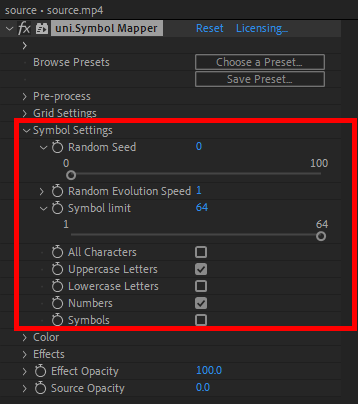
Random Seed provides an initial value from which Symbol Mapper derives part of its process for character selection. The Random Seed slider spans from 0 to 100, but the manual input range is essentially unlimited.
Random Evolution Speed dictates how many times per second the random seed changes. This can serve to help automate changing randomness. A value of 0 means that the characters do not change over time. A value of 1 will change the characters once per second, and a value of 30 (the maximum possible) for 30 fps video means that every frame will have a different set of characters.
The Symbol Limit control bounds how many different characters will appear in your Symbol Mapper grid. A value of 1 will generate your entire image with a single character throughout your grid, such as all ampersands (as shown below) or lowercase j’s. The maximum value is 64.
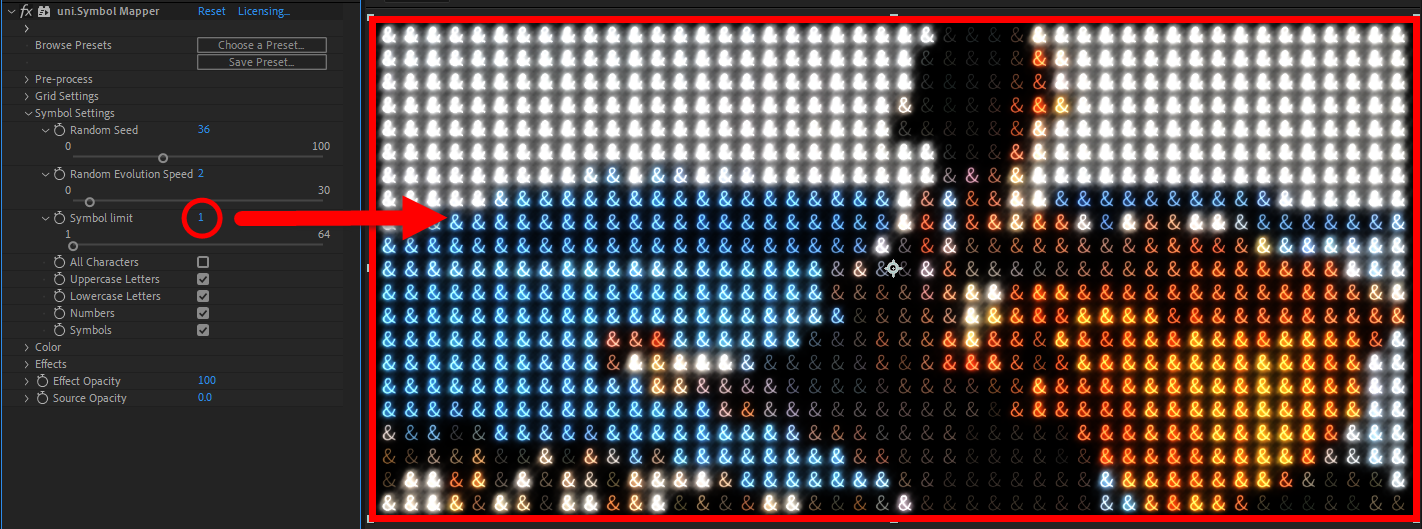
The Symbol Limit establishes a percentage of brightness from 0% to 100% then divides by the number of the Symbol Limit. So, if you choose 4, it will divide by 4, and every character will have 25% of the comp’s “real estate.” Values from 0 to 25 will be the first character, which will be dark. Values from 25 to 50 will be the second character, which will be less dark, and so on.
When the All Characters checkbox is enabled, the functionality is the same as having the box deselected but still having the Uppercase Letters, Lowercase Letters, Numbers, and Symbols boxes all checked. Otherwise, you’re free to select or omit character types as you please. The math-inclined may only want Symbol Mapper to show numbers. Those trying to shout their creative concept may want all-caps letters. We don’t judge.