
Lens Distortion Matcher
SIMPLIFY LENS-DISTORTED FOOTAGE MATCHING
Getting Started
- Drag the Lens Distortion Matcher effect onto your clip.
Modify the Effect
-
Lens Type
determines whether the tool applies its distortion for a
Standard Lens
or
Fisheye Lens.
- Tip: Standard Lens covers everything other than Fisheye. If you’re not sure which lens was used for the shot, the tool may suggest one as you start to identify straight lines.
-
Identify Straight Lines
-
Line Tools
provides two tools to trace over your footage's straight lines.

Line Drawing Tool is used to trace over lines that the effect will straighten. Double-click to end a line currently being drawn. Hold Shift to delete a point on a line. If the center of the lens isn’t in the center of the frame, draw multiple lines to help solve for the Optical Center. Sometimes drawing two or more lines will be necessary to help solve your shot’s lens distortion.

Point Selection can grab and refine points on any line drawn from the Line Drawing Tool above. Lines can also be selected and removed with the Delete/Backspace key.
- Overlay Color defines the color of the traced line and its points.
- Show Overlay toggles the traced line and its points over the frame.
-
Line Tools
provides two tools to trace over your footage's straight lines.
-
Undistortion
- Solve For sets whether the effect aims only to straighten traced lines (Distortion) or straighten out traced lines and center the shot in the frame (Distortion & Optical Center).
- Resize Layer toggles whether the undistorted composition will change size to match the new undistorted layer output from the shot. If unchecked, the undistorted layer will be cropped on the edges to fit the current composition size.
-
Maximum Layer Width
defines the maximum area (in pixels) the entirety of the undistorted output can occupy.
- Tip: Establishing maximum layer width helps create an output without hitting the memory limits of your machine or After Effects. If you find your machine struggling after creating the undistorted output, consider lowering this setting.
-
Undistort
offers two options for the final output of the effect:
- Remove Distortion undistorts the clip in the current composition.
-
Create Undistortion Precomp
creates the steps necessary for the workflow of compositing with distorted shots.

-
Two precomps will be created in your project:
- (Layer Name) Undistorted - the undistorted version of your layer.
- (Layer Name) Undistorted Work - the comp for working on your undistorted shot. This will include your undistorted footage as a guide layer.
-
Your original composition will bring in your Undistorted Work precomp and reverse the distortion. Any work added to the plate will now match the original distortion, while the original plate remains in your composition untouched.
- Note: If you make adjustments on the Lens Distortion Matcher effect within the Undistort precomp, you will also need to update the values of the Lens Distortion Matcher effect on the Undistorted Work precomp, as the two are direct inversions of one another.
-
Two precomps will be created in your project:
-
Distortion Values
are parameters that are automatically set by the effect, but they can be adjusted here for preference.
-
Barrel/Pincushion
(Standard Lens Only)
adjusts for barrel distortion (positive values) or pincushion distortion (negative values)
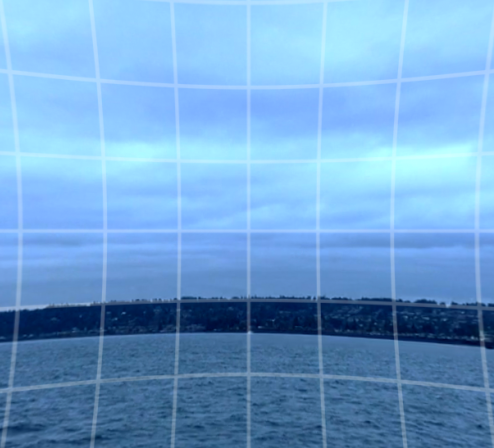
Pincushion distortion squeezes the frame inward from the sides.
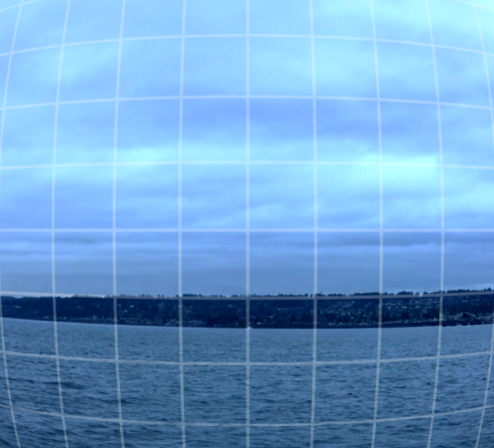
Barrel distortion bulges the frame outward from the center. - Edge (Standard Lens Only) sets the position of the edges of the frame inward (negative values) or outward (positive values). This bounds the area between the center and edges in which distortion will occur.
- Fringe (Standard Lens Only) sets the position of the frame edge inward (negative values) or outward (positive values) while minimizing the effect on areas closer to the center.
- Distortion (Fisheye Lens Only) increases or decreases the applied distortion/undistortion effect. A value of 0 reverts the distortion to the original clip.
- Optical Center provides coordinates for where the center of the lens is estimated to be. Values default to the composition's center.
- Invert toggles whether the output of the effect is distorted inward or outward from the parameters defined above.
-
Barrel/Pincushion
(Standard Lens Only)
adjusts for barrel distortion (positive values) or pincushion distortion (negative values)