
Universe
Plugin Overview
Getting Started
Most Universe plugin features operate across seven of today's top editing host applications:
 Adobe Premiere Pro
 Adobe After Effects
 Apple Final Cut Pro
 Motion
 VEGAS Pro
 DaVinci Resolve
 Avid Media Composer
In most cases, applying a Universe tool only needs you to drag the specific effect (named uni.[effect], see image below) onto your clip. However, there may be occasional exceptions in host app compatibility and the steps needed to apply an effect. In these rare cases, we will call out the exceptions on the specific tool's page.
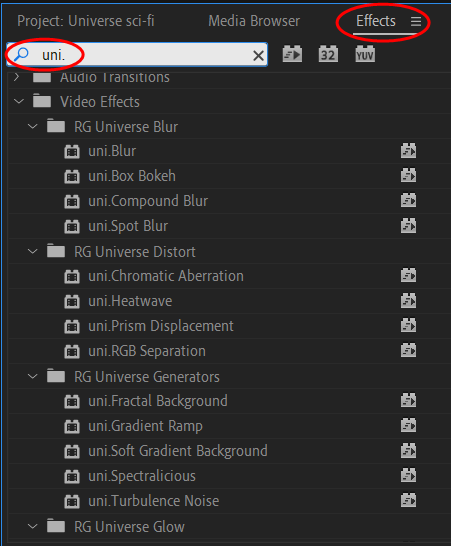
Universe tools fall into the following categories:
From simple to complex, Universe Blur tools provide more feature options than your host application, and they delivers high-quality results at GPU-accelerated speeds.
DISTORT
From color separation to camera shake, Universe’s unique and classic distortion effects deliver high-quality results superior to those available in your host app.
GENERATORS
From simple gradients to complex background animations, Universe Generator tools offer a serious step up in functionality and performance from host app options.
GLOW
Universe’s unique Glow tools give smooth, beautiful, high-dynamic range results with super-fast rendering speeds.
MOTION GRAPHICS
Create beautiful motion graphic elements.
STYLIZE
Create authentic retro and modern-day looks that span from the glitchy days of analog video to the holographic possibilities of sci-fi.
- AV Club
- Carousel
- Ecto
- Finisher
- Glitch
- Glo Fi II
- Grain 16
- Holomatrix II
- Knoll Light Factory EZ
- Long Shadow
- Luster
- Misfire
- Noir Moderne
- Overlight
- Retrograde
- Shrinkray
- Texturize
- VHS
TEXT
Bring easy stylizations and effects to your text layers.
TRANSITIONS
Universe Transitions make quick work of transitioning between two pieces of footage with style. You an implement all transitions as either native NLE transitions or effects (in Adobe After Effects).
- Blinds
- Camera Shake
- Carousel
- Channel Blur
- Channel Surf
- Clock Wipe
- Color Mosaic
- Color Stripe
- Cube
- Diamond Wave
- Dolly Fade
- Exposure Blur
- Film Transition
- Flicker Cut
- Fold
- Glitch Transition
- Halflight
- Inside Cube
- Knoll Light Transition
- Linear Wipe
- Retrograde
- Rubix Cube
- Shape Wipe
- Slide
- Soft Edge Wipe
- Spectralicious Transition
- Swish Pan
- Triangle Wave
- Turbulence Transition
- Unfold
- VHS Transition
UTILITIES
The Utilities toolset solves post-production challenges that normally require extensive workarounds and time better spent being creative.