Wrap Object
This page documents the Wrap deformer in Cinema 4D. It bends flat geometry into cylindrical or spherical shapes — wrapping labels around bottles, panels around towers or grids onto globes.

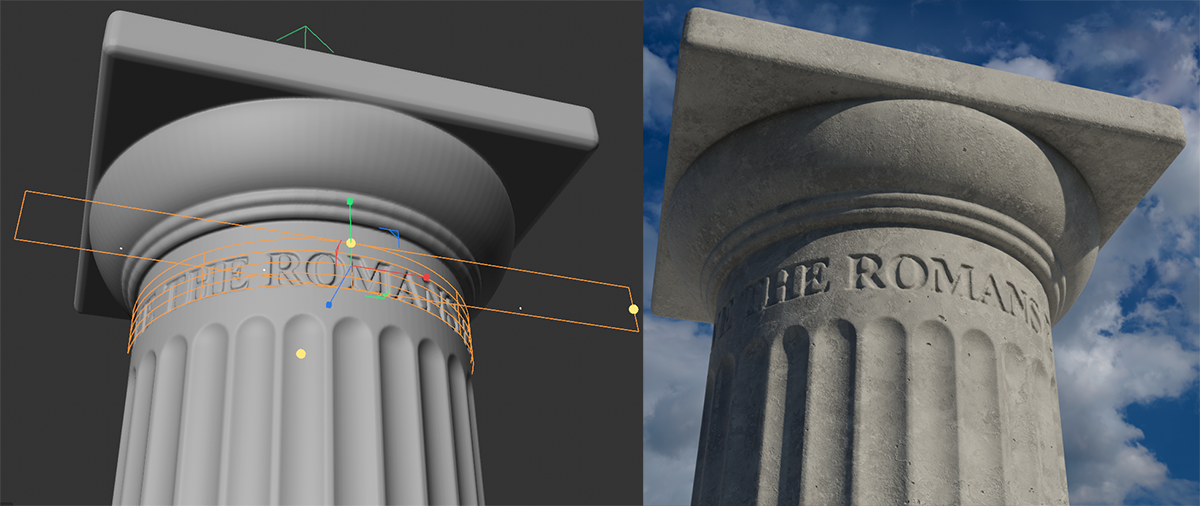
This deformation object can be used to wrap objects in a cylindrical or spherical shape. The Wrap object and the object to be deformed should be in the same position, as shown in the illustration below, as the object is bent around the axes of the Wrap object.
The Wrap object consists of a straight and a curved surface. The curved surface represents the radius of the cylinder (or sphere). The straight surface symbolizes the dimensions of the area to be wrapped around the curved surface. The wider this straight surface is, the further the object is wrapped around the curved surface. Use the orange-colored handles in the X and Y directions to determine the dimensions of the straight surface. Use the handle in the Z direction to control the radius of the cylinder (or sphere).
Example