
Smooth Shift
This page documents the Smooth Shift tool in Cinema 4D. Like Extrude it moves polygons along their normals, but the Maximum Angle decides where connecting faces are created — giving smoother transitions on curved surfaces than a plain extrude.

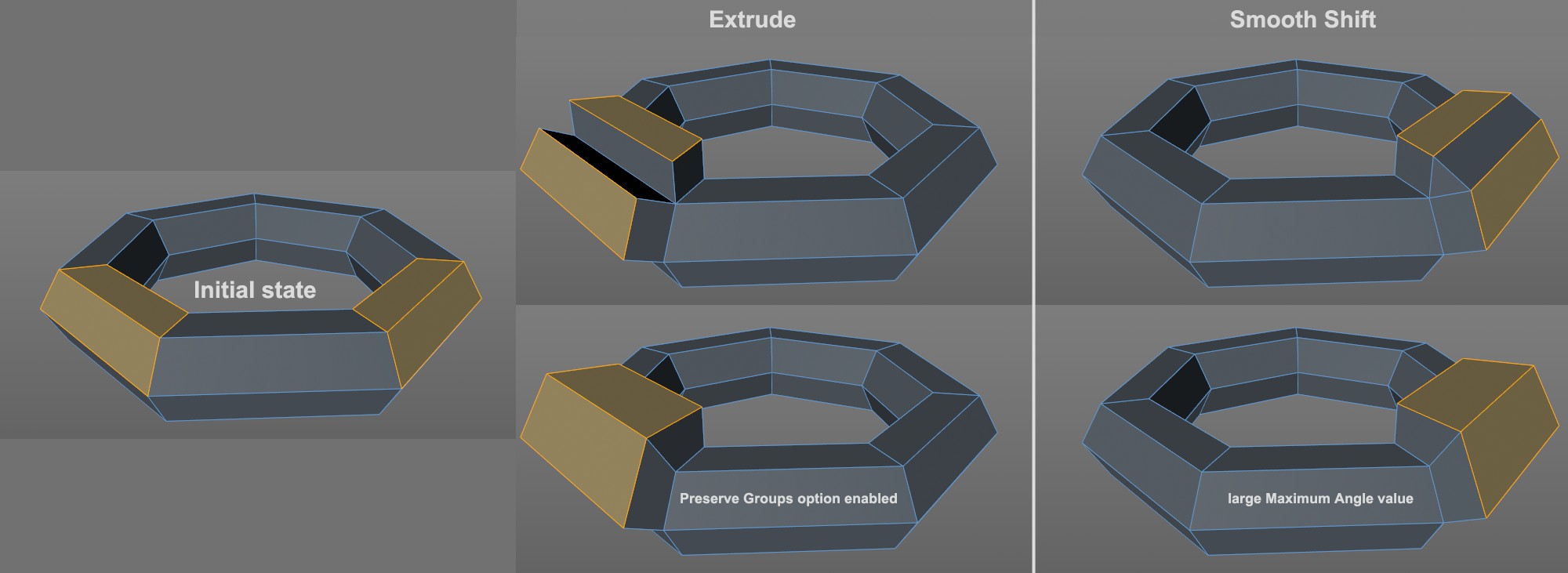 Comparison between Extrude and Smooth Shift.
Smooth Shift is very similar to the Extrude tool. Selected surfaces will be moved in the direction of their Normals. However, the defined Maximum Angle value will be used to determine if a new connecting surface should be created between polygons (for those of constant size) or if the surface will simply be extruded (whereby the polygon's sizes will change).
Smooth Shift can be applied to surfaces only. If no surfaces are selected, then all surfaces are considered.
Drag the mouse left or right within the Viewport to apply Smooth Shift interactively or, for as long as the tool is active, adjust the parameters in the Attribute Manager.