

Set Edge Flow
What is it about?
This page describes the Set Edge Flow tool in Cinema 4D. It adapts selected edge loops to the curvature implied by their neighbors — a topology polish tool that makes inserted loops follow the surface instead of flattening it.
This interactive tool - drag in the view while holding down the mouse button to regulate the Tension - works only in Edge mode. Selected Edges/Edge Loops will adapt to the surface curvature created by parallel Edges/Edge Loops.
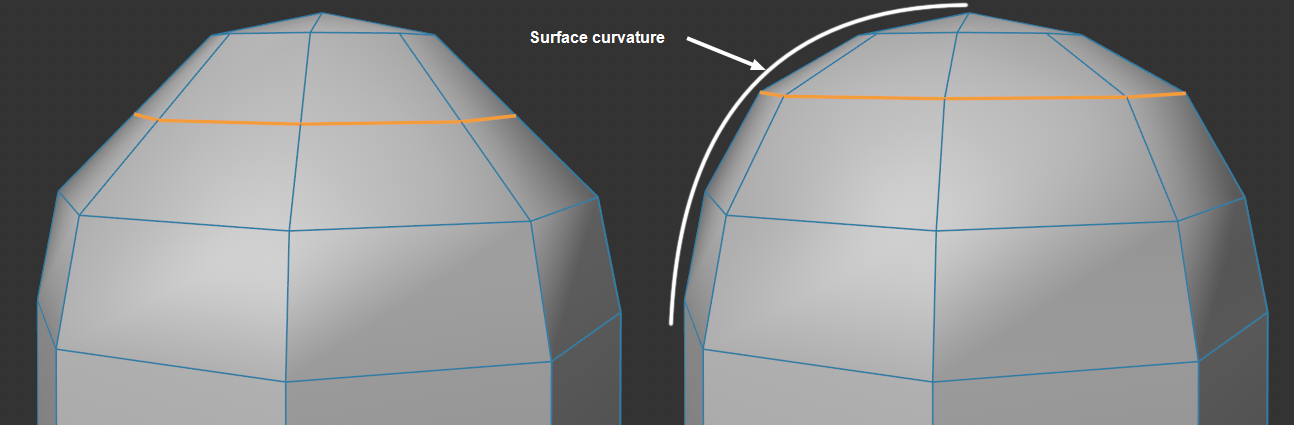 On the left, the initial position; on the right, the result with the Equal Spacing option enabled.
If the edges perpendicular to an edge selection form a closed loop (e.g., all perpendicular edges in the case of a cube with multiple subdivisions), the tool cannot function out of principle. It can help to select only every other edge segment.