
Shader Switch
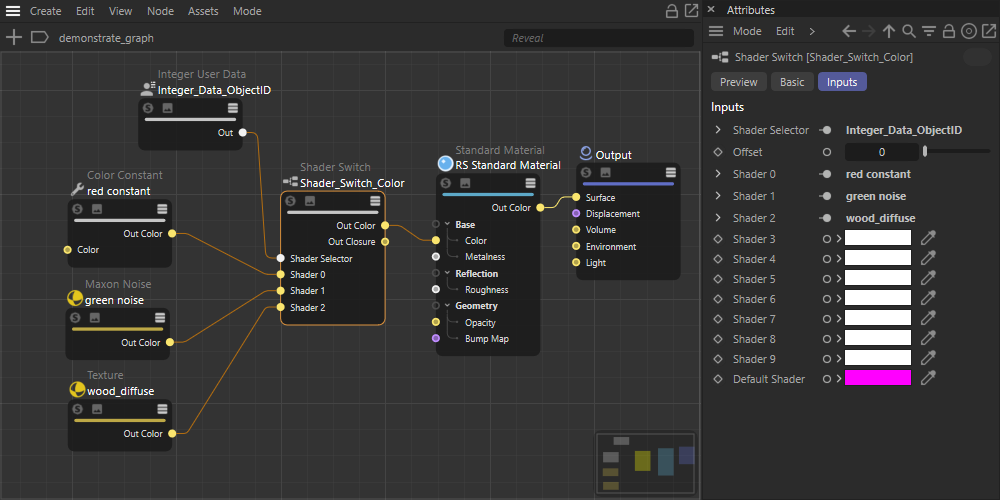
The Shader Switch can be used to switch the input of a shader based on user attribute data like per-object id.
Frequently this is used for adding shading variation, such as colors or textures, across multiple different objects with one material shading graph. For example, instead of having a different material for each object, a Shader Switch could be used to control which textures are connected to which objects all through one material. Depending on the requirements of your scene, this can greatly simplify material management.
A Shader Switch can be chained together with additional Shader Switch nodes when 10 variations are not enough.
Example
Create a Shader Switch node and connect it to something that you want to drive variation in, then drive the shader selector parameter with a per object attribute or per Vertex Attribute node.
|
More than 10 shaders
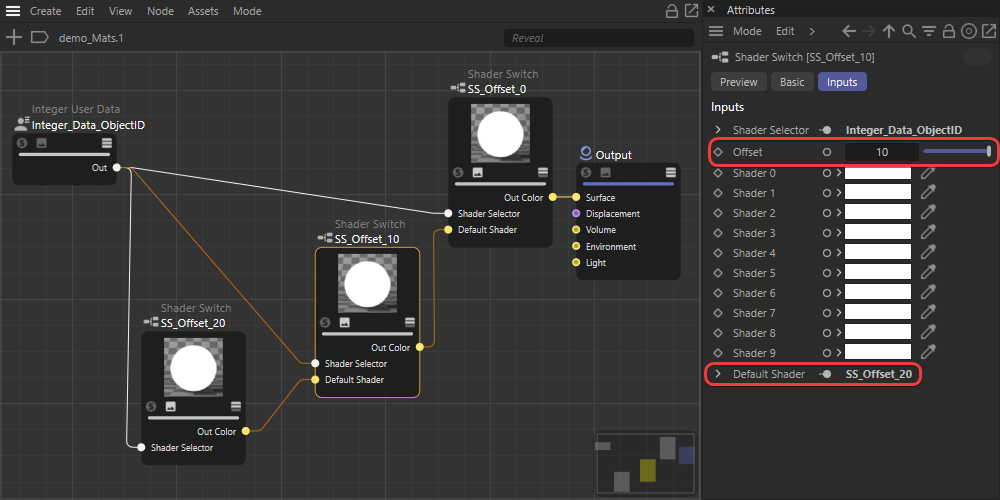
When more than 10 shaders variations are required this can be accomplished by nesting another Shader Switch into the Default Shader input of another Shader Switch. The selector parameter of each Shader Switch should be driven by the same input and the offset value of each Shader Switch should be set appropriately.
For example, if 30 variations are required then 3 Shader Switch nodes should be used. The first Shader Switch should have an offset of 0, and the second and third Shader Switches should have an offset value of 10 and 20 respectively.
|