
Options
As a rule, square textures with the same number of pixels in width and height are used, as these are easier to compress on the graphics card. For this reason, you will find only a single numerical value for Resolution above the UV Editor; this value is automatically applied to both width and height to calculate the Texel Density of the UV unwrap. In reality, however, you can of course also load textures into the material that are not square. In such cases, you can enable Override Resolution, which gives you access to Resolution Width and Resolution Height to specify a custom aspect ratio, which then results in a corresponding transformation of the UV tile.
The absolute values are irrelevant here; what matters is the aspect ratio between the width and height, which is determined by the resolution values.
Resolution Width[32..2147483647]
Resolution Height[32..2147483647]
If the Override Resolution option is enabled, you can manually enter a custom aspect ratio here to be used for scaling the UV tile. By default, a square texture resolution is assumed, as this offers advantages in terms of texture compression.
Enter the minimum distance between the UV islands in pixels here. Please note that valuable texture resolution is lost as the minimum distance between UV islands increases, since this also reduces the Texel Density. This is particularly important for many small UV islands. A small distance between the UV islands is necessary to prevent color overlapping at the seams when painting a texture for this surface.
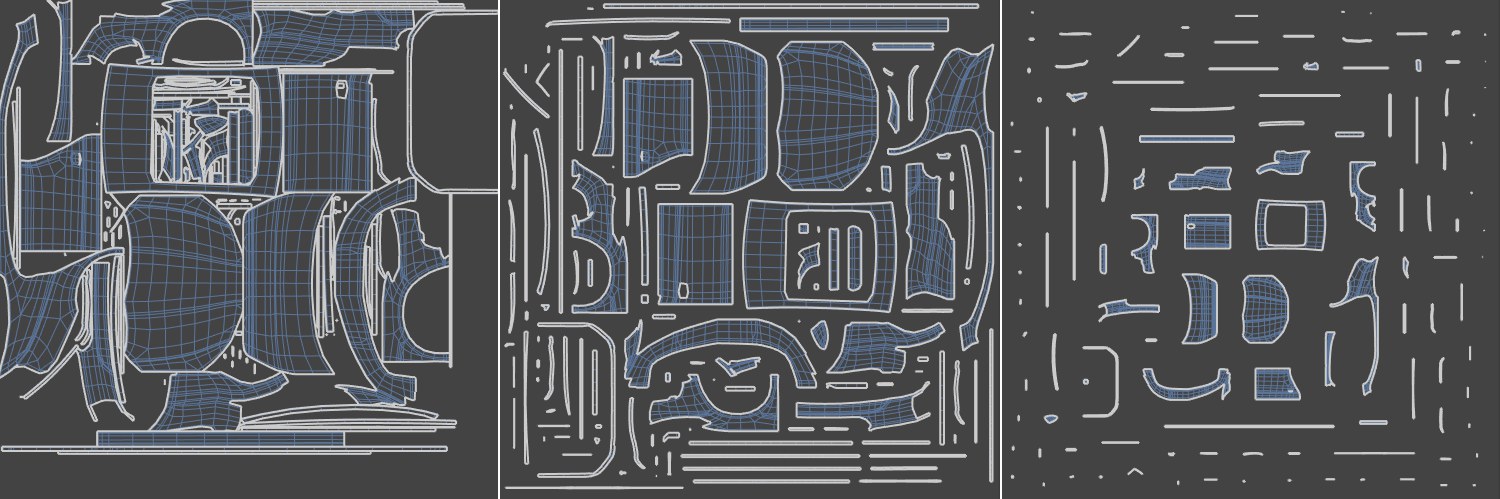 Increasing the Gap Size from left to right.
Three different functions are available for splitting and arranging the UV polygons:
- Packed: An automatic process that unwraps, relaxes and optimally arranges ("packs") your UV mesh. This is the most modern and therefore recommended solution (see also description below).
- Cubic: Divides the UV mesh into groups according to their orientations relative to a cubic shape (see also description below). Also offers a smoothing option to relax the unwrapped UV coordinates.
- Angle: Divides the UV mesh into groups taking into account the directions of the surface normals. This as well offers an optional smoothing and relaxing option for the unwrapped UV coordinates (see this section for additional information).
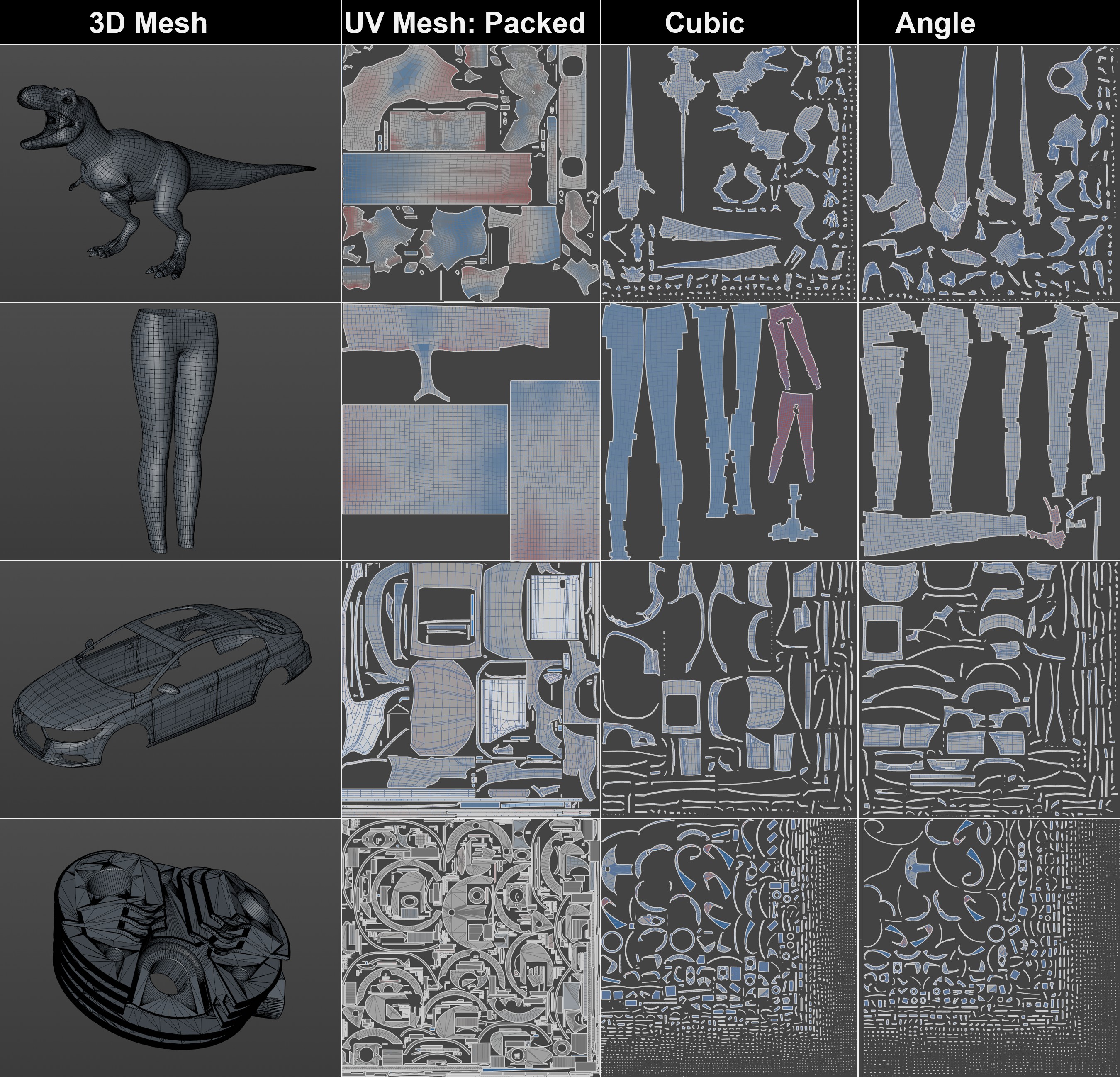 The various automatic methods for unwrapping a UV mesh. As you can easily see, the Packed method yields the best results. Note in particular how tightly the UV islands can be packed together, which makes optimal use of the texture space. This method also results in the fewest separate UV islands.
Packed
This algorithm splits the UV mesh into as few UV islands as possible, which are as undistorted as possible and whose scaling matches the 3D geometry as closely as possible. The algorithm is able, for example, to recognize cylindrical sections or cones and unfold them accordingly. Strip-shaped contours are also recognized and sensibly unwrapped.
The UV islands are then packed, i.e. arranged as densely as possible in the UV tile without overlapping, making best use of the texture resolution.
This automatic method is the all-round carefree solution if, for example, you need to quickly use Projection Painting in the 3D viewport and create a texture by directly painting on the object.
However, if you want to have full control over the unwrapping process, you should use UV Unwrap and Relax instead.
Cubic
This method uses a rectangular prism. All polygons that run nearly parallel to one of the prism's faces are grouped into a single UV island and unwrapped from the perspective of that face. This process is therefore comparable to the classic Cubic Projection mode of a Material Tag.
Angle
In this method, each polygon is examined individually and compared with its neighbors. Based on an Angle value, a decision is then made as to whether the neighboring polygons should be separated or whether these areas should be UV unfolded as a single continuous island.
Higher values give the algorithm more flexibility in Unwrap ModePacked to better fill the available space of the UV tile by individually scaling the width and height of the UV islands. As you can see in the figure below, the - undesirable - distortion (more "red" in the view) increases with higher Stretch values.
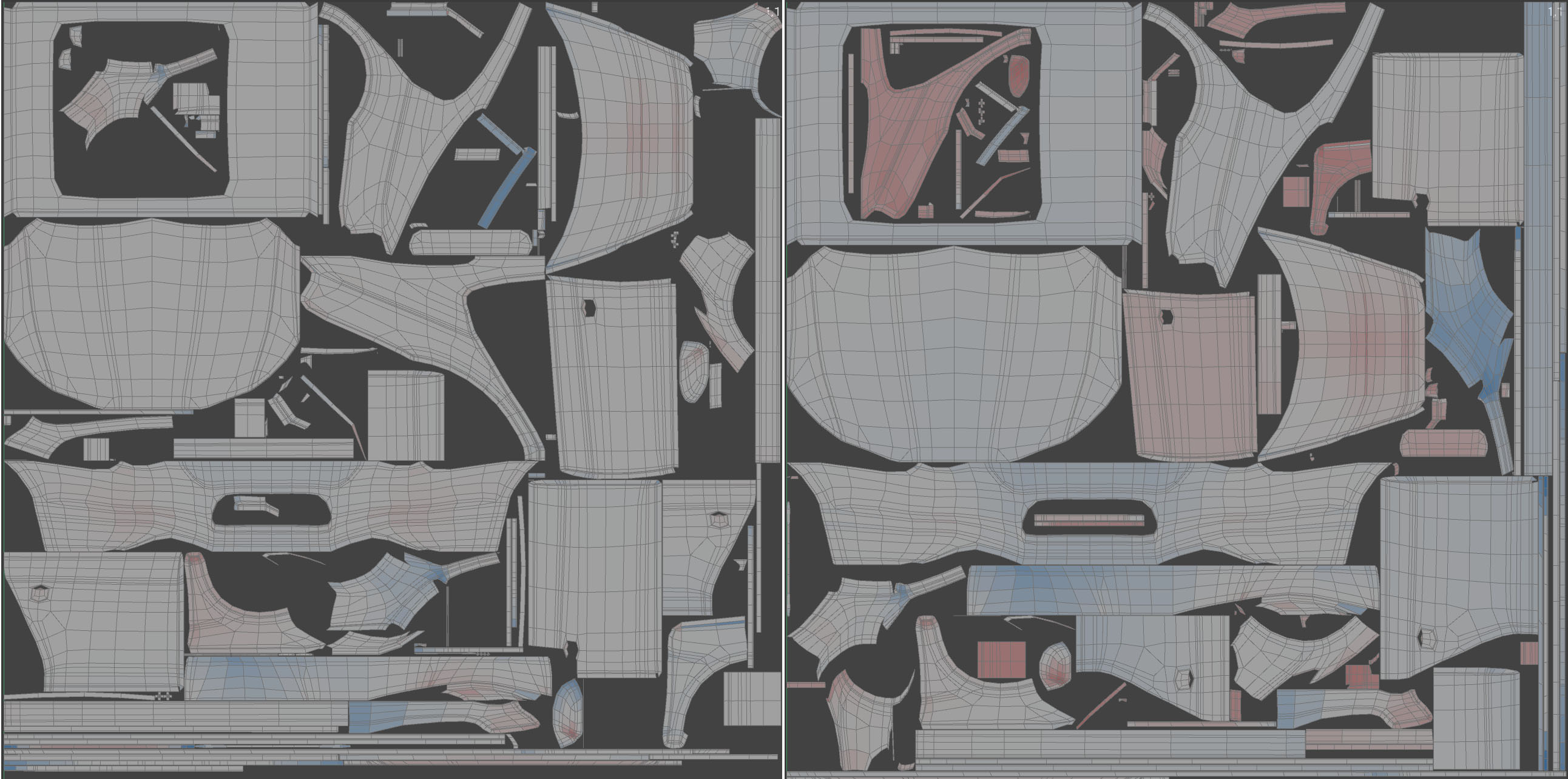 Using a small Stretch on the left and a large value on the right. The UV mesh occupies more texture area on the right.
With this parameter, you can use larger values to determine whether UV coordinates can make even better use of the texture space by stretching them accordingly. As you can see in the above illustration on the right, the - undesirable - distortion (more "red" in the view) increases.
Activating these options the algorithm attempts to find identical or mirrored UV islands in order to place them on top of each other. The texture is then projected identically onto the corresponding UV islands.
In some cases, both options lead to identical results:
- if Stack Identical Islands is activated, identical shapes or shapes that are identical when rotated 90°, 180° or 270° fall under this criterion.
- if Stack Mirrored Islands is activated, identical shapes or shapes in which one axis is mirrored and these are then identical fall under this criterion. This function does not apply to axially symmetrical UV islands (e.g. to fold one half onto the other).
This is only available for Cubic and Angle Unwrap Modes.
When this option is enabled, the algorithm is forced to preserve the original orientation of the UV polygon groups. This saves time when calculating the UV polygon positions. Otherwise, the UV islands may rotate if doing so allows the algorithm to achieve optimized space utilization.
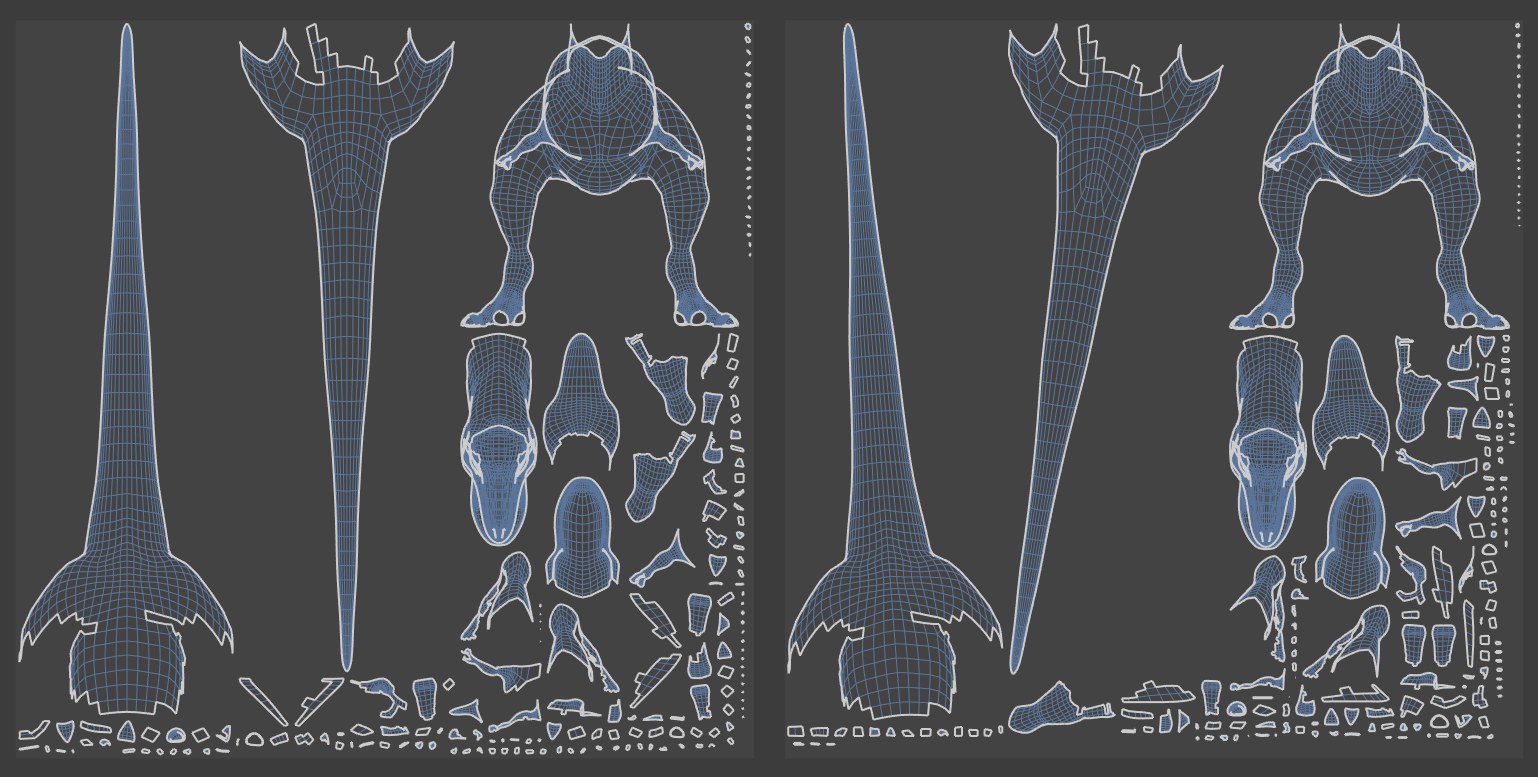 Preserve Orientation activated on the left, deactivated on the right
Relaxation Steps[0..2147483647]
Relaxation Steps[0..2147483647]
Here, you combine a UV relax algorithm with Automatic UV. The higher the value you select, the more iterations are performed to relax and smooth the unwrapped UV positions. Setting the value to 0 disables this calculation. Relaxing the unwrapped UVs can help reduce distortion.
This is only available for Cubic and AngleUnwrap Modes.
If this option is activated, the UV islands are scaled independently of each other in the U and V directions so that they occupy the largest possible UV area (also taking the Gap Size into account).
If the option is deactivated, scaling is only performed proportionally.
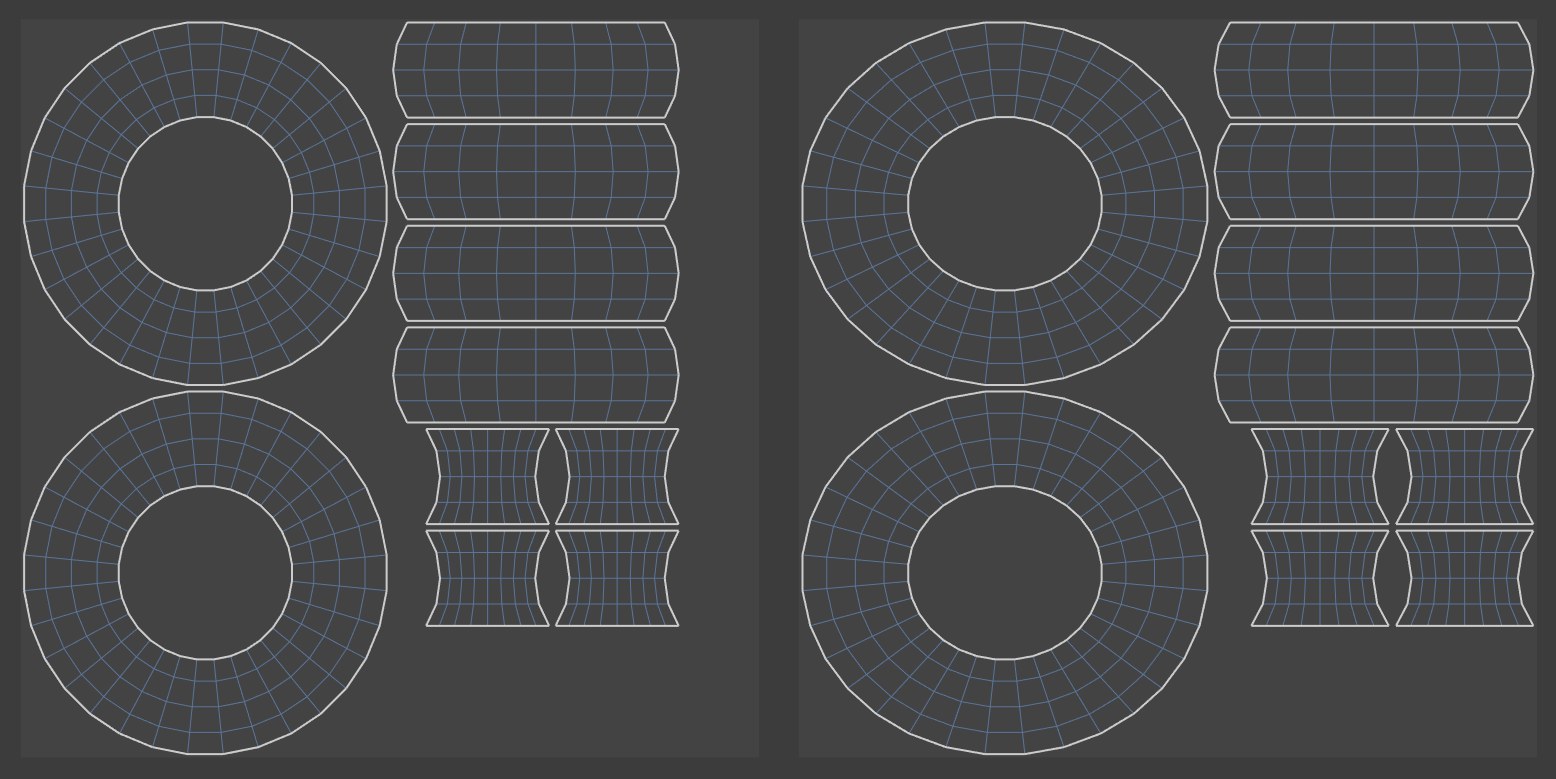 Left deactivated, right activated Stretch to Fit
This is only available for Unwrap Mode Angle.
The smaller the Angle specified here, the fewer polygons are unwrapped into contiguous UV islands. This configuration is therefore better suited for technical components or architectural models, which often contain flat surfaces.
Organic shapes, on the other hand, typically consist of many smaller polygons, all oriented differently, to represent rounded curves. For such shapes, using larger Angle values can be useful to unwrap larger sections of the surface as contiguous UV islands.