

Effector
Use this setting to adjust the overall strength of the effect. Values of less than 0% and greater than 100% can be entered.
 On the left, a Step effector is shown without selection; on the right, it is shown with a selection applied. A Step effector was chosen here as an example of selection; otherwise, selections work differently depending on the type of effector.
A MoGraph Selection or MoGraph Weightmap tag can be dragged into this field or placed automatically by selecting a Cloner object and an existing MoGraph selection/weighting, and creating an Effector.
The Effector will then work as follows, depending on the tag’s settings:
- MoGraph Selection tag: Will only affect the clones belonging to the selection.
- MoGraph Weightmap tag: The clone weighting (values between 0% and 100%) saved in the tag will be multiplied with the effector strength.

Use these settings to increase or decrease internal range values.
Note also the Remapping settings for the Layers in the Field list. Use this Field functionality as your preferred method since it’s more powerful and easier to understand in combination with other Layers.
Enabling this option will set the script back to animation frame 0, i.e., all variables, etc. will be reset to their original state.
Here you can define how far-reaching the control of the Python Effector should be.
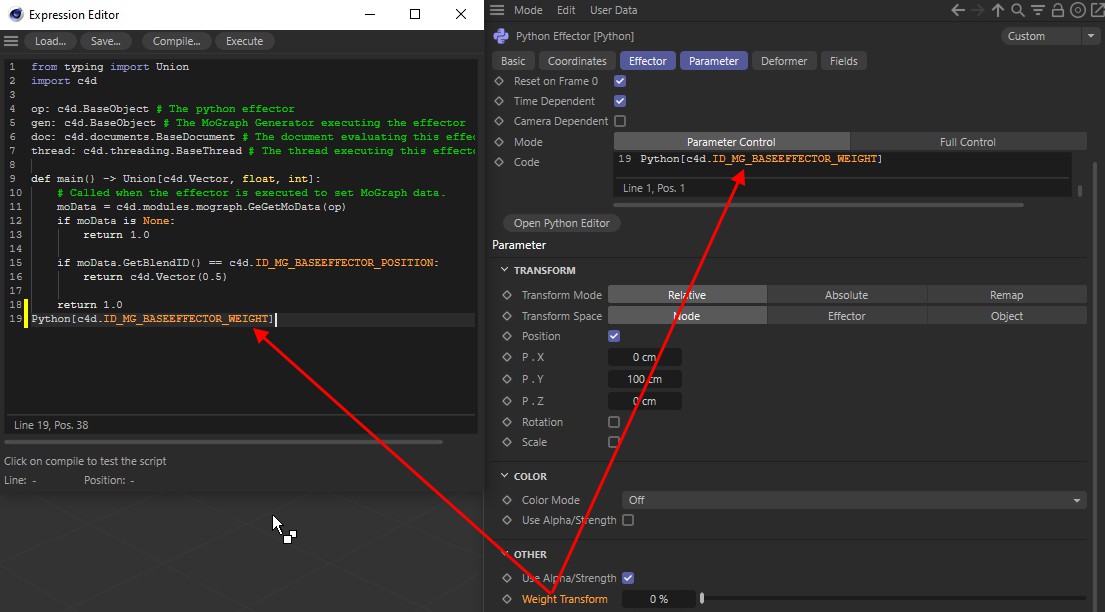
In this mode, only the Effector settings are controlled (e.g., Position, Scale, Weight Transform, etc.). The given parameter can simply be dragged into the Code field in the Expression Editor. The corresponding ID will then be set:
This option gives you complete control over the Clones. You can, for example, position Clones wherever you want, you can add or delete Clones or modify any value, etc. In most cases, this option is faster than the Parameter Control mode.
Enter your Python code here. Details can be found at http://developers.maxon.net or in the Python SDK documentation.
Clicking on this button opens the Expression Editor, which is somewhat more comfortable than using the Code field. Both fields are linked. Hence, it does not matter where you modify the code, it will automatically be modified in the other field.