
Key Properties
The key is shown in this frame of the animation.
This option fixes the key at the current time and thus protects it against unintentional movement, for example.
See Breakdown Color.
This mutes the key, which means that none of the stored values of these keys are evaluated in the time intervals between these muted keys. Instead, the values of the neighboring keys that are not muted continue to be evaluated. The effect is therefore as if the muted keys were not there at all. This can be used, for example, to temporarily deactivate the secondary movements of an animation in order to concentrate on the key poses of the remaining active keys and, for example, to be able to fundamentally examine their timing.
See Breakdown.
Drag the corresponding target object from the Object Manager into this field.
This controls the interpolation between the keys. You can use the Bias to speed up or delay the morph transition between the keys.
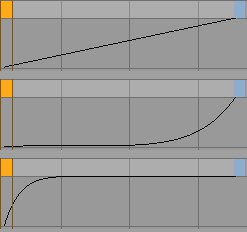 Bias 0, 40, -100
Normally, only neighboring keys are interpolated. If you activate the Soft option, any existing keys before and after it will be taken into account. This makes the movement more harmonious and organic.