

Inputs
Here you direct the geometry into the Node where elements are to be deleted. If there is an active selection on this geometry and it also corresponds to the selected Type, these elements will be removed if you use Default for Selection String.
Here you define whether points, edges or polygons should be removed.
Please follow these instructions:
- When deleting polygons, the points that are also used by other polygons are always retained. However, if a polygon is located at the edge of a plane, for example, you can activate the Delete Unused Points option to simultaneously remove the points that are no longer required for other polygons after the polygon has been deleted.
- When deleting an edge, only the polygons adjacent to this edge will be deleted. The points on the specified edges are retained if they are still used for other polygons. If the deleted edge delimits an N-gon, the N-gon will be retained if there are more than three other edges on its border. If deleting the edges and the polygons connected to them results in points that have no connection to other polygons, these can also be removed by activating Delete Unused Points.
- When a point on a polygon geometry is deleted, all polygons that use this point will be deleted. N-gons are an exception to this. If more than three points remain along the edge of the N-gon even after the point has been deleted, the N-gon will be retained and will adjust its shape accordingly. If a spline geometry is used and a point is deleted, the neighboring points along the corresponding segment will be reconnected.
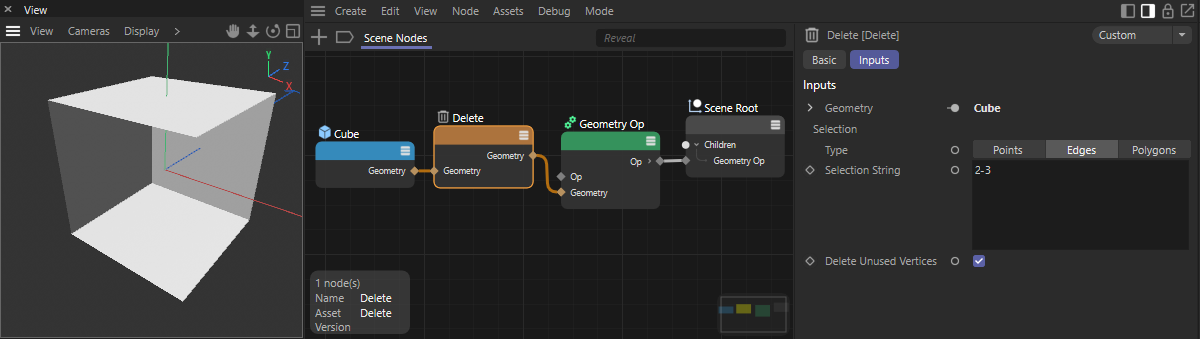 Example for the removal of an edge on a cube. The edge was defined here directly in the selection string (the edges between points 2 and 3 are removed).
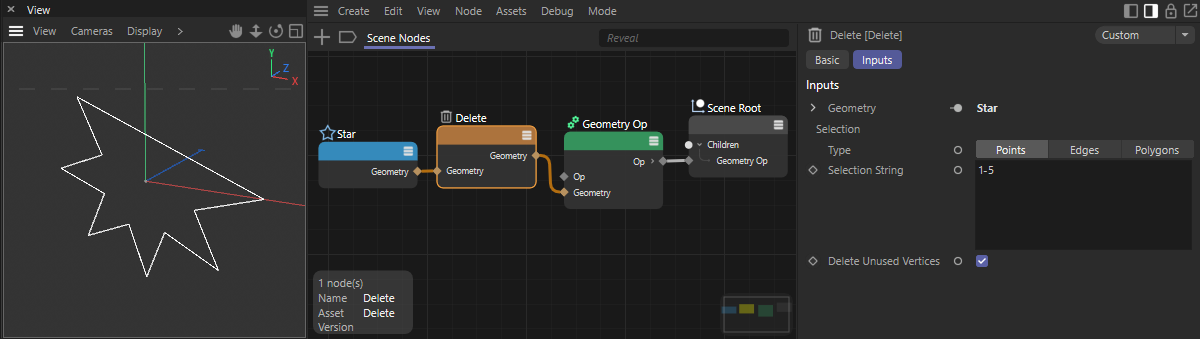 Example of using the Delete Node to remove points on a spline. Here, the points to be deleted have been entered directly as a selection string (points 1 to 5 are removed).
Here you can link by index array a selection of the points, edges or polygons that are to be deleted at the geometry. Otherwise you can also use the Selection string.
Here you can, for example, use the name of a selection in quotation marks that you want to read out, e.g., "MySelection". Otherwise, the default entry will use an active selection on the geometry.
You can also use special keywords and logical operations here to create a new selection from scratch or a combination of already saved selections. The following keywords and operations can be used:
- Default: This term causes an active selection currently present on the geometry to be used. If no selection is active, all points will be used.
- odd: This term is used to select all elements that have an odd index number.
- even: This term is used to select all elements that have an even index number.
- all: This selects all elements of the selected type.
- hidden: Selects the hidden elements of the geometry.
- Name of a saved selection: If you enter the name of a saved selection in quotation marks, this selection will be read and used. To use a combination of a saved selection and another keyword or selection, use quotation marks with the selection name.
- Index numbers: You can also use index numbers directly, just as you are used to from the Index Array From String Node.
- Mathematical and logical operations: Mathematical or logical operations can be used to combine selections. Using the string odd – "center" for instance selects all odd elements and then subtracts the selection that has been stored by the name "center". You can use +, -, & (logical and), | (logical or) as well as a comma to combine multiple selections or index sequences.
If the deletion of polygons or edges also results in points that are no longer connected to remaining polygons, these can be automatically deleted by activating this option. This option is only relevant when processing polygon geometry.