Morph Deformer
This page documents the Morph deformer in Cinema 4D. It applies the targets of a Pose Morph tag through a deformer's area of influence — so morphs can be blended spatially with Fields instead of affecting the whole object uniformly.

This deformer allows you to display the morph targets created in a Morph Tag for an object using the deformer's area of influence.
This is usually particularly useful if fields are assigned that can be used to limit the deformer influence.
Assign this deformer to an object as usual, either by making it its child-object or by placing it on the same hierarchy level as the object in a shared parent object, for example a Null object. The Morph Deformer is suitable, for example, for effects where you want to fade in a specific morph target, but also any combination of morph targets, for example from left to right. Simply animate the position of the deformer.
But also remember that you have the option of turning your character's current deformed state directly into a morph target. To do this, right-click on the morphed mesh and select the command Current State to Object. This freezes the current deformation and assigns it to a mesh copy. Then use this mesh in the Pose Morph Tag as the new morph target. When using this application, however, make sure that other deformers, such as the Skin object, do not affect your character at the same time, as otherwise its deformation will also be included in the morph target created in this way.
To create a new morph target, simply drag the mesh into the Poses list of the Pose Morph Tag. This must be in Edit mode. You will then be asked whether you want to create an Absolute or Relative morph target. If Absolute is selected, the mesh is linked in the Target field ('Advanced' group) of the Pose Morph Tag. The morph process is then always oriented towards this goal. So if you want to edit the morph target, you must always edit this object instead of the object to be deformed. Please note that deleting the linked object from the document will result in the loss of the morph.
Absolute can make it easier to work on multiple poses or meshes that are shared by multiple projects/collaborators.
If you select Relative, the current deformation is recorded by and in the Pose Morph Tag so that the mesh can be edited as with a regular morph pose.
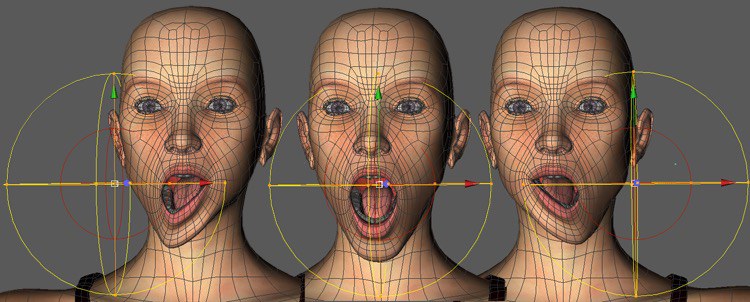
Example
Here, a Linear Field with a delay affects the morphing process: