
Key Reducer

The Key Reducer is an indispensable tool when it comes to editing motion capture tracks. In principle, motion capture systems always create one key per image. This is usually a horror for the animator, as practical changes are hardly possible due to the large number of keys.
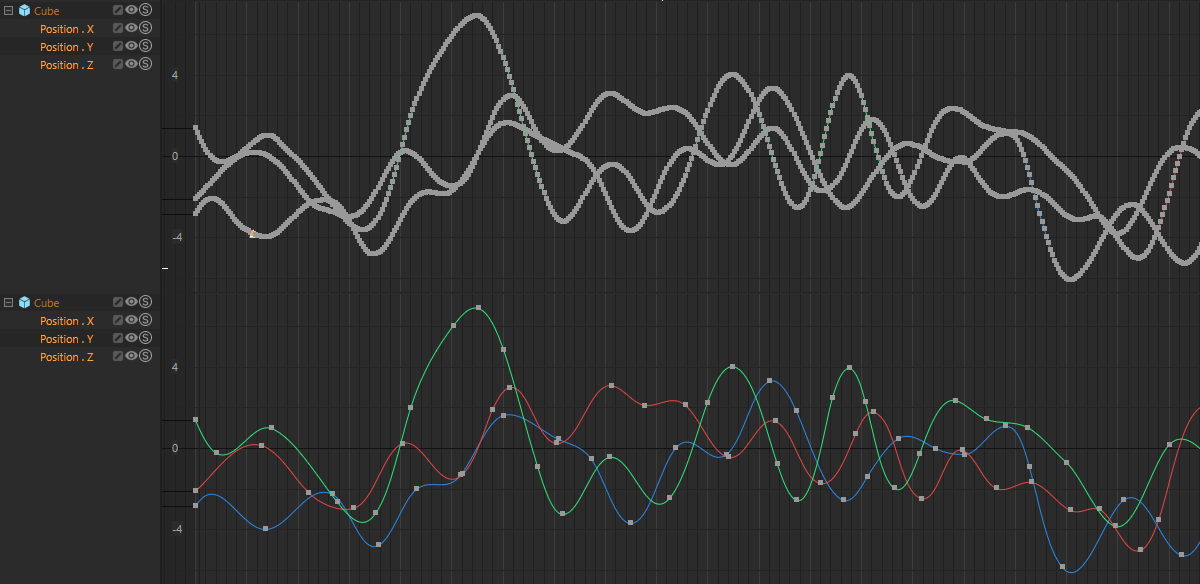
What does the Key Reducer do? It thins out the tracks full of keys (the same algorithm is used for the  Reset RM Curve command, by the way). With increasing Strength, it primarily leaves keys at the F-curve vertices as a result.
How to use it
In F-curve mode, select the tracks to be simplified, call up the Key Reducer and adjust the reduction interactively using its settings. As soon as you are satisfied with the result, click OK.
Please note that the Key Reducer only affects the complete F-curve, so individual key selections will have no effect.
The Key Reducer has the following settings:
- Strength: The higher you set the Strength, the more keys that wil be removed. Be careful with values that are too high, as there will not be much left of the original F-curve.
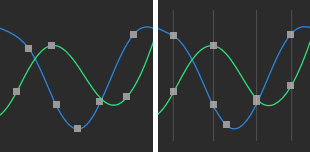
- Magnet: If you reduce several tracks at the same time, this setting will attempt to make keys congruent within the time span defined here. For example, if you have selected the X, Y and Z-F curves of an item, it is often desirable for their keys to be on the same screen. Example: 2 curves, left without a Magnet, right with a value of 10:
- Locked keys: If keys are locked in terms of value and/or time, they will be fixed and will not be changed by the Key Reducer.
However, when editing motion capture data that has been recorded via corresponding motion capture systems, the Key Reducer must be used with great care. Simply controlling all tracks simultaneously will almost never lead to the desired result. On the contrary, you will notice that the bone/joint skeleton will literally disintegrate into its individual parts, as the Key Reducer cannot take into account any desired dependencies on bone distances, for example. The Key Reducer considers all objects independently of each other. You should, therefore, always work through the tracks one after the other.