

Selections
It would be practical if source surfaces, cover surfaces and thicken surfaces could be covered with materials separately. Exactly that can be done here in two ways (first, activate the corresponding options in the Selections tab that are used to create the Polygon Selection tags):
-
These Polygon Selection tags can then be placed in the Texture tag at Selection, for example.
-
Alternatively, you can enter the corresponding abbreviations - which are listed to the right of the options - e.g., in the Texture tag.
This will restrict the material to these areas.
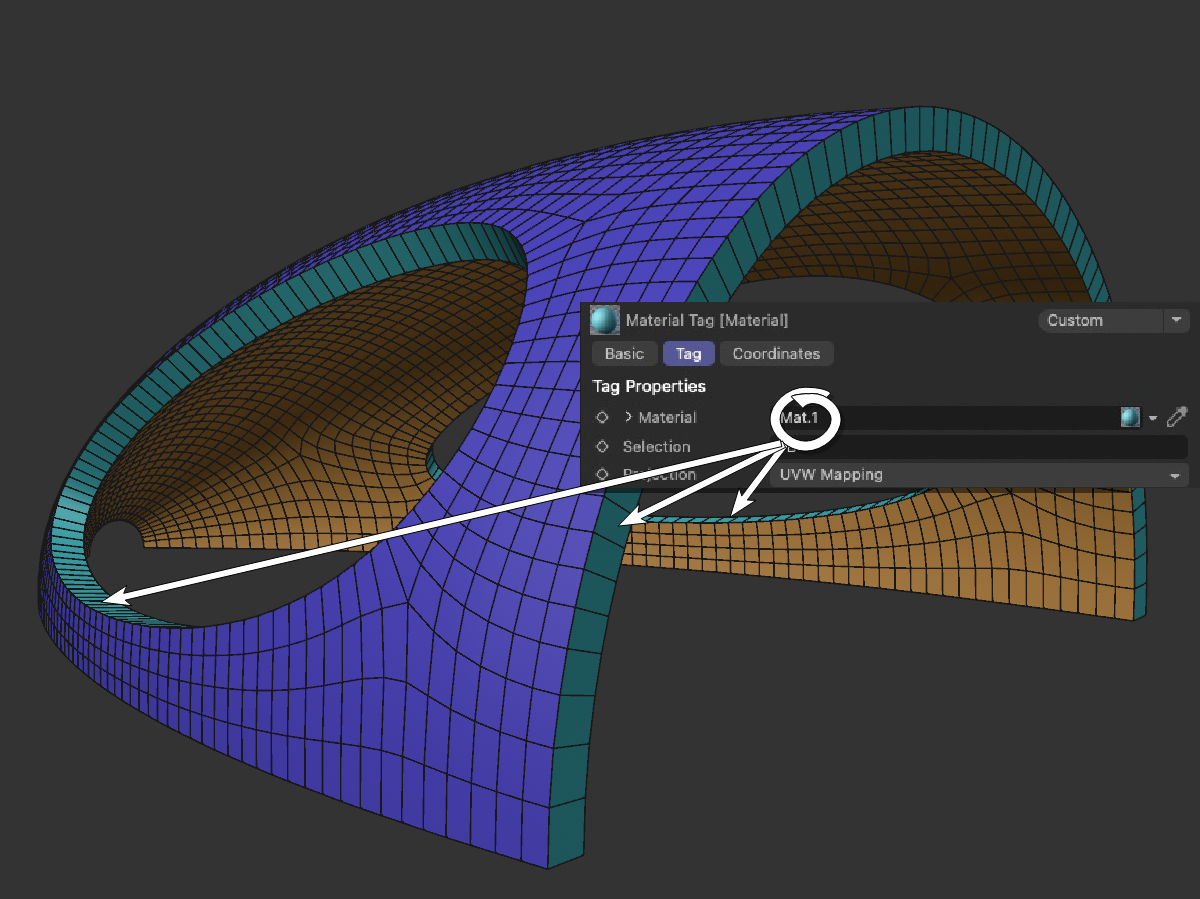 PB stands for the wall thickness selection to which a material tag can be restricted.
The Generator tags created when this option is enabled - which, by the way, are specially marked in their icon - can neither be deleted nor copied directly, but they can be dragged into corresponding fields. The selection name can be freely adjusted on the right-hand side.
Edge selections (as a tag or abbreviation) can be used e.g., in the Bevel Deformer (Selection) to restrict the beveling to them.
Thicken is defined as the polygon strip created at the edges between the source and the top surface.
The tag name is PB (Polygon Boundary).
The original area is included in this selection.
The tag name is PS (Polygon Source)
This selection contains the newly-created cover surface shifted perpendicular to the initial surface.
The tag name is PC (Polygon Caps).
This edge selection contains the edge between the original surface and the new edge surface.
The tag name is EBS (Edge Boundary Source).
This edge selection contains the edge between new face and new edge surface.
The tag name is EBC (Edge Boundary Caps).
This point selection contains the points of the original surface.
The tag name is VS (Vertex Source).
This point selection contains the points of the new cover surface.
The tag name is VC (Vertex Caps).