

Tag Properties
You have a choice of 2 modes here:
- Face Camera: the tag-carrying object is aligned perpendicular to the camera Z-axis, i.e. the camera viewing direction. Suitable e.g. for the "billboards" mentioned on the main page.
- Align to Camera Plane: the tag-carrying object is oriented to the camera plane and always rotates with the Z-axis perpendicular to it and the X-axis parallel to the camera X-axis. The practical effect: the object behaves a little like a two-dimensional layer in the view, similar to the Annotation Tag, for example. For example, if you place a text object horizontally in the view and select the Align to Camera Plane Mode here, it will always remain horizontal and therefore clearly legible with all camera rotations.
In the following video you can see the two modes (Tree: Face Camera; Text: Align to Camera Plane) in action.
As it often happens that the Z-axis of the object to be aligned with the camera is oriented the wrong way round, e.g. it is displayed mirror-inverted backwards, this option ensures that it is displayed with its Z-axis in the opposite direction.
These two settings only work for the Face Camera Mode and define which rotation axes (see following figure) are permitted when aligning to the camera:
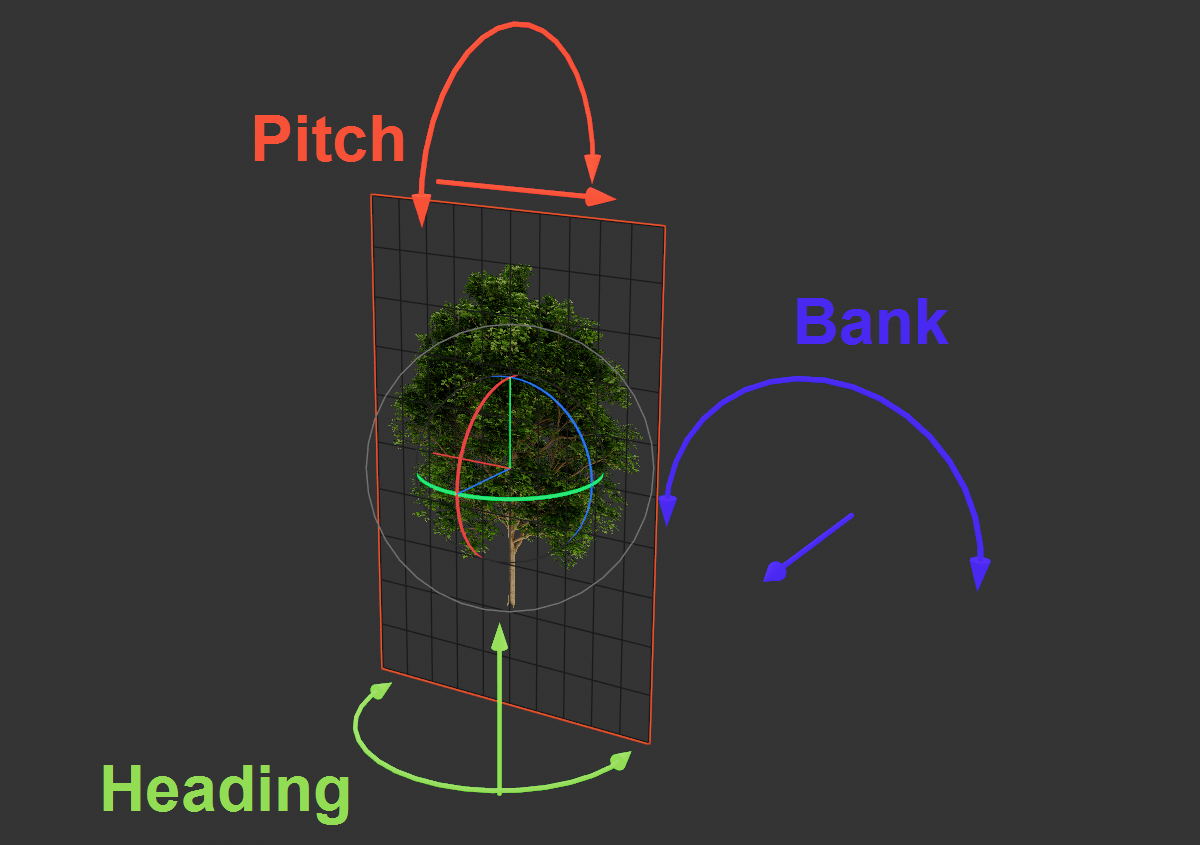
If you want to align an area with a tree, as shown in the example, it is advisable to leave both options deactivated, as the trees will then always stand vertically on the ground. Activate both options if the object surface should actually always be oriented vertically and frontally to the camera's viewing direction.
If you want to direct the alignment to a specific camera - i.e. not necessarily the currently active one - you can drag a corresponding Camera object in here.