

Split
This page describes the Split node of the Scene Nodes system in Cinema 4D. It copies selected polygons into a new geometry while leaving the original untouched — non-destructive extraction of mesh parts.
This Node offers a comparable functionality to the Disconnect command of the Mesh menu and copies selected polygons of a geometry into a new geometry. The original initial geometry remains unchanged. The following image shows an example of this.
If you only want to move a part of your geometry independently of neighboring polygons, for example, or change it using modeling commands, you can also use the Disconnect Node. However, this changes the initial geometry, as new points and edges are generated at the edges of your selection.
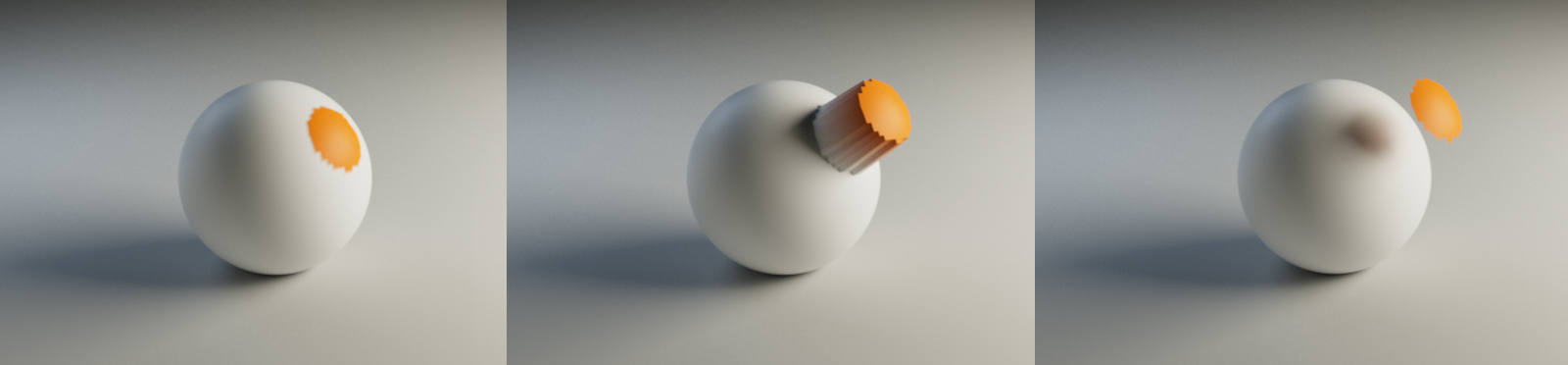 On the left you can see the initial geometry with a colored polygon selection. When these polygons are moved, drag a part of the adjacent surfaces with them, as shown in the center of the illustration. However, if these surfaces are separated beforehand and thus copied into a new geometry, they can be moved independently of the original geometry without any problems (right in the image).