

Set Color
This page covers the Set Color node of the Scene Nodes system in Cinema 4D. As a capsule or node it assigns vertex colors uniformly, randomly or based on the bounding box — quick procedural coloring that materials can pick up.
This asset can be grouped directly in the Object Manager under a polygon object or linked to a geometry in the Node Editor.
This asset makes it very easy to assign vertex colors to a geometry uniformly, randomly or automatically by evaluating the bounding box. The following example shows a landscape that was initially assigned RGB color values along the X, Y and Z axis directions via the Node. The green color component is applied along the Y-axis by default. Using a color gradient within a Redshift Standard Material, we then only use this green color component and first read it out via a Vertex Attribute Node. The result is a color gradient with the colors gray, green and white, as shown in the left part of the illustration. Since the Node can also be applied multiple times to the same Vertex Color Map, a second Set Color Node is added, this time to create uniform color values for the points with odd index numbers( odd Selection String ) and overlaid with the existing vertex colors using the Normal Operation. The result can be seen on the right-hand side of the following illustration.
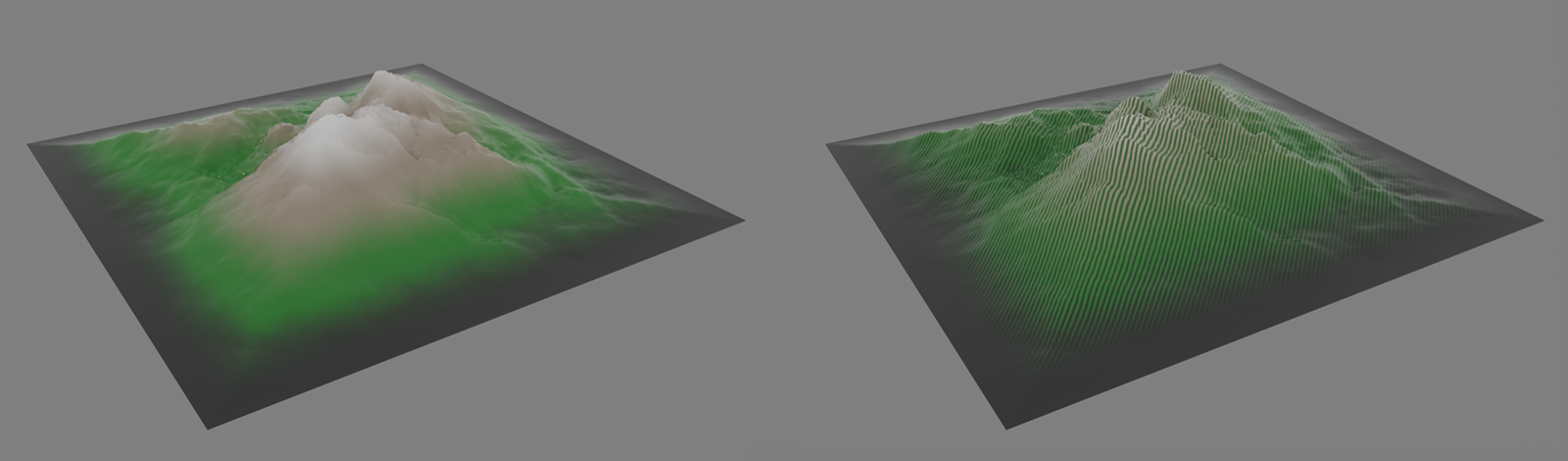 Some options for automatic vertex color assignment