

Effector
As is the case with all Effectors, this slider is used to define the overall strength of the Effector.
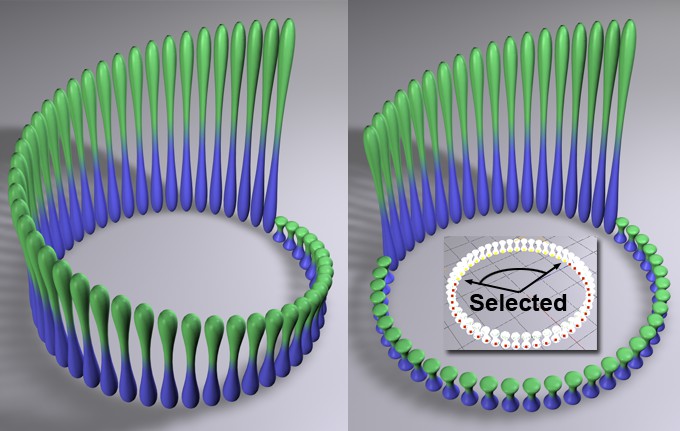 On the left, a Step effector is shown without selection; on the right, it is shown with a selection applied. A Step effector was chosen here as an example of selection; otherwise, selections work differently depending on the type of effector.
A MoGraph Selection or MoGraph Weightmap tag can be dragged into this field or placed automatically by selecting a Cloner object and an existing MoGraph selection/weighting, and creating an Effector.
The Effector will then work as follows, depending on the tag’s settings:
- MoGraph Selection tag: Will only affect the clones belonging to the selection.
- MoGraph Weightmap tag: The clone weighting (values between 0% and 100%) saved in the tag will be multiplied with the effector strength.
The three available modes can be characterized as follows:
This mode will uniformly blend the clone states. Use the Strength setting to adjust the speed with which this occurs.
The clone states will first be blended quickly, then slowly. Use the Strength slider to adjust the overall speed with which this occurs.
As the name suggests, the clones will behave as though they have springs between them, resulting in slight residual oscillation. Over-oscillation can also occur. Large values will increase residual oscillation, i.e., the larger the value, the softer the springs.