
UV Packing
This page documents the UV Packing function in Cinema 4D. It rearranges existing UV islands for maximum texture-space usage without re-unwrapping — the standalone version of the packing step inside Automatic UV.
By clicking on the gear icon, you will find various settings for rearranging and optimizing existing UV islands.
Well, isn't that what functions like Automatic UV already do? Correct, these are partial functionalities of the Automatic UV mapping. If you remember: Automatic UV mapping takes several steps in succession:
- Unwrapping the UV mesh
- Relaxing the UV mesh
- Packing the UV mesh
The settings for UV Packing are therefore only limited to the 3rd step: the optimal arrangement of the existing UV islands without creating new ones (exceptions prove the rule, see UV Packing Mode Rasterized). In most cases, the aim is to make good use of the UV space so as not to waste any texture resolution.
To restrict the effect of packing to certain areas, create polygon selections.
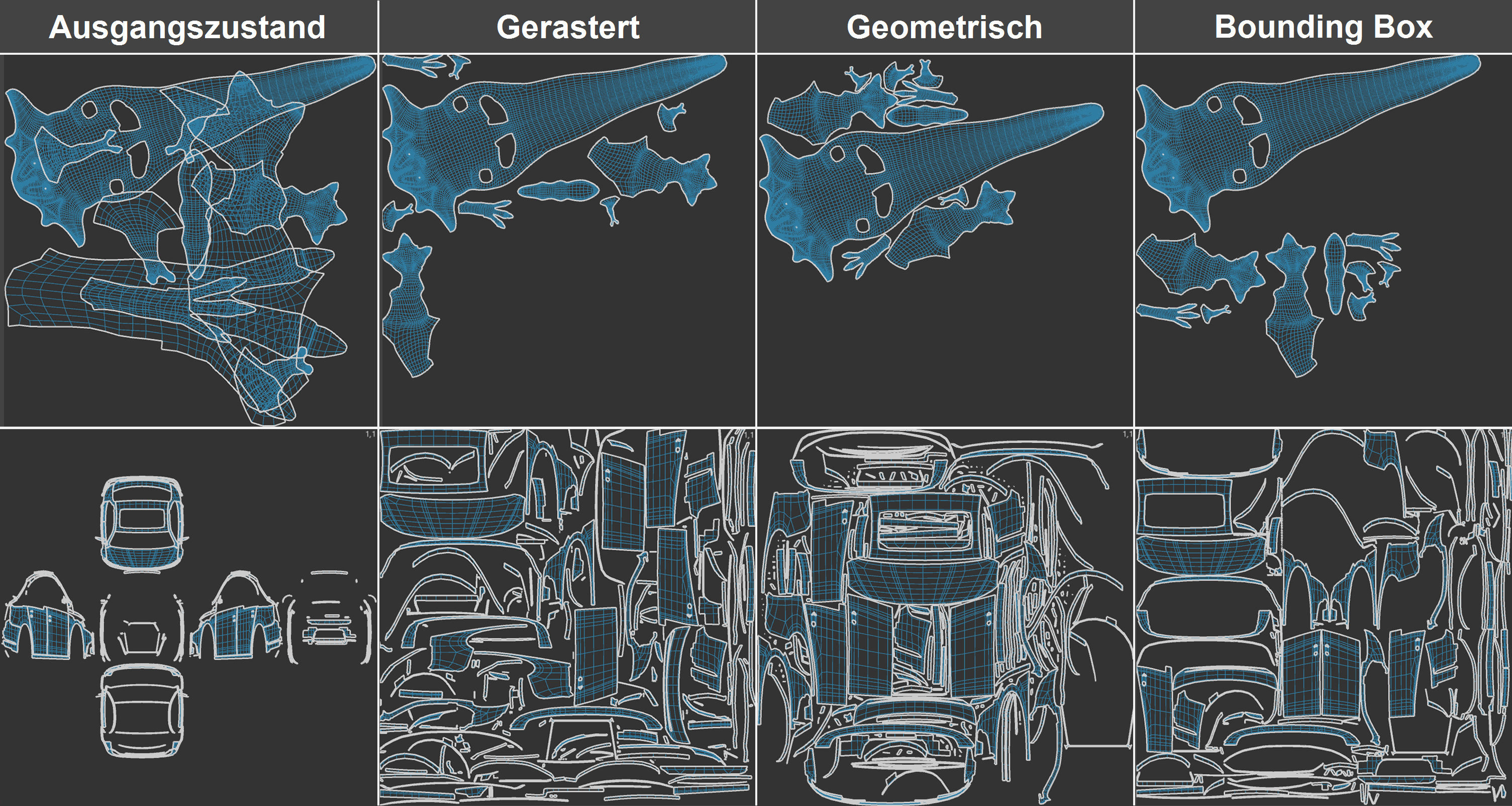 The 3 UV pack modes with different UV meshes. On the left is the initial UV state before packing.
When to use which mode:
- Rasterized: Use this mode for a large number of UV islands, it offers good and fast results. In contrast to the other two modes, deformation of the UV islands is possible under certain circumstances, as well as the creation of new islands in the case of UV island self-overlaps. Note that when multi-processing UV tags, Rasterized and Geometric use the available UV space for the entirety of all UV islands of all UV tags. This means that you can theoretically use one texture for many UVW tags.
- Geometric: This mode offers the best results. The UV surface is optimally utilized here. However, the computing time is considerably longer here than in the other modes, especially with many UV islands. Note that this mode can have problems with UV meshes if they still have self-overlaps - as can occur with projections. Packing can then be aborted with an error message.
- Bounding Box: This mode is very fast, but cannot nest UV islands inside each other like the other two modes can. It therefore 'wastes' more of the UV space than the other two modes. The mode forms a bounding box around each UV island, i.e. a rectangle with the maximum dimensions of the UV island, and rearranges these rectangles including the island by evaluating a number of parameters. Naturally, concave shapes cannot be nested or island holes used, as is the case in the other modes.
Please note that pressing the Apply button several times can always produce different results. In contrast to other operations, there are an infinite number and no single, unique packing solution. The algorithm is heavily dependent on the 'fed' in UV meshes. This means that different UV meshes lead to different results.