
Add UV Pins
This allows you to lock the points of selected UV points, edges or polygons so that they cannot be moved by transformation tools or functions such as UV Unwrap and Relax. Defining points as Pins is therefore useful for all areas of an existing UV unwrap that should remain unchanged, such as those parts that have already been perfectly aligned with a texture.
Pins can be indicated by a red marker, provided this has been enabled via the UV Editor’s menu. Pinning can also be temporarily toggled on and off using the Use UV Pins option. You’ll find this option in the icon bar above the UV Editor.
Points defined as Pins can also be selected in Points mode and then released from their fixed positions by executing the Remove UV Pins command. Alternatively, you can use the Clear UV Pins command to remove all Pin fixations at once.
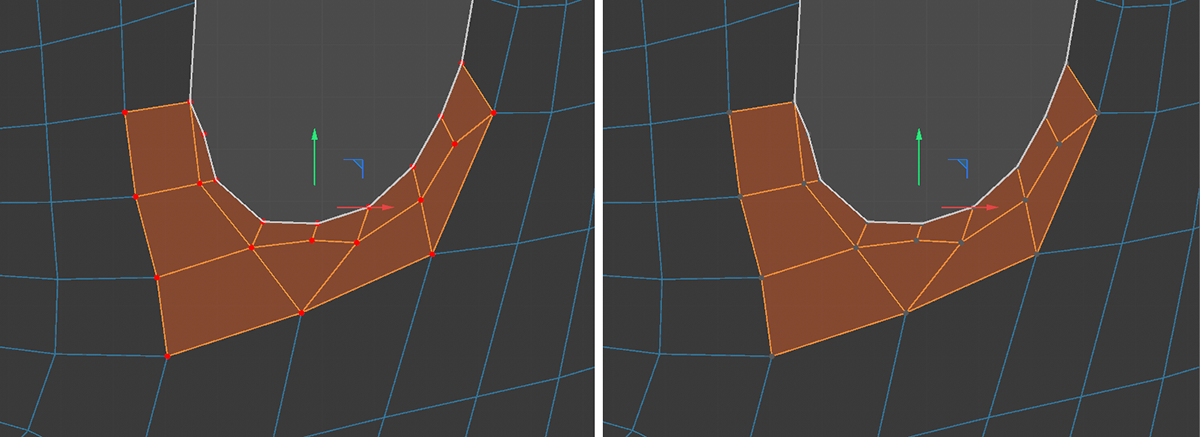 On the left, you can see the red markers for points that have been pinned. On the right, the Use UV Pins option has been turned off. As a result, points with the Pin property are no longer pinned and are displayed in gray.