

XRef Materials
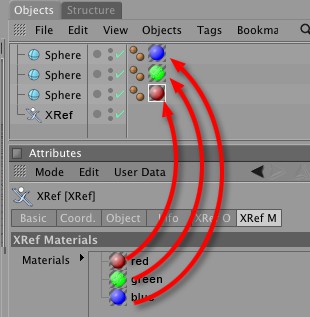 A reference file's materials can be dragged directly onto an object of the master file.
All materials from the reference scene are displayed in this field. These materials can also be dragged onto an object belonging to the master scene.
This functionality lets materials / textures be detached from the master scene and be edited by other artists via a material reference scene.
Tip:Make sure not to delete the corresponding XRef object! If the object is deleted its materials will not be able to be located.
XRef materials can also be dragged into the Material Manager. A local copy of the material will be created which will be independent of changes made to the reference scene. If you have assigned materials to objects, as in the example above, the Material tag will adhere to changes made to the material in the Material Manager.