

Ray Switch
This page covers the Ray Switch node of the Redshift render engine in Cinema 4D (C4D). This shading utility lets a material react differently to individual ray types (such as GI, reflection or refraction rays) or to front- and back-facing surfaces — useful for thin double-sided materials like paper or decals, for art-directing GI color bleed, or for optimizing render times.
Sometimes you might want your material to shade differently when intersected by specific ray types, or whether it is seen front-facing or back-facing. Differentiating between front and back faces is important for representing very thin 'double sided' materials such as paper, or decals on glass, without having to model the actual thickness with different materials for each side.
Enabling different shading for specific ray types can be useful for special effects such as boosting GI color bleeding, reducing rough reflection noise, or simply hand optimizing the material by reducing its shader graph complexity for specific ray types.
Redshift distinguishes between rays of the following types:
- Camera (i.e. primary rays)
- Reflection
- Refraction/Transparency
- GI
Ray Switch Example
The following scene demonstrates a GI ray switch (left sphere), Reflection ray switch (middle sphere) and Camera Front/Back (right single-sided plane). A mirror has been placed in the scene to show this in action.
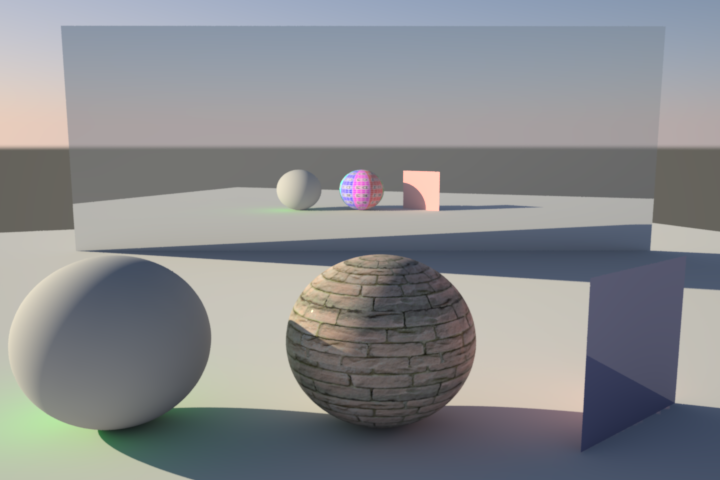
You can clearly see a different GI color (green) on the left sphere. In the mirror reflection you can see we are using a different texture for the middle sphere material when reflected. The front side of the right plane is blue and glossy, with the back side orange, which can be clearly seen in the reflection and GI.
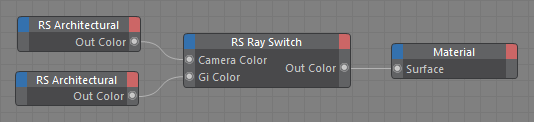
The Shader Graph for the left sphere, with a green GI ray switch.

The Shader Graph for the middle sphere with a texture reflection ray switch.
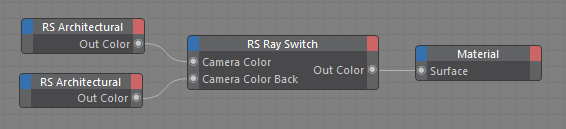
The Shader Graph for the right plane with back-face camera ray switch.